

Approved Performance - Front Premium Wheel Hub Bearing Assembly 4WD AWD
Approved Performance - Front Premium Wheel Hub Bearing Assembly 4WD AWD







Approved Performance - Front Premium Wheel Hub Bearing Assembly 4WD AWD
Front Wheel - Hub Bearing Assembly | |
Description | |
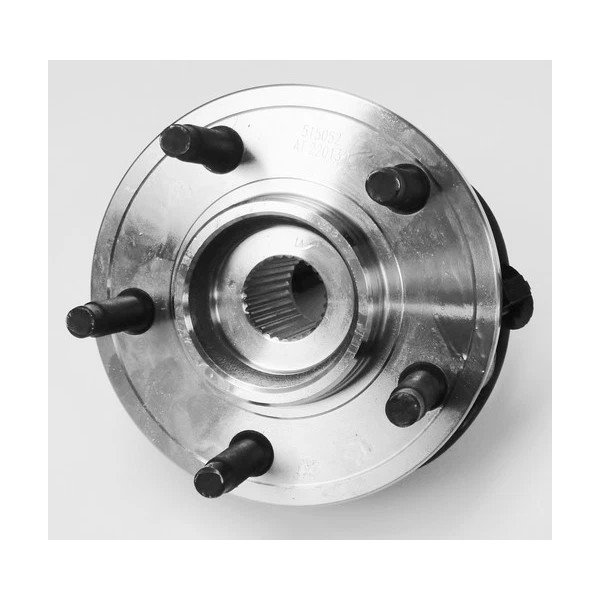
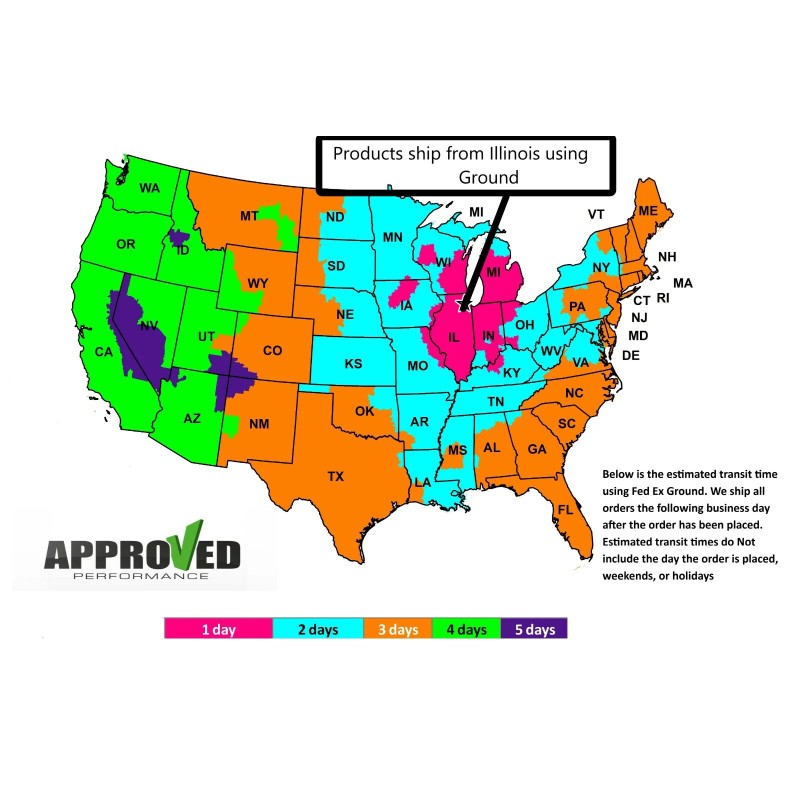
ALL NEW Front Wheel - Hub Bearing Assembly *WE SHIP VIA FED EX MONDAY-FRIDAY (HOLIDAYS EXCLUDED) 99% OF THE ORDERS ARE SHIPPED WITHIN 1 BUSINESS DAY OF THE PAYMENT BEING RECEIVED. AGAIN WEEKENDS AND HOLIDAYS ARE EXCLUDED. ANY AND ALL ORDERS PLACED AND PAID FOR AFTER 1:00 PM FRIDAY WILL SHIP ON THE FOLLOWING BUSINESS DAY. ***1 Year Warranty *** You have purchased a premium quality product designed toreplace your original equipment brakes. There is absolutely No modificationsrequired to the product or your vehicle to install. The warranty covers cracking warping and manufactures defects,The Warranty is from the original date of purchase. It is a 1 time replacementand covers the product / products purchased only, it does not cover the cost oflabor to remove or install any of the products. Warranty does not cover units that have been modified, abused,or are used for anything other than its intended use which is the same as its originalequipment intentions. Warranty is VOID if used on vehicles for racing or offroad use. Customer is responsible for freight charges to return thealleged defective product. FEATURES & BENEFITS:
FAQ Q: How quick can I get my order? | |
| |
Hub Bearing Installation Instructions Parkthevehicleon a flat, level paved or concrete surface. Place the vehicle in gear or parkand apply the parking brake, chock opposite wheel to prevent the vehicle fromrolling. Loosen the lug nutson the wheel of the hub bearing you're replacing with the breaking bar and asocket; do not remove them Only Loosen Lift the wheel withthe floor jack in a safe and secure manner. Support the vehicle on a jackstand, preferably on the frame rail if present. Remove the lug nutsand wheel. Locate and remove thecaliper bolts with ratchet and a socket. Remove caliper gentlyand support the caliper. Do not allow the caliper to dangle on the rubber brakehose. Locatethe caliper bracket bolts (if applicable) and remove them with the ratchet anda socket. You may want to break them loose with the breaking bar first ifthey're really tight. On some vehicles the brake pads will remain in thebridge and can be removed by prying out with the screwdriver. On other models,the pads stay intact and may be clipped to the caliper. If you have to removethe pads, do so by taking note how they were placed in the bridge and be sureyou're able to put them back in the same manner they were extracted. Remove the rotor. Ifit is stuck to the hub, you may have to hit it between the studs with a largerubber mallet. Use a rubber mallet if you're not going to replace the rotor, soyou don't damage the surface. Remove any ABS wiresattached to the hub bearing assembly (if applicable) or unclip the wire andtrace it to the plug. In many applications, if the ABS wire is integrated withthe wheel-bearing hub assembly, a new one will come with it. If you're notsure, check the box of the new bearing and if there's an ABS wire, follow thewire until you locate the plug, unplug it and unclip it from its mounts. If ABSis present but not integrated with the bearing assembly, remove the sensor fromthe bearing with a ratchet and socket. Remove the spindlenut with the breaking bar and a spindle nut socket. Remove the washer behindthe spindle nut. Locate thewheel-bearing assembly bolts behind the knuckle, (If Applicable see replacementunit for type of mounting) and loosen them with the breaking bar and socket.The location of these can sometimes create a tight area to place a socket andtool on to remove them with. You may have to apply some ingenuity. Replace thesocket on the ratchet to extract the bolts quickly and easier. Most hubs havethree or four bolts. Install the slidehammer onto the lug studs and secure with tightened lug nuts. This may takeseveral attempts and a couple of breaks in between to remove the hub bearingfrom the knuckle. Pay close attention to your progress and try to determinewhen the bearing will separate. Take note of how the backing plate is installedbetween the knuckle and the bearing so you can replace it in the same manner.Note some models will slide off the spindle without the need of a slide hammer. Sand off the rust andcorrosion around the knuckle with a fine- to medium-grade sandpaper. Move thedrive-shaft spindle around to get it out of your way. Take your time when doingthis and make sure it's as clean as possible. Place the backingplate in its original position and place the new bearing onto the knuckle.Manipulate the drive-shaft spindle splines into the center of the hub bearing.Push the bearing on as far as you can, making sure to line it up correctly ifABS lines or plugs are present. Replace thewheel-bearing assembly bolts. They're pretty long, so as soon as you can threadthem into the new bearing, start to tighten them. Pull the bearing in bytightening the bolts a little bit at a time and then switching to the next boltto make sure the bearing assembly does not shift in the knuckle and causedamage. Once the bearing is drawn in flush, use the breaking bar to get thebolts as tight as you can get them. Replace washer andspindle nut and tighten to proper torquespecifications with the half-inch drive torque wrench and spindle socket.Do Not Over Tighten you could damage the new Hub Assembly. Replace the brakes inthe same manner you extracted them. You may need to push the caliper piston ina bit with a C-clamp to get it over the rotor. (Note some rear calipers have apiston that screws in. DO NOT use a C Clamp on this type of caliper piston) Plugin the ABS lines or reattach them to the bearing, if applicable. Replace the tire andlug nuts, and tighten the lug nuts as tight as you can get them. Lower the vehicle andtighten the lug nuts in an alternate fashion with the torque wrench and socketat the correct wheel nut specifications torque setting. Pump the brake pedalif you had to push the caliper piston in with a C-clamp to restore hydraulicpressure to that caliper piston. Releasethe parking brake, remove chock and go for atest drive. | |
inkfrog terapeak
| Brand: | Approved Performance |
|---|---|
| Isin: | IR5S0RJV4C4C |
Out of Stock
In Stock
Backordered
Out of Stock



IBspot Buyer Protection
Shop confidently on IBspot, receive your item as described or your money back for eligible orders. Learn Program Terms
GUARANTEED SAFE CHECKOUT
-

MONEY BACK GUARANTEE
30 days money back guarantee, no additional fee charged.
-

EXCELLENT SUPPORT
We provide 24/7 online customer support via email.
-

Fast Shipping
One week domestic shipping. Global delivery to the US in 2 weeks.
Front Wheel - Hub Bearing Assembly | |
Description | |
ALL NEW Front Wheel - Hub Bearing Assembly *WE SHIP VIA FED EX MONDAY-FRIDAY (HOLIDAYS EXCLUDED) 99% OF THE ORDERS ARE SHIPPED WITHIN 1 BUSINESS DAY OF THE PAYMENT BEING RECEIVED. AGAIN WEEKENDS AND HOLIDAYS ARE EXCLUDED. ANY AND ALL ORDERS PLACED AND PAID FOR AFTER 1:00 PM FRIDAY WILL SHIP ON THE FOLLOWING BUSINESS DAY. ***1 Year Warranty *** You have purchased a premium quality product designed toreplace your original equipment brakes. There is absolutely No modificationsrequired to the product or your vehicle to install. The warranty covers cracking warping and manufactures defects,The Warranty is from the original date of purchase. It is a 1 time replacementand covers the product / products purchased only, it does not cover the cost oflabor to remove or install any of the products. Warranty does not cover units that have been modified, abused,or are used for anything other than its intended use which is the same as its originalequipment intentions. Warranty is VOID if used on vehicles for racing or offroad use. Customer is responsible for freight charges to return thealleged defective product. FEATURES & BENEFITS:
FAQ Q: How quick can I get my order? | |
| |
Hub Bearing Installation Instructions Parkthevehicleon a flat, level paved or concrete surface. Place the vehicle in gear or parkand apply the parking brake, chock opposite wheel to prevent the vehicle fromrolling. Loosen the lug nutson the wheel of the hub bearing you're replacing with the breaking bar and asocket; do not remove them Only Loosen Lift the wheel withthe floor jack in a safe and secure manner. Support the vehicle on a jackstand, preferably on the frame rail if present. Remove the lug nutsand wheel. Locate and remove thecaliper bolts with ratchet and a socket. Remove caliper gentlyand support the caliper. Do not allow the caliper to dangle on the rubber brakehose. Locatethe caliper bracket bolts (if applicable) and remove them with the ratchet anda socket. You may want to break them loose with the breaking bar first ifthey're really tight. On some vehicles the brake pads will remain in thebridge and can be removed by prying out with the screwdriver. On other models,the pads stay intact and may be clipped to the caliper. If you have to removethe pads, do so by taking note how they were placed in the bridge and be sureyou're able to put them back in the same manner they were extracted. Remove the rotor. Ifit is stuck to the hub, you may have to hit it between the studs with a largerubber mallet. Use a rubber mallet if you're not going to replace the rotor, soyou don't damage the surface. Remove any ABS wiresattached to the hub bearing assembly (if applicable) or unclip the wire andtrace it to the plug. In many applications, if the ABS wire is integrated withthe wheel-bearing hub assembly, a new one will come with it. If you're notsure, check the box of the new bearing and if there's an ABS wire, follow thewire until you locate the plug, unplug it and unclip it from its mounts. If ABSis present but not integrated with the bearing assembly, remove the sensor fromthe bearing with a ratchet and socket. Remove the spindlenut with the breaking bar and a spindle nut socket. Remove the washer behindthe spindle nut. Locate thewheel-bearing assembly bolts behind the knuckle, (If Applicable see replacementunit for type of mounting) and loosen them with the breaking bar and socket.The location of these can sometimes create a tight area to place a socket andtool on to remove them with. You may have to apply some ingenuity. Replace thesocket on the ratchet to extract the bolts quickly and easier. Most hubs havethree or four bolts. Install the slidehammer onto the lug studs and secure with tightened lug nuts. This may takeseveral attempts and a couple of breaks in between to remove the hub bearingfrom the knuckle. Pay close attention to your progress and try to determinewhen the bearing will separate. Take note of how the backing plate is installedbetween the knuckle and the bearing so you can replace it in the same manner.Note some models will slide off the spindle without the need of a slide hammer. Sand off the rust andcorrosion around the knuckle with a fine- to medium-grade sandpaper. Move thedrive-shaft spindle around to get it out of your way. Take your time when doingthis and make sure it's as clean as possible. Place the backingplate in its original position and place the new bearing onto the knuckle.Manipulate the drive-shaft spindle splines into the center of the hub bearing.Push the bearing on as far as you can, making sure to line it up correctly ifABS lines or plugs are present. Replace thewheel-bearing assembly bolts. They're pretty long, so as soon as you can threadthem into the new bearing, start to tighten them. Pull the bearing in bytightening the bolts a little bit at a time and then switching to the next boltto make sure the bearing assembly does not shift in the knuckle and causedamage. Once the bearing is drawn in flush, use the breaking bar to get thebolts as tight as you can get them. Replace washer andspindle nut and tighten to proper torquespecifications with the half-inch drive torque wrench and spindle socket.Do Not Over Tighten you could damage the new Hub Assembly. Replace the brakes inthe same manner you extracted them. You may need to push the caliper piston ina bit with a C-clamp to get it over the rotor. (Note some rear calipers have apiston that screws in. DO NOT use a C Clamp on this type of caliper piston) Plugin the ABS lines or reattach them to the bearing, if applicable. Replace the tire andlug nuts, and tighten the lug nuts as tight as you can get them. Lower the vehicle andtighten the lug nuts in an alternate fashion with the torque wrench and socketat the correct wheel nut specifications torque setting. Pump the brake pedalif you had to push the caliper piston in with a C-clamp to restore hydraulicpressure to that caliper piston. Releasethe parking brake, remove chock and go for atest drive. | |

inkfrog terapeak
Item Specifics
- Country/Region of Manufacture: China
- Anti-lock Braking System: Yes
- OE/OEM Part Number: 515052
- Wheel Stud Quantity: 5
- Interchange Part Number: Ford Explorer Sport Trac, Ford Ranger, Mazda B4000, For, Truck, SUV
- Type: Wheel Hub & Bearing Assembly
- Manufacturer Part Number: 515052 2003 2004 2005 2006 2007 2008 2009 2010
- Finish: Chrome, Polished
- Placement on Vehicle: Front, Left, Right
- Brand: Approved Performance
- Manufacturer Warranty: 1 Year
- Other Part Number: WA515052
- Items Included: Mount, Grease, Seal
- Material: Alloy Steel, Carbon, Steel
- Vintage Part: No
- Universal Fitment: No
- Performance Part: No
- UPC: 0705833110628
Processing Time
- We process and ship orders Monday through Friday, excluding holidays.
- Most orders are processed within 1–3 business days, depending on product availability.
- Processing time does not include delivery time, which varies based on your location and the product’s shipping origin.
Shipping Coverage
We currently ship to addresses within the United States only.
Products may ship from:
- Our U.S. warehouses, or
- Our international fulfillment centers (including Korea, Japan, China, Australia, Mexico, Canada, the United Kingdom, and the EU).
Each product page clearly displays the “Ships From” location before checkout.
Shipping Methods & Estimated Delivery
| Shipping Method | Estimated Delivery | Cost |
|---|---|---|
| Free Shipping (US) | 5–10 business days | Free, available on eligible items |
| Standard Shipping (US to US by Item) | 5–10 business days | $6.50 for the first item, $2.00 each additional |
| Standard Shipping (From US Warehouse by Weight) | 3–7 business days | Starts at $6.50, increasing by $2 for every additional 4 oz (0.25 lb) up to 1 lb, then by $4 for each additional pound beyond 1 lb. |
| Extended Delivery (Ships from Overseas Warehouse) | 10–20 business days | $14.50 for the first item, $2.00 each additional |
Shipping costs vary by product weight, quantity and origin. Exact rates and delivery estimates are displayed on each product page and confirmed during checkout.
Free Shipping
We offer free standard shipping on select products or during promotional periods. Availability of free shipping will be displayed on the product page and at checkout.
Carriers
We primarily use USPS and UPS for U.S. deliveries. Items shipped from international warehouses may be handled by partner carriers depending on the country of origin.
Import Duties & Taxes
All import duties and taxes for goods imported into the United States are included in the product price. There are no hidden fees or additional charges at checkout.
Tracking & Notifications
Every order is fully trackable. You will receive a tracking number via email once your order ships. If your order ships in multiple packages, each package will have its own tracking number. If you don’t receive a shipping confirmation immediately, your order is still being processed and will arrive within the estimated timeframe shown at checkout.
You can track your shipment anytime using the Track Your Order page on our website.
Order Changes & Cancellations
If you need to modify or cancel an order, please contact our customer support team as soon as possible. Orders can only be canceled before they ship. Once shipped, cancellations are not possible, but you may request a return after the item is delivered.
Contact: support@ibspot.com
Item Not Received
If your tracking number shows “Delivered” but you haven’t received your package:
- Check with your local USPS or UPS office.
- Confirm that the shipping address provided was correct.
- If the issue remains unresolved, contact support@ibspot.com for assistance.
Damaged or Lost Parcels
If your package arrives damaged or fails to arrive, please contact us immediately. For deliveries to P.O. boxes, ibspot is not responsible for damage caused by weather, temperature, or theft.
Customer Support
For any questions about shipping, tracking, or delivery, our customer support team is here to help.
Email: support@ibspot.com
We’re always happy to help.
Please read our policy carefully before making a purchase.
We aim to ensure every customer has a smooth and transparent experience with ibspot.com.
Order Cancellation Policy
Customers may request to cancel an order before it has been shipped.
Once the package has been shipped, cancellations are no longer possible; however, you may still request a return after receiving your order.
How to Request a Cancellation
You can contact us through:
- Email: support@ibspot.com
- Contact Form: Submit a request through our Contact Us page
Please submit your cancellation request as soon as possible after placing the order to allow us to process it before shipment.
Return Policy
We accept returns for most items within 30 days of delivery for a full refund.
To be eligible for a return:
- The item must be unused, in the same condition as received, and in its original packaging.
- A tracking number must be provided to confirm the return shipment.
Non-Returnable Items
Certain products cannot be returned, including:
- Perishable goods (for example, food, flowers, newspapers, magazines)
- Intimate or sanitary goods
- Hazardous materials or flammable liquids/gases
- Gift cards
- Downloadable software
- Some health and personal care items
Partial Refunds (If Applicable)
Partial refunds may be granted in specific situations, such as:
- Books with obvious signs of use
- Opened CDs, DVDs, software, or vinyl records
- Items not in their original condition, damaged, or missing parts not due to our error
- Items returned more than 30 days after delivery
How to Return an Item
To initiate a return, please contact us at support@ibspot.com with your order number and details about the product you wish to return.
Our team will provide you with return instructions and a prepaid return label.
Shipping Cost for Returns
Please contact us before returning any item.
We will provide a free return shipping label.
If a return is sent back without prior contact or without our provided label, we cannot be held responsible for return shipping costs.
For items valued over $75, we recommend using a trackable shipping service or purchasing shipping insurance.
We cannot guarantee that we will receive your returned item if shipped independently.
Refund Processing
Once your return is received and inspected:
- In-store returns are refunded to the original form of payment or issued as a gift card.
- Mail-in returns using our prepaid label are refunded to the original payment method within 3–5 business days after we receive your return.
Please allow:
- 5–7 business days for the return to reach our Returns Center.
- An additional 3–10 business days for your bank to post the refund to your account.
Damages, Issues & Claims
Please inspect your order immediately upon receipt.
If you receive a defective, damaged, or incorrect item, contact us right away at support@ibspot.com.
We’ll evaluate the issue promptly and make it right.
Product Claims
Before purchasing, please review product details carefully.
If there is a problem with your order upon arrival, visit our Support Center or contact us directly to arrange return shipping or replacement.
Exchanges
We do not process direct exchanges.
The fastest way to get what you need is to return the original item and place a new order once your return is accepted.
Return Address
IBSPOT Return Center
15 Sawmill Ln
Dover Plains, NY 12522
United States
Customer Support
Our support team is available 24/7 to assist with cancellations, returns, or general inquiries.
Email: support@ibspot.com
Contact Form: Contact Us page

Oops!
Sorry, it looks like some products are not available in selected quantity.