

XGODY 11.3" Portable 4K Touch Screen Car Stereo Wireless Apple Carplay Android Auto BT
XGODY 11.3" Portable 4K Touch Screen Car Stereo Wireless Apple Carplay Android Auto BT


XGODY 11.3" Portable 4K Touch Screen Car Stereo Wireless Apple Carplay Android Auto BT
Product Description
Warm reminder: This product does not contain batteries and needs to be plugged in during use.
1. High-definition touch screen and advanced display technology:
H16 adopts an 11.3-inch touch screen with a screen resolution of up to 1440*540, allowing you to view the recorded content clearly and comfortably.
2. Dual-camera recording:
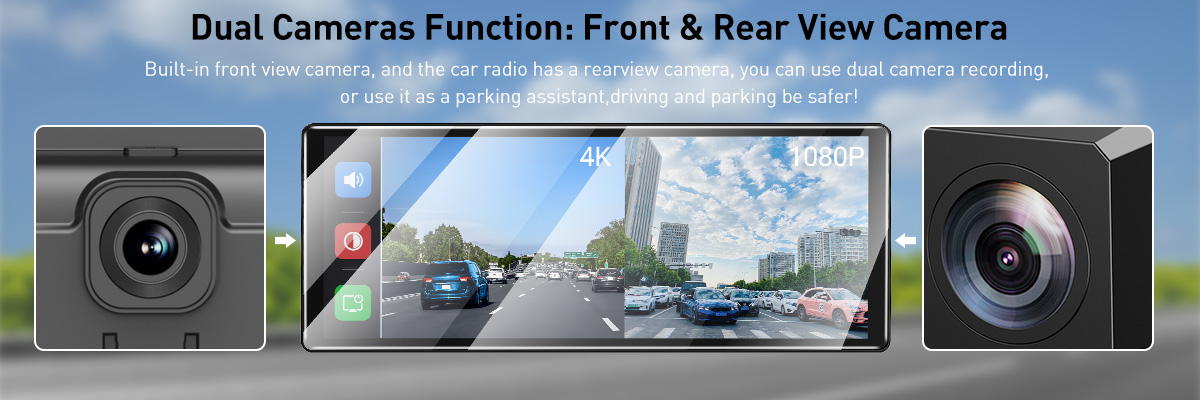
The front camera supports 4K resolution and has a 170° wide-angle field of view, ensuring that you capture more road information.
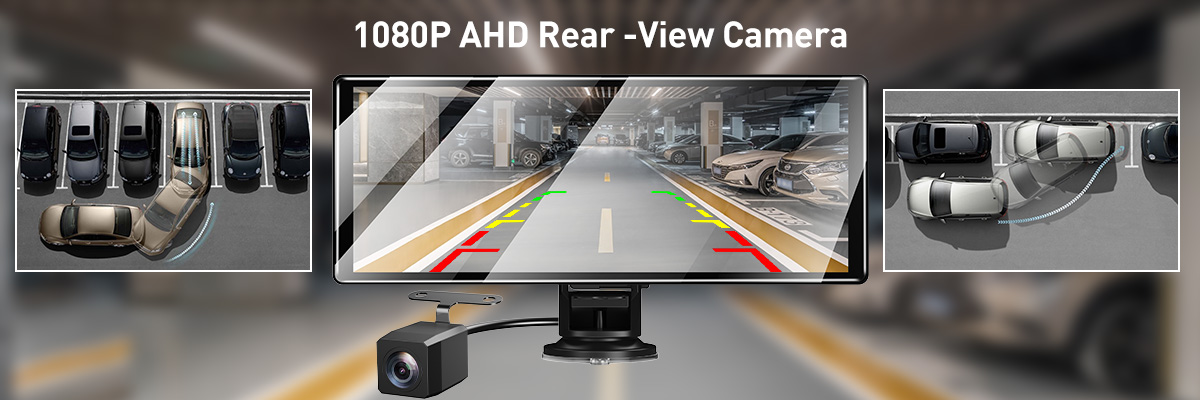
The rear camera supports 1080P resolution, has a 160° wide-angle field of view, and provides a reversing assist function, making you safer and more confident when reversing.
3. Smart interconnection functions:
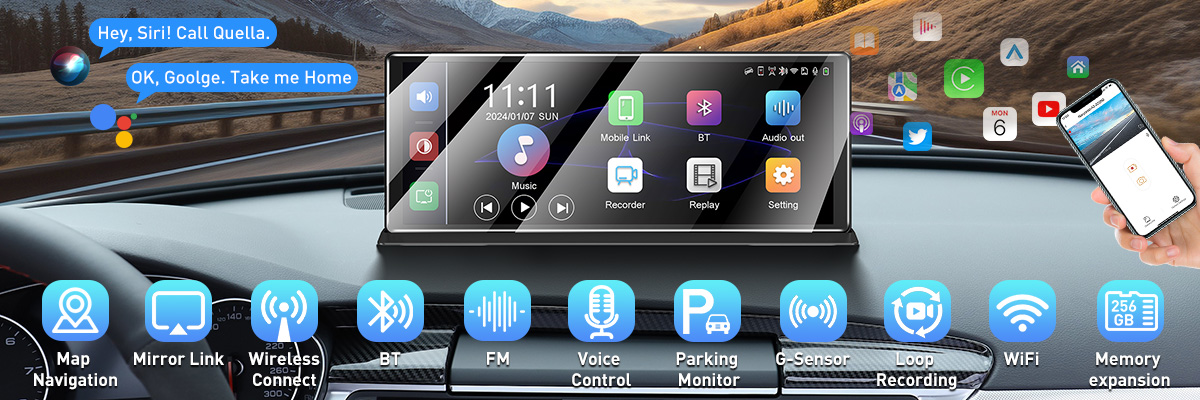
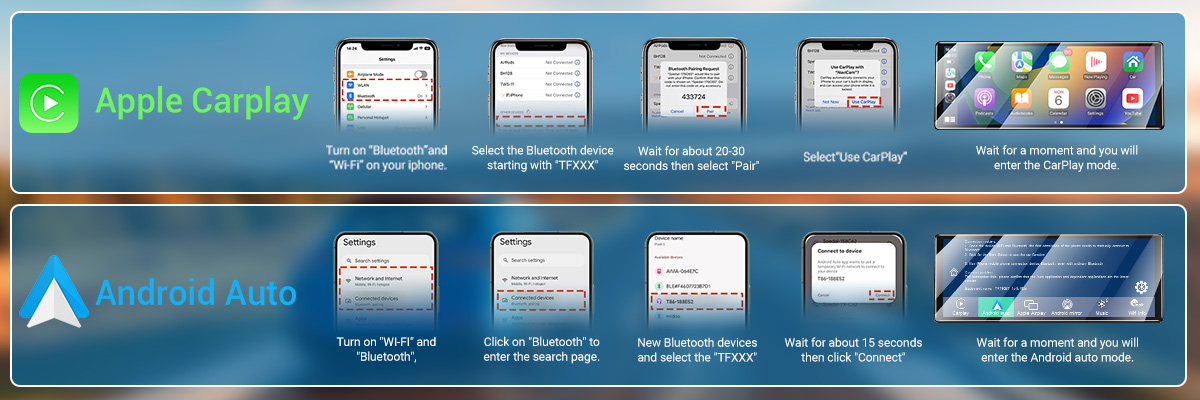
CarPlay & Android auto: Provides smartphone integration, voice control, navigation, music and messaging functions. Connect your mobile phone to the H16 dash cam for a smarter and safer driving experience.
Mobile screen projection: With Airplay & Android mirror, you can project the smartphone screen content to the large touch display of the XGODY H16, allowing you to use smartphone functions more easily while focusing on the road conditions, providing a more convenient driving experience.
Bluetooth 5.0: Provides high-speed connection, stability, low energy consumption and wider coverage, allowing you to achieve fast and reliable device connection on the XGODY H16 dash cam.
WiFi connection: WiFi connection enables access and sharing, firmware updates, mobile application support and fast download functions, providing convenient data management and control functions for the XGODY H16 dash cam.
4. Multiple practical functions:
True WDR technology - solves the problem of strong light changes. It can capture images under different light conditions at the same time and merge them to obtain a balanced picture, ensuring that you can see details clearly in both high-light and low-light environments.
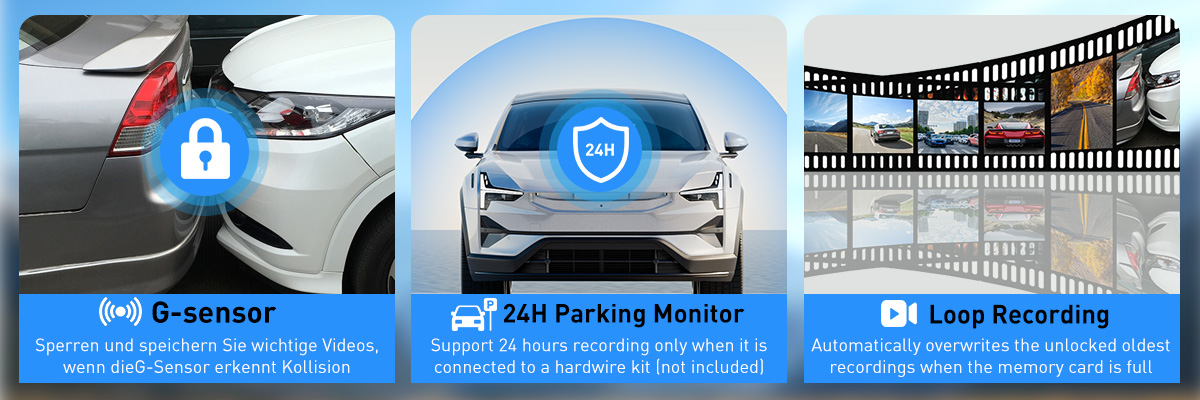
Loop recording - ensure continuous recording of your driving journey without stopping due to insufficient storage space. When the memory card capacity is almost exhausted, the old video files are automatically overwritten so that the latest driving data can be recorded continuously without you having to manually manage storage space.
Gravity sensing, emergency lock - When the dash cam detects movement or collision in the surrounding environment, it automatically starts recording to capture potential events or anomalies. This helps protect your vehicle while also providing you with additional security.
24-hour parking monitoring (wired kit required, not included) - This means that even if you are not near the vehicle, the dashcam can continue to monitor the situation around the vehicle. If a collision or abnormal event occurs, it will automatically record and save the relevant footage, providing you with important evidence to ensure the safety of the vehicle.
5. Large-capacity storage:
XGODY H16 supports up to 256GB memory card expansion (card not included), ensuring that you can record important moments during driving for a long time without frequently deleting old data.
6. Car Audio - AUX&FM&Bluetooth:
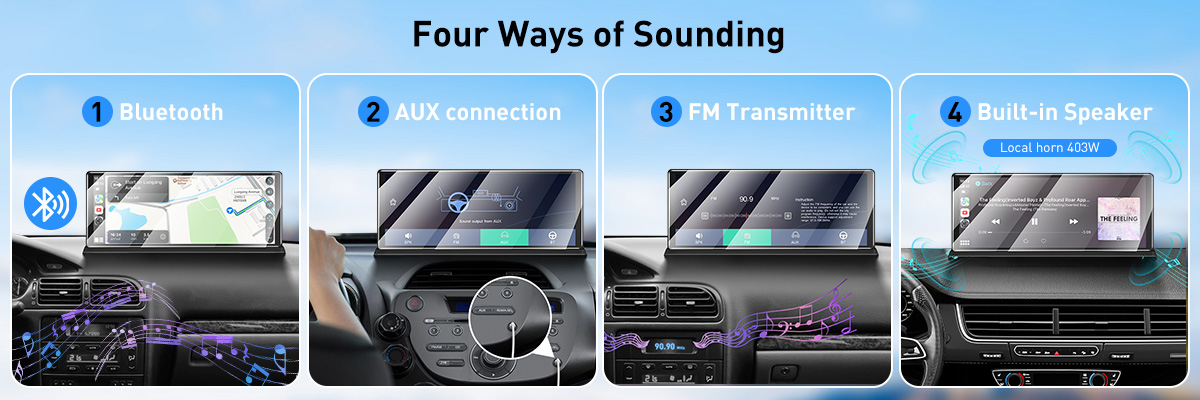
The device has built-in speakers, but if you want a more stereoscopic sound, it is recommended to connect to the car audio.
Bluetooth: With Bluetooth connection, you can wirelessly connect your mobile device to the car audio for audio synchronization, providing convenience and good sound quality.
You need to make sure that the car audio system has selected Bluetooth mode and the connected device has also enabled Bluetooth connection.
AUX: Use the AUX cable to physically connect your mobile device to the car audio, providing high-quality sound, but requires a physical connection.
You need to make sure that the car audio system has selected AUX mode and the connected device is also in AUX mode.
FM transmitter: Use the FM transmitter to transmit mobile device audio to the car stereo via FM frequency, but it may be affected by wireless interference and the sound quality is not as stable as other options.
You need to make sure that both the car stereo and the device are switched to FM mode, and the car radio is tuned to the same frequency as the transmitter in order to receive the audio signal from the connected device.
7. Flexible screen display mode:
H16 provides a variety of screen display modes, including full screen and split screen display, allowing you to freely choose your favorite display method to meet different needs.
8. Easy installation:
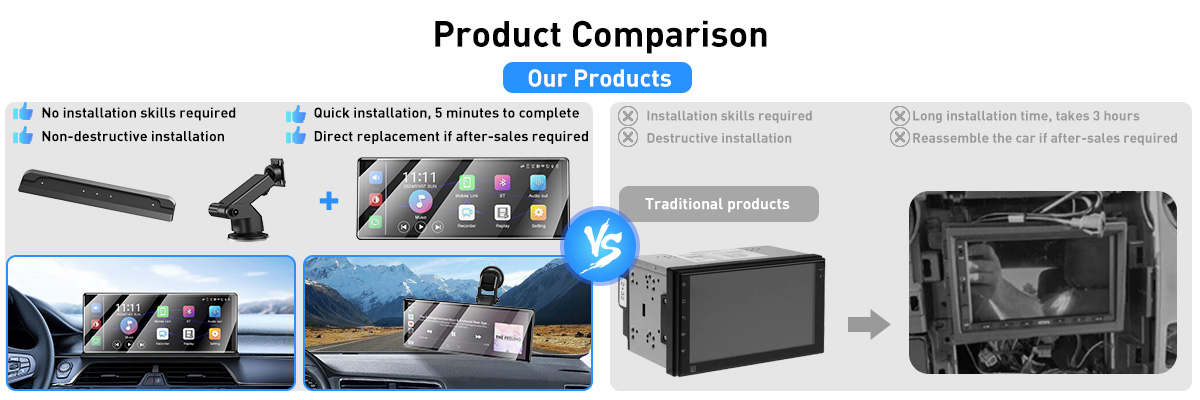
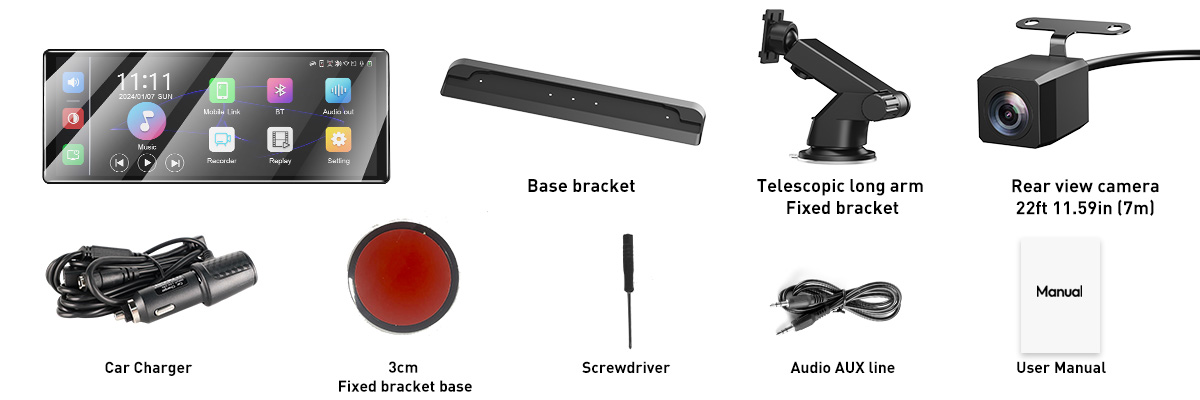
XGODY H16 is very simple to install, and there are two ways to install it.
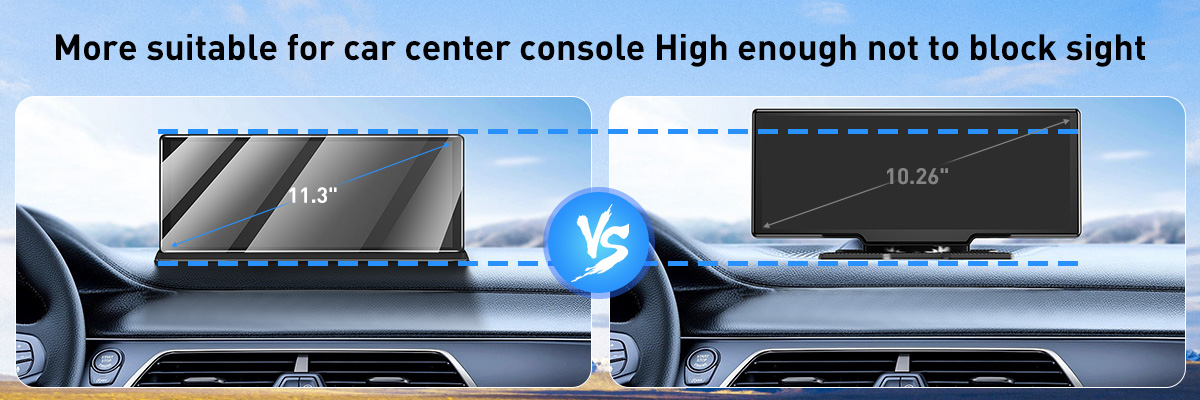
(1) Base bracket, just place it directly on the appropriate car center console. This installation method is lower in height and can reduce visual blind spots.
(2) Suction cup long arm direct, tear off the 3M glue and fix it directly on the car center console or windshield.
It is compatible with most car models and does not require disassembly of the original car device
1. High-definition touch screen and advanced display technology:
H16 adopts an 11.3-inch touch screen with a screen resolution of up to 1440*540, allowing you to view the recorded content clearly and comfortably.
2. Dual-camera recording:
The front camera supports 4K resolution and has a 170° wide-angle field of view, ensuring that you capture more road information.
The rear camera supports 1080P resolution, has a 160° wide-angle field of view, and provides a reversing assist function, making you safer and more confident when reversing.
3. Smart interconnection functions:
CarPlay & Android auto: Provides smartphone integration, voice control, navigation, music and messaging functions. Connect your mobile phone to the H16 dash cam for a smarter and safer driving experience.
Mobile screen projection: With Airplay & Android mirror, you can project the smartphone screen content to the large touch display of the XGODY H16, allowing you to use smartphone functions more easily while focusing on the road conditions, providing a more convenient driving experience.
Bluetooth 5.0: Provides high-speed connection, stability, low energy consumption and wider coverage, allowing you to achieve fast and reliable device connection on the XGODY H16 dash cam.
WiFi connection: WiFi connection enables access and sharing, firmware updates, mobile application support and fast download functions, providing convenient data management and control functions for the XGODY H16 dash cam.
4. Multiple practical functions:
True WDR technology - solves the problem of strong light changes. It can capture images under different light conditions at the same time and merge them to obtain a balanced picture, ensuring that you can see details clearly in both high-light and low-light environments.
Loop recording - ensure continuous recording of your driving journey without stopping due to insufficient storage space. When the memory card capacity is almost exhausted, the old video files are automatically overwritten so that the latest driving data can be recorded continuously without you having to manually manage storage space.
Gravity sensing, emergency lock - When the dash cam detects movement or collision in the surrounding environment, it automatically starts recording to capture potential events or anomalies. This helps protect your vehicle while also providing you with additional security.
24-hour parking monitoring (wired kit required, not included) - This means that even if you are not near the vehicle, the dashcam can continue to monitor the situation around the vehicle. If a collision or abnormal event occurs, it will automatically record and save the relevant footage, providing you with important evidence to ensure the safety of the vehicle.
5. Large-capacity storage:
XGODY H16 supports up to 256GB memory card expansion (card not included), ensuring that you can record important moments during driving for a long time without frequently deleting old data.
6. Car Audio - AUX&FM&Bluetooth:
The device has built-in speakers, but if you want a more stereoscopic sound, it is recommended to connect to the car audio.
Bluetooth: With Bluetooth connection, you can wirelessly connect your mobile device to the car audio for audio synchronization, providing convenience and good sound quality.
You need to make sure that the car audio system has selected Bluetooth mode and the connected device has also enabled Bluetooth connection.
AUX: Use the AUX cable to physically connect your mobile device to the car audio, providing high-quality sound, but requires a physical connection.
You need to make sure that the car audio system has selected AUX mode and the connected device is also in AUX mode.
FM transmitter: Use the FM transmitter to transmit mobile device audio to the car stereo via FM frequency, but it may be affected by wireless interference and the sound quality is not as stable as other options.
You need to make sure that both the car stereo and the device are switched to FM mode, and the car radio is tuned to the same frequency as the transmitter in order to receive the audio signal from the connected device.
7. Flexible screen display mode:
H16 provides a variety of screen display modes, including full screen and split screen display, allowing you to freely choose your favorite display method to meet different needs.
8. Easy installation:
XGODY H16 is very simple to install, and there are two ways to install it.
(1) Base bracket, just place it directly on the appropriate car center console. This installation method is lower in height and can reduce visual blind spots.
(2) Suction cup long arm direct, tear off the 3M glue and fix it directly on the car center console or windshield.
It is compatible with most car models and does not require disassembly of the original car device
FAQ
Q: What we can do if it can't record video normally?
A: You can change the TF card; change the resolution, frames per second; insert the larger capacity memory card; make sure the card has been installed correctly(during the installation process; you should hear a clicking sound),delete unnecessary files from the memory card to release space.
Q: Why it power off automatically after working a few minutes?
A: Please make sure it connects car charge to provide power, because the battery can't work a long time.
Q: Why the dash cam can’t recognize the SD card?
A: First, please use the class 10 with branded memory card will be better. (CLASS 10 IS BEST).
Second, please check the micro SD card position, (normally, there is a mark on the device near to the card port showing the correct position of memory card.) and you will feel a little button bounce insert the device after you insert the memory card.
Third, please insert the micro SD card into the device before you power on the device.
Last, please format the micro SD card. Last, please reset the dash cam, there is a little hole on the device, could you please use a little needle to push it (reset hole).
Q: Why did the dash cam turn on/off automatically?
A: About turning itself off, please try double check the device at first:
1, Please changing another Car charger OR connect it with the computer via the USB cable directly always, and test if the device can work well? If yes, the car charger is defect.
2, Please check if you had turned on the auto turn off function already, If yes, Please turn it OFF, this is so important, please check:
1) Double press the top right MENU button (near the power on one) -- Press the down button select auto power off.
2) Use the left up/ down button to select " OFF " on the right side and then press the REC button to confirm.
3) If it still can't work, please kindly change another memory card in the device, OR please remove the memory card to test.
Q: Why doesn't the recorder record after I insert the SD card? Not working?
A: You need to format your SD card on the computer. After inserting the SD card into the mirror camera, format the machine again. Click "setting" → "format"
Q: Can you adjust the reverse aid lines width and angle? The reverse aid is too narrow and highly inaccurate.
A: Hello width cannot be adjusted. You can adjust the angle up and down. On the left one-third of the screen, swipe up and down to adjust the view scope of the camera.
Q: Can I replace the rear camera only?
A: Yes, of course.
Q: Does it record only what’s on the screen or it records both the front and the back even the screen only shows either the front or the rear?
A: This mirror dashcam records both the front and the back even the screen only shows either the front or the rear.
Q: No longer loop recording
A: The reason why the device will no longer loop video recording is that the video in the SD card cannot be overwritten. In other words, the file is locked completely and cannot be overwritten. Please format the SD card manually. Then adjust the protection level to medium or low.
A: You can change the TF card; change the resolution, frames per second; insert the larger capacity memory card; make sure the card has been installed correctly(during the installation process; you should hear a clicking sound),delete unnecessary files from the memory card to release space.
Q: Why it power off automatically after working a few minutes?
A: Please make sure it connects car charge to provide power, because the battery can't work a long time.
Q: Why the dash cam can’t recognize the SD card?
A: First, please use the class 10 with branded memory card will be better. (CLASS 10 IS BEST).
Second, please check the micro SD card position, (normally, there is a mark on the device near to the card port showing the correct position of memory card.) and you will feel a little button bounce insert the device after you insert the memory card.
Third, please insert the micro SD card into the device before you power on the device.
Last, please format the micro SD card. Last, please reset the dash cam, there is a little hole on the device, could you please use a little needle to push it (reset hole).
Q: Why did the dash cam turn on/off automatically?
A: About turning itself off, please try double check the device at first:
1, Please changing another Car charger OR connect it with the computer via the USB cable directly always, and test if the device can work well? If yes, the car charger is defect.
2, Please check if you had turned on the auto turn off function already, If yes, Please turn it OFF, this is so important, please check:
1) Double press the top right MENU button (near the power on one) -- Press the down button select auto power off.
2) Use the left up/ down button to select " OFF " on the right side and then press the REC button to confirm.
3) If it still can't work, please kindly change another memory card in the device, OR please remove the memory card to test.
Q: Why doesn't the recorder record after I insert the SD card? Not working?
A: You need to format your SD card on the computer. After inserting the SD card into the mirror camera, format the machine again. Click "setting" → "format"
Q: Can you adjust the reverse aid lines width and angle? The reverse aid is too narrow and highly inaccurate.
A: Hello width cannot be adjusted. You can adjust the angle up and down. On the left one-third of the screen, swipe up and down to adjust the view scope of the camera.
Q: Can I replace the rear camera only?
A: Yes, of course.
Q: Does it record only what’s on the screen or it records both the front and the back even the screen only shows either the front or the rear?
A: This mirror dashcam records both the front and the back even the screen only shows either the front or the rear.
Q: No longer loop recording
A: The reason why the device will no longer loop video recording is that the video in the SD card cannot be overwritten. In other words, the file is locked completely and cannot be overwritten. Please format the SD card manually. Then adjust the protection level to medium or low.
Warranty
Comprehensive after-sales guarantee, high-quality service! Shop with confidence, we are with you!
-- Comprehensive after-sales protection: ensure a worry-free shopping experience. Our professional customer service team will provide you with support and answers at any time.
-- High-quality customer service: Provide the best quality service for each customer. The professionally trained customer service team has rich product knowledge and problem-solving ability.
-- Quick response and problem solving: Value your time and needs, promise to respond in the shortest time and find the best solution.
-- Worry-free return and exchange policy: protect your rights and interests. If you are not satisfied with the product or have quality problems within 30 days from the date of purchase, we will assist you to return or exchange the product and bear the relevant costs. Our products are also backed by a one-year warranty.
-- Long-term technical support: establish a long-term cooperative relationship with customers. After your purchase, you get ongoing technical support, ready to help and make sure your problems are solved.
| Brand: | XGODY |
|---|---|
| Isin: | IO5BVV7ACURK |
Out of Stock
In Stock
Backordered
Out of Stock



IBspot Buyer Protection
Shop confidently on IBspot, receive your item as described or your money back for eligible orders. Learn Program Terms
GUARANTEED SAFE CHECKOUT
-

MONEY BACK GUARANTEE
30 days money back guarantee, no additional fee charged.
-

EXCELLENT SUPPORT
We provide 24/7 online customer support via email.
-

Fast Shipping
One week domestic shipping. Global delivery to the US in 2 weeks.

Product Description
Warm reminder: This product does not contain batteries and needs to be plugged in during use.
1. High-definition touch screen and advanced display technology:
H16 adopts an 11.3-inch touch screen with a screen resolution of up to 1440*540, allowing you to view the recorded content clearly and comfortably.
2. Dual-camera recording:
The front camera supports 4K resolution and has a 170° wide-angle field of view, ensuring that you capture more road information.
The rear camera supports 1080P resolution, has a 160° wide-angle field of view, and provides a reversing assist function, making you safer and more confident when reversing.
3. Smart interconnection functions:
CarPlay & Android auto: Provides smartphone integration, voice control, navigation, music and messaging functions. Connect your mobile phone to the H16 dash cam for a smarter and safer driving experience.
Mobile screen projection: With Airplay & Android mirror, you can project the smartphone screen content to the large touch display of the XGODY H16, allowing you to use smartphone functions more easily while focusing on the road conditions, providing a more convenient driving experience.
Bluetooth 5.0: Provides high-speed connection, stability, low energy consumption and wider coverage, allowing you to achieve fast and reliable device connection on the XGODY H16 dash cam.
WiFi connection: WiFi connection enables access and sharing, firmware updates, mobile application support and fast download functions, providing convenient data management and control functions for the XGODY H16 dash cam.
4. Multiple practical functions:
True WDR technology - solves the problem of strong light changes. It can capture images under different light conditions at the same time and merge them to obtain a balanced picture, ensuring that you can see details clearly in both high-light and low-light environments.
Loop recording - ensure continuous recording of your driving journey without stopping due to insufficient storage space. When the memory card capacity is almost exhausted, the old video files are automatically overwritten so that the latest driving data can be recorded continuously without you having to manually manage storage space.
Gravity sensing, emergency lock - When the dash cam detects movement or collision in the surrounding environment, it automatically starts recording to capture potential events or anomalies. This helps protect your vehicle while also providing you with additional security.
24-hour parking monitoring (wired kit required, not included) - This means that even if you are not near the vehicle, the dashcam can continue to monitor the situation around the vehicle. If a collision or abnormal event occurs, it will automatically record and save the relevant footage, providing you with important evidence to ensure the safety of the vehicle.
5. Large-capacity storage:
XGODY H16 supports up to 256GB memory card expansion (card not included), ensuring that you can record important moments during driving for a long time without frequently deleting old data.
6. Car Audio - AUX&FM&Bluetooth:
The device has built-in speakers, but if you want a more stereoscopic sound, it is recommended to connect to the car audio.
Bluetooth: With Bluetooth connection, you can wirelessly connect your mobile device to the car audio for audio synchronization, providing convenience and good sound quality.
You need to make sure that the car audio system has selected Bluetooth mode and the connected device has also enabled Bluetooth connection.
AUX: Use the AUX cable to physically connect your mobile device to the car audio, providing high-quality sound, but requires a physical connection.
You need to make sure that the car audio system has selected AUX mode and the connected device is also in AUX mode.
FM transmitter: Use the FM transmitter to transmit mobile device audio to the car stereo via FM frequency, but it may be affected by wireless interference and the sound quality is not as stable as other options.
You need to make sure that both the car stereo and the device are switched to FM mode, and the car radio is tuned to the same frequency as the transmitter in order to receive the audio signal from the connected device.
7. Flexible screen display mode:
H16 provides a variety of screen display modes, including full screen and split screen display, allowing you to freely choose your favorite display method to meet different needs.
8. Easy installation:
XGODY H16 is very simple to install, and there are two ways to install it.
(1) Base bracket, just place it directly on the appropriate car center console. This installation method is lower in height and can reduce visual blind spots.
(2) Suction cup long arm direct, tear off the 3M glue and fix it directly on the car center console or windshield.
It is compatible with most car models and does not require disassembly of the original car device
1. High-definition touch screen and advanced display technology:
H16 adopts an 11.3-inch touch screen with a screen resolution of up to 1440*540, allowing you to view the recorded content clearly and comfortably.
2. Dual-camera recording:
The front camera supports 4K resolution and has a 170° wide-angle field of view, ensuring that you capture more road information.
The rear camera supports 1080P resolution, has a 160° wide-angle field of view, and provides a reversing assist function, making you safer and more confident when reversing.
3. Smart interconnection functions:
CarPlay & Android auto: Provides smartphone integration, voice control, navigation, music and messaging functions. Connect your mobile phone to the H16 dash cam for a smarter and safer driving experience.
Mobile screen projection: With Airplay & Android mirror, you can project the smartphone screen content to the large touch display of the XGODY H16, allowing you to use smartphone functions more easily while focusing on the road conditions, providing a more convenient driving experience.
Bluetooth 5.0: Provides high-speed connection, stability, low energy consumption and wider coverage, allowing you to achieve fast and reliable device connection on the XGODY H16 dash cam.
WiFi connection: WiFi connection enables access and sharing, firmware updates, mobile application support and fast download functions, providing convenient data management and control functions for the XGODY H16 dash cam.
4. Multiple practical functions:
True WDR technology - solves the problem of strong light changes. It can capture images under different light conditions at the same time and merge them to obtain a balanced picture, ensuring that you can see details clearly in both high-light and low-light environments.
Loop recording - ensure continuous recording of your driving journey without stopping due to insufficient storage space. When the memory card capacity is almost exhausted, the old video files are automatically overwritten so that the latest driving data can be recorded continuously without you having to manually manage storage space.
Gravity sensing, emergency lock - When the dash cam detects movement or collision in the surrounding environment, it automatically starts recording to capture potential events or anomalies. This helps protect your vehicle while also providing you with additional security.
24-hour parking monitoring (wired kit required, not included) - This means that even if you are not near the vehicle, the dashcam can continue to monitor the situation around the vehicle. If a collision or abnormal event occurs, it will automatically record and save the relevant footage, providing you with important evidence to ensure the safety of the vehicle.
5. Large-capacity storage:
XGODY H16 supports up to 256GB memory card expansion (card not included), ensuring that you can record important moments during driving for a long time without frequently deleting old data.
6. Car Audio - AUX&FM&Bluetooth:
The device has built-in speakers, but if you want a more stereoscopic sound, it is recommended to connect to the car audio.
Bluetooth: With Bluetooth connection, you can wirelessly connect your mobile device to the car audio for audio synchronization, providing convenience and good sound quality.
You need to make sure that the car audio system has selected Bluetooth mode and the connected device has also enabled Bluetooth connection.
AUX: Use the AUX cable to physically connect your mobile device to the car audio, providing high-quality sound, but requires a physical connection.
You need to make sure that the car audio system has selected AUX mode and the connected device is also in AUX mode.
FM transmitter: Use the FM transmitter to transmit mobile device audio to the car stereo via FM frequency, but it may be affected by wireless interference and the sound quality is not as stable as other options.
You need to make sure that both the car stereo and the device are switched to FM mode, and the car radio is tuned to the same frequency as the transmitter in order to receive the audio signal from the connected device.
7. Flexible screen display mode:
H16 provides a variety of screen display modes, including full screen and split screen display, allowing you to freely choose your favorite display method to meet different needs.
8. Easy installation:
XGODY H16 is very simple to install, and there are two ways to install it.
(1) Base bracket, just place it directly on the appropriate car center console. This installation method is lower in height and can reduce visual blind spots.
(2) Suction cup long arm direct, tear off the 3M glue and fix it directly on the car center console or windshield.
It is compatible with most car models and does not require disassembly of the original car device

FAQ
Q: What we can do if it can't record video normally?
A: You can change the TF card; change the resolution, frames per second; insert the larger capacity memory card; make sure the card has been installed correctly(during the installation process; you should hear a clicking sound),delete unnecessary files from the memory card to release space.
Q: Why it power off automatically after working a few minutes?
A: Please make sure it connects car charge to provide power, because the battery can't work a long time.
Q: Why the dash cam can’t recognize the SD card?
A: First, please use the class 10 with branded memory card will be better. (CLASS 10 IS BEST).
Second, please check the micro SD card position, (normally, there is a mark on the device near to the card port showing the correct position of memory card.) and you will feel a little button bounce insert the device after you insert the memory card.
Third, please insert the micro SD card into the device before you power on the device.
Last, please format the micro SD card. Last, please reset the dash cam, there is a little hole on the device, could you please use a little needle to push it (reset hole).
Q: Why did the dash cam turn on/off automatically?
A: About turning itself off, please try double check the device at first:
1, Please changing another Car charger OR connect it with the computer via the USB cable directly always, and test if the device can work well? If yes, the car charger is defect.
2, Please check if you had turned on the auto turn off function already, If yes, Please turn it OFF, this is so important, please check:
1) Double press the top right MENU button (near the power on one) -- Press the down button select auto power off.
2) Use the left up/ down button to select " OFF " on the right side and then press the REC button to confirm.
3) If it still can't work, please kindly change another memory card in the device, OR please remove the memory card to test.
Q: Why doesn't the recorder record after I insert the SD card? Not working?
A: You need to format your SD card on the computer. After inserting the SD card into the mirror camera, format the machine again. Click "setting" → "format"
Q: Can you adjust the reverse aid lines width and angle? The reverse aid is too narrow and highly inaccurate.
A: Hello width cannot be adjusted. You can adjust the angle up and down. On the left one-third of the screen, swipe up and down to adjust the view scope of the camera.
Q: Can I replace the rear camera only?
A: Yes, of course.
Q: Does it record only what’s on the screen or it records both the front and the back even the screen only shows either the front or the rear?
A: This mirror dashcam records both the front and the back even the screen only shows either the front or the rear.
Q: No longer loop recording
A: The reason why the device will no longer loop video recording is that the video in the SD card cannot be overwritten. In other words, the file is locked completely and cannot be overwritten. Please format the SD card manually. Then adjust the protection level to medium or low.
A: You can change the TF card; change the resolution, frames per second; insert the larger capacity memory card; make sure the card has been installed correctly(during the installation process; you should hear a clicking sound),delete unnecessary files from the memory card to release space.
Q: Why it power off automatically after working a few minutes?
A: Please make sure it connects car charge to provide power, because the battery can't work a long time.
Q: Why the dash cam can’t recognize the SD card?
A: First, please use the class 10 with branded memory card will be better. (CLASS 10 IS BEST).
Second, please check the micro SD card position, (normally, there is a mark on the device near to the card port showing the correct position of memory card.) and you will feel a little button bounce insert the device after you insert the memory card.
Third, please insert the micro SD card into the device before you power on the device.
Last, please format the micro SD card. Last, please reset the dash cam, there is a little hole on the device, could you please use a little needle to push it (reset hole).
Q: Why did the dash cam turn on/off automatically?
A: About turning itself off, please try double check the device at first:
1, Please changing another Car charger OR connect it with the computer via the USB cable directly always, and test if the device can work well? If yes, the car charger is defect.
2, Please check if you had turned on the auto turn off function already, If yes, Please turn it OFF, this is so important, please check:
1) Double press the top right MENU button (near the power on one) -- Press the down button select auto power off.
2) Use the left up/ down button to select " OFF " on the right side and then press the REC button to confirm.
3) If it still can't work, please kindly change another memory card in the device, OR please remove the memory card to test.
Q: Why doesn't the recorder record after I insert the SD card? Not working?
A: You need to format your SD card on the computer. After inserting the SD card into the mirror camera, format the machine again. Click "setting" → "format"
Q: Can you adjust the reverse aid lines width and angle? The reverse aid is too narrow and highly inaccurate.
A: Hello width cannot be adjusted. You can adjust the angle up and down. On the left one-third of the screen, swipe up and down to adjust the view scope of the camera.
Q: Can I replace the rear camera only?
A: Yes, of course.
Q: Does it record only what’s on the screen or it records both the front and the back even the screen only shows either the front or the rear?
A: This mirror dashcam records both the front and the back even the screen only shows either the front or the rear.
Q: No longer loop recording
A: The reason why the device will no longer loop video recording is that the video in the SD card cannot be overwritten. In other words, the file is locked completely and cannot be overwritten. Please format the SD card manually. Then adjust the protection level to medium or low.
Warranty
Comprehensive after-sales guarantee, high-quality service! Shop with confidence, we are with you!
-- Comprehensive after-sales protection: ensure a worry-free shopping experience. Our professional customer service team will provide you with support and answers at any time.
-- High-quality customer service: Provide the best quality service for each customer. The professionally trained customer service team has rich product knowledge and problem-solving ability.
-- Quick response and problem solving: Value your time and needs, promise to respond in the shortest time and find the best solution.
-- Worry-free return and exchange policy: protect your rights and interests. If you are not satisfied with the product or have quality problems within 30 days from the date of purchase, we will assist you to return or exchange the product and bear the relevant costs. Our products are also backed by a one-year warranty.
-- Long-term technical support: establish a long-term cooperative relationship with customers. After your purchase, you get ongoing technical support, ready to help and make sure your problems are solved.
Processing Time
- We process and ship orders Monday through Friday, excluding holidays.
- Most orders are processed within 1–3 business days, depending on product availability.
- Processing time does not include delivery time, which varies based on your location and the product’s shipping origin.
Shipping Coverage
We currently ship to addresses within the United States only.
Products may ship from:
- Our U.S. warehouses, or
- Our international fulfillment centers (including Korea, Japan, China, Australia, Mexico, Canada, the United Kingdom, and the EU).
Each product page clearly displays the “Ships From” location before checkout.
Shipping Methods & Estimated Delivery
| Shipping Method | Estimated Delivery | Cost |
|---|---|---|
| Free Shipping (US) | 5–10 business days | Free, available on eligible items |
| Standard Shipping (US to US by Item) | 5–10 business days | $6.50 for the first item, $2.00 each additional |
| Standard Shipping (From US Warehouse by Weight) | 3–7 business days | Starts at $6.50, increasing by $2 for every additional 4 oz (0.25 lb) up to 1 lb, then by $4 for each additional pound beyond 1 lb. |
| Extended Delivery (Ships from Overseas Warehouse) | 10–20 business days | $14.50 for the first item, $2.00 each additional |
Shipping costs vary by product weight, quantity and origin. Exact rates and delivery estimates are displayed on each product page and confirmed during checkout.
Free Shipping
We offer free standard shipping on select products or during promotional periods. Availability of free shipping will be displayed on the product page and at checkout.
Carriers
We primarily use USPS and UPS for U.S. deliveries. Items shipped from international warehouses may be handled by partner carriers depending on the country of origin.
Import Duties & Taxes
All import duties and taxes for goods imported into the United States are included in the product price. There are no hidden fees or additional charges at checkout.
Tracking & Notifications
Every order is fully trackable. You will receive a tracking number via email once your order ships. If your order ships in multiple packages, each package will have its own tracking number. If you don’t receive a shipping confirmation immediately, your order is still being processed and will arrive within the estimated timeframe shown at checkout.
You can track your shipment anytime using the Track Your Order page on our website.
Order Changes & Cancellations
If you need to modify or cancel an order, please contact our customer support team as soon as possible. Orders can only be canceled before they ship. Once shipped, cancellations are not possible, but you may request a return after the item is delivered.
Contact: support@ibspot.com
Item Not Received
If your tracking number shows “Delivered” but you haven’t received your package:
- Check with your local USPS or UPS office.
- Confirm that the shipping address provided was correct.
- If the issue remains unresolved, contact support@ibspot.com for assistance.
Damaged or Lost Parcels
If your package arrives damaged or fails to arrive, please contact us immediately. For deliveries to P.O. boxes, ibspot is not responsible for damage caused by weather, temperature, or theft.
Customer Support
For any questions about shipping, tracking, or delivery, our customer support team is here to help.
Email: support@ibspot.com
We’re always happy to help.
Please read our policy carefully before making a purchase.
We aim to ensure every customer has a smooth and transparent experience with ibspot.com.
Order Cancellation Policy
Customers may request to cancel an order before it has been shipped.
Once the package has been shipped, cancellations are no longer possible; however, you may still request a return after receiving your order.
How to Request a Cancellation
You can contact us through:
- Email: support@ibspot.com
- Contact Form: Submit a request through our Contact Us page
Please submit your cancellation request as soon as possible after placing the order to allow us to process it before shipment.
Return Policy
We accept returns for most items within 30 days of delivery for a full refund.
To be eligible for a return:
- The item must be unused, in the same condition as received, and in its original packaging.
- A tracking number must be provided to confirm the return shipment.
Non-Returnable Items
Certain products cannot be returned, including:
- Perishable goods (for example, food, flowers, newspapers, magazines)
- Intimate or sanitary goods
- Hazardous materials or flammable liquids/gases
- Gift cards
- Downloadable software
- Some health and personal care items
Partial Refunds (If Applicable)
Partial refunds may be granted in specific situations, such as:
- Books with obvious signs of use
- Opened CDs, DVDs, software, or vinyl records
- Items not in their original condition, damaged, or missing parts not due to our error
- Items returned more than 30 days after delivery
How to Return an Item
To initiate a return, please contact us at support@ibspot.com with your order number and details about the product you wish to return.
Our team will provide you with return instructions and a prepaid return label.
Shipping Cost for Returns
Please contact us before returning any item.
We will provide a free return shipping label.
If a return is sent back without prior contact or without our provided label, we cannot be held responsible for return shipping costs.
For items valued over $75, we recommend using a trackable shipping service or purchasing shipping insurance.
We cannot guarantee that we will receive your returned item if shipped independently.
Refund Processing
Once your return is received and inspected:
- In-store returns are refunded to the original form of payment or issued as a gift card.
- Mail-in returns using our prepaid label are refunded to the original payment method within 3–5 business days after we receive your return.
Please allow:
- 5–7 business days for the return to reach our Returns Center.
- An additional 3–10 business days for your bank to post the refund to your account.
Damages, Issues & Claims
Please inspect your order immediately upon receipt.
If you receive a defective, damaged, or incorrect item, contact us right away at support@ibspot.com.
We’ll evaluate the issue promptly and make it right.
Product Claims
Before purchasing, please review product details carefully.
If there is a problem with your order upon arrival, visit our Support Center or contact us directly to arrange return shipping or replacement.
Exchanges
We do not process direct exchanges.
The fastest way to get what you need is to return the original item and place a new order once your return is accepted.
Return Address
IBSPOT Return Center
15 Sawmill Ln
Dover Plains, NY 12522
United States
Customer Support
Our support team is available 24/7 to assist with cancellations, returns, or general inquiries.
Email: support@ibspot.com
Contact Form: Contact Us page

Oops!
Sorry, it looks like some products are not available in selected quantity.