

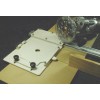
Woodline USA DADORIGHT WITH 50" CLAMP

Brand: Woodline USA
The DadoRight™ jig and your router is the simplest way to make perfect fitting dados and grooves every time.

CAUTION: POWER TOOLS CAN BE DANGEROUS AND MISUSE CAN CAUSE SERIOUS INJURY OR DEATH. ALWAYS READ AND FOLLOW ALL POWER TOOL INSTRUCTIONS. IF YOU ARE NOT SURE WHAT YOU ARE DOING, STOP AND SEEK FUTHER INSTRUCTION. DO NOT USE WITH DAMAGED BITS. DO NOT USE WITH WOOD THAT CONTAINS NAILS, SCREWS OR OTHER OBJECTS. WOODLINE USA IS NOT RESPONSIBLE FOR INJURY, ACCIDENTS, OR MISUSE. 
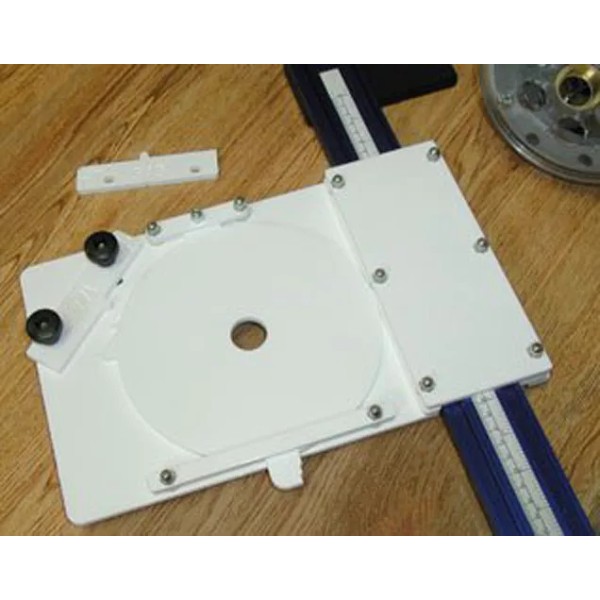
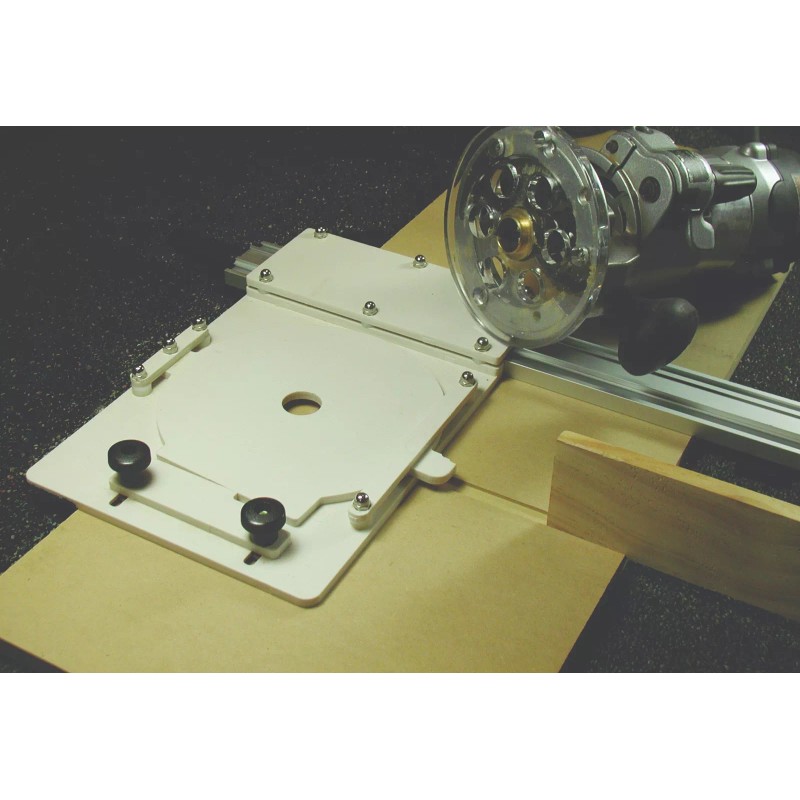
The system uses a pivoting baseplate and a router. One side of the movement is limited by a fixed stop and the other side is controlled by an adjustable set plate. A perfect dado is easily made by setting the set plate, moving the DadoRight™ along a guide clamp (not included) while simultaneously holding the router against the fixed stop. At the end of the first cut, the router is pivoted against the set plate and drawn back towards the operator. The travel of the DadoRight™ is controlled, and no matter how many passes are used to clean the cut, the final product is a great fit simply and easily.
The amount of pivot plate movement required depends on the diameter of the router bit used. The system is designed to work with either a 1/4″ or 3/8″ bit. The minimum width of a groove or dado is the diameter of the bit used, however, a smaller bit can be used to make a wider slot. Additional passes may be required to clean out the middle of the groove.
The DadoRight™ can be used with a variety of guide clamps. Woodline sells clamps for use with the system. However it will fit clamps by many manufacturers. If you have a guide clamp that is too wide or thick to use with the DadoRight™, please contact Woodline technical support for a possible solution. We offer a variety of low cost adaptors. 
Fitting the DadoRight™ to your clamp. 
Place the DadoRight™ over the clamp and loosen the three screws on the outside edge of the mounting assembly. Squeeze the sides of the portion of the mounting assembly that covers the clamp and hold while tightening the screws snugly. The DadoRight™ has small slots that allow for precise adjustment. When properly set, the DadoRight™ should slide smoothly along the guide without excessive play. If the DadoRight™ moves smoothly in some places but binds in other areas, check for glue buildup or other imperfections in the clamp. 
Woodline USA recommends a 24″ guide clamp for most dado applications, however, longer clamps can be used. Alternatively the system can be used with a straight, smooth board no greater than 5/8″ thick and 2⅛″ wide and an appropriate width. 
Setting up your DadoRight™  
The DadoRight™ works well with virtually any router with a base plate up to 6½″ in diameter (most 2½ HP or less routers). A router can be mounted to the pivot plate directly for dedicated use or you can use a standard 1″ OD style bushing (optional). 
Using a Bushing 
The DadoRight™ can be used with or without an optional 1″ guide bushing. A standard 1″ diameter guide bushing fits tightly into the center hole of the pivot plate and the DadoRight™ can easily be removed for use elsewhere. Contact Woodline USA or visit woodline.com if you need to purchase a 1″ bushing. 
Without a 1″ bushing, the router must be mounted to the pivot plate. 
Option 1: Remove the pivot plate from the jig by removing the three retaining screws. Place the router on top of the pivot plate and note the position of the router handles and other fittings. The router should be turned until the handles and fittings will not interfere with the set plate knobs when the router base is pivoted during use. The opening in the pivot plate should be centered on the router bit opening. Carefully mark the location of router mounting holes. Drill the mounting holes and countersink them so the screw heads are just below the bottom surface of the pivot plate. Reinstall the pivot plate into the jig and tighten all the screws. The pivot screw is secured with a special nylon lock nut. Tighten the screw firmly, then back off ¾ turn to allow smooth movement of the pivot plate. Figure 3 Place over clamp, Loosen all three screws. Squeeze and then tighten. Figure 4 router with 1" bushing installed. The pivot plate is marked and drilled, then countersunk to fit a router.  
Option 2: Remove the pivot plate from the jig by removing the three retaining screws. Remove the original router baseplate and place the router on top of the plate. Note the position of the router handles and other fittings. The router should be rotated until the handles and fittings will not interfere with the set plate when the router base is pivoted during use. The opening in the pivot plate should be centered on the router bit opening. If your router plate will accept a bushing, use the bushing to help you center the router on your pivot plate. Carefully mark the location of router mounting holes. Drill the mounting holes and countersink them so the screw heads are just below the bottom surface of the pivot plate. Reinstall the pivot plate into the jig and tighten all the screws. The pivot screw is secured with a special nylon lock nut. Tighten the screw firmly, then back off ¾ turn to allow smooth movement of the pivot plate.
Setting dado width to match material 
To set the dado width, select the set plate that matches the diameter of the bit used. Select ¼″ for dados from ¼″ to ½″ wide. Use a ⅜″ bit and set plate for dadoes from ⅜″ and larger. A ¼″ or ⅜″ DOWN spiral is preferred, but a straight bit will also work. 
Install the set plate and push the pivot plate against the left stop as shown; place a sample of the material between the straight portion of the pivot plate and the set plate. Press the set plate trapping the material between the pivot plate and the set plate.
Compensation for runout and adjusting fit.
There is an additional adjustment that compensates for variation in routers, runout, and degree of desired fit. Set plates are adjustable left to right by a small amount. There is an arrow on the set plate. Moving the set plate in the direction of the arrow tightens the dado slightly. Moving it to the right loosens the cut. If your test dado it too tight, move the set plate to the right. If your dado is too loose, move the set plate to the left. 
NOTE: There is a reference slot in the base plate and a notch cut in each set plate to allow a visual reference of the setting. You may have to practice a couple of times, but you will soon get the hang of it! 
We recommend you make your initial cut with the set plate in the “tight” position. You can always make a small adjustment and make another pass if the dado is too narrow. Press the set plate against the material and tighten both thumbscrews snugly. Once set for a given thickness, all additional dados should be exactly the same width.
ALWAYS TEST THE FIT IN A SCRAP OF WOOD TO ASSURE YOU HAVE PROPERLY ADJUSTED THE SET PLATE. SOME VARIATION CAN EXIST AND CORRECTIONS ARE EASILY MADE BY ADJUSTING THE LEFT TO RIGHT POSITION OF THE SET PLATE A SMALL AMOUNT TO GIVE A TIGHTER OR LOOSER FIT. 
Cutting A Dado  
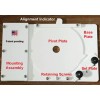
Place the DadoRight™ over the guide clamp and adjust the position of the guide clamp to the desired location and lock the guide clamp in place. The DadoRight™ pivot plate contains an alignment indicator that will closely correspond to the left edge of the dado when the pivot plate is against the left stop. It is best to make a test cut and compare the actual position with the indicator. Any variation is the result of mounting the router a little off center or runout in the router. A user can quickly note the alignment of the test cut versus the indicator and use this knowledge to set up future cuts accurately and easily.
DO NOT TURN ON THE ROUTER BEFORE INSERTING THE ROUTER COMPLETELY INTO THE JIG. DAMAGE TO THE JIG AND POSSIBLE SERIOUS INJURY MAY OCCUR.
Once the clamp is in position, place the jig over the guide with the center hole located off the edge of the material. Place the router with bit set to the desired depth onto the jig. If using a bushing, make sure the router is fully inserted into the pivot plate. Firmly hold the router and jig assembly while simultaneously gently pressing the assembly to the left so the pivot plate is against the left side of the jig (toward the guide clamp). 
Turn on the router, and with a slow smooth action, slide the assembly along the guide clamp making a cut. Once the end of the cut is reached, and without turning off or lifting the router, move the pivot plate against the right hand set plate and slide the jig assembly along the guide toward the user. Repeat sliding the jig assembly as necessary to clean out the middle of the dado. The router cannot move outside the area of your perfect dado. 
Turn off the router and wait until the bit stops turning. Then and only then can you remove the router and jig from the workpiece.
The DadoRight™ is the perfect solution for perfect dados quickly and easily. 
Woodline USA can supply replacement parts for any damaged items. Some woodworkers may also like to have an extra pivot plate for other routers. If you damage the jig by accidently lifting the router bit while it is still turning, just give us a call. We sell replacement parts for a reasonable price.
For videos and additional instructions visit Woodline.com and select the “INSTRUCTIONS” tab. We recommend that all users read these instructions carefully and visit our website for updates and additional information. 


ROUTER NOT INCLUDED
Brand: Woodline USA
Isin: IFZXGNRJVI2D

$240.33

  • Free shipping in US
  • Arrives:

  • Free 30-Day returns

In Stock

Sold by , Fulfilled by IBSPOT
Ships from USA

IBspot Buyer Protection

Shop confidently on IBspot, receive your item as described or your money back for eligible orders. Learn Program Terms

supported payment methods:Visa, Mastercard, Discover, Amex, Apple Pay, Google Pay

GUARANTEED SAFE CHECKOUT

More seller options

Starting from

Compare all sellers
  • MONEY BACK GUARANTEE

    30 days money back guarantee, no additional fee charged.

  • EXCELLENT SUPPORT

    We provide 24/7 online customer support via email.

  • Fast Shipping

    One week domestic shipping. Global delivery to the US in 2 weeks.

scroll to top arrow
Woodline USA DADORIGHT WITH 50" CLAMP

Woodline USA DADORIGHT WITH 50" CLAMP

$240.33

The DadoRight™ jig and your router is the simplest way to make perfect fitting dados and grooves every time.

CAUTION: POWER TOOLS CAN BE DANGEROUS AND MISUSE CAN CAUSE SERIOUS INJURY OR DEATH. ALWAYS READ AND FOLLOW ALL POWER TOOL INSTRUCTIONS. IF YOU ARE NOT SURE WHAT YOU ARE DOING, STOP AND SEEK FUTHER INSTRUCTION. DO NOT USE WITH DAMAGED BITS. DO NOT USE WITH WOOD THAT CONTAINS NAILS, SCREWS OR OTHER OBJECTS. WOODLINE USA IS NOT RESPONSIBLE FOR INJURY, ACCIDENTS, OR MISUSE. 

The system uses a pivoting baseplate and a router. One side of the movement is limited by a fixed stop and the other side is controlled by an adjustable set plate. A perfect dado is easily made by setting the set plate, moving the DadoRight™ along a guide clamp (not included) while simultaneously holding the router against the fixed stop. At the end of the first cut, the router is pivoted against the set plate and drawn back towards the operator. The travel of the DadoRight™ is controlled, and no matter how many passes are used to clean the cut, the final product is a great fit simply and easily.

The amount of pivot plate movement required depends on the diameter of the router bit used. The system is designed to work with either a 1/4″ or 3/8″ bit. The minimum width of a groove or dado is the diameter of the bit used, however, a smaller bit can be used to make a wider slot. Additional passes may be required to clean out the middle of the groove.

The DadoRight™ can be used with a variety of guide clamps. Woodline sells clamps for use with the system. However it will fit clamps by many manufacturers. If you have a guide clamp that is too wide or thick to use with the DadoRight™, please contact Woodline technical support for a possible solution. We offer a variety of low cost adaptors. 

Fitting the DadoRight™ to your clamp. 
Place the DadoRight™ over the clamp and loosen the three screws on the outside edge of the mounting assembly. Squeeze the sides of the portion of the mounting assembly that covers the clamp and hold while tightening the screws snugly. The DadoRight™ has small slots that allow for precise adjustment. When properly set, the DadoRight™ should slide smoothly along the guide without excessive play. If the DadoRight™ moves smoothly in some places but binds in other areas, check for glue buildup or other imperfections in the clamp. 

Woodline USA recommends a 24″ guide clamp for most dado applications, however, longer clamps can be used. Alternatively the system can be used with a straight, smooth board no greater than 5/8″ thick and 2⅛″ wide and an appropriate width. 

Setting up your DadoRight™  
The DadoRight™ works well with virtually any router with a base plate up to 6½″ in diameter (most 2½ HP or less routers). A router can be mounted to the pivot plate directly for dedicated use or you can use a standard 1″ OD style bushing (optional). 

Using a Bushing 

The DadoRight™ can be used with or without an optional 1″ guide bushing. A standard 1″ diameter guide bushing fits tightly into the center hole of the pivot plate and the DadoRight™ can easily be removed for use elsewhere. Contact Woodline USA or visit woodline.com if you need to purchase a 1″ bushing. 

Without a 1″ bushing, the router must be mounted to the pivot plate. 

Option 1: Remove the pivot plate from the jig by removing the three retaining screws. Place the router on top of the pivot plate and note the position of the router handles and other fittings. The router should be turned until the handles and fittings will not interfere with the set plate knobs when the router base is pivoted during use. The opening in the pivot plate should be centered on the router bit opening. Carefully mark the location of router mounting holes. Drill the mounting holes and countersink them so the screw heads are just below the bottom surface of the pivot plate. Reinstall the pivot plate into the jig and tighten all the screws. The pivot screw is secured with a special nylon lock nut. Tighten the screw firmly, then back off ¾ turn to allow smooth movement of the pivot plate. Figure 3 Place over clamp, Loosen all three screws. Squeeze and then tighten. Figure 4 router with 1" bushing installed. The pivot plate is marked and drilled, then countersunk to fit a router.  

Option 2: Remove the pivot plate from the jig by removing the three retaining screws. Remove the original router baseplate and place the router on top of the plate. Note the position of the router handles and other fittings. The router should be rotated until the handles and fittings will not interfere with the set plate when the router base is pivoted during use. The opening in the pivot plate should be centered on the router bit opening. If your router plate will accept a bushing, use the bushing to help you center the router on your pivot plate. Carefully mark the location of router mounting holes. Drill the mounting holes and countersink them so the screw heads are just below the bottom surface of the pivot plate. Reinstall the pivot plate into the jig and tighten all the screws. The pivot screw is secured with a special nylon lock nut. Tighten the screw firmly, then back off ¾ turn to allow smooth movement of the pivot plate.

Setting dado width to match material 

To set the dado width, select the set plate that matches the diameter of the bit used. Select ¼″ for dados from ¼″ to ½″ wide. Use a ⅜″ bit and set plate for dadoes from ⅜″ and larger. A ¼″ or ⅜″ DOWN spiral is preferred, but a straight bit will also work. 

Install the set plate and push the pivot plate against the left stop as shown; place a sample of the material between the straight portion of the pivot plate and the set plate. Press the set plate trapping the material between the pivot plate and the set plate.

Compensation for runout and adjusting fit.

There is an additional adjustment that compensates for variation in routers, runout, and degree of desired fit. Set plates are adjustable left to right by a small amount. There is an arrow on the set plate. Moving the set plate in the direction of the arrow tightens the dado slightly. Moving it to the right loosens the cut. If your test dado it too tight, move the set plate to the right. If your dado is too loose, move the set plate to the left. 

NOTE: There is a reference slot in the base plate and a notch cut in each set plate to allow a visual reference of the setting. You may have to practice a couple of times, but you will soon get the hang of it! 

We recommend you make your initial cut with the set plate in the “tight” position. You can always make a small adjustment and make another pass if the dado is too narrow. Press the set plate against the material and tighten both thumbscrews snugly. Once set for a given thickness, all additional dados should be exactly the same width.

ALWAYS TEST THE FIT IN A SCRAP OF WOOD TO ASSURE YOU HAVE PROPERLY ADJUSTED THE SET PLATE. SOME VARIATION CAN EXIST AND CORRECTIONS ARE EASILY MADE BY ADJUSTING THE LEFT TO RIGHT POSITION OF THE SET PLATE A SMALL AMOUNT TO GIVE A TIGHTER OR LOOSER FIT. 

Cutting A Dado  

Place the DadoRight™ over the guide clamp and adjust the position of the guide clamp to the desired location and lock the guide clamp in place. The DadoRight™ pivot plate contains an alignment indicator that will closely correspond to the left edge of the dado when the pivot plate is against the left stop. It is best to make a test cut and compare the actual position with the indicator. Any variation is the result of mounting the router a little off center or runout in the router. A user can quickly note the alignment of the test cut versus the indicator and use this knowledge to set up future cuts accurately and easily.

DO NOT TURN ON THE ROUTER BEFORE INSERTING THE ROUTER COMPLETELY INTO THE JIG. DAMAGE TO THE JIG AND POSSIBLE SERIOUS INJURY MAY OCCUR.

Once the clamp is in position, place the jig over the guide with the center hole located off the edge of the material. Place the router with bit set to the desired depth onto the jig. If using a bushing, make sure the router is fully inserted into the pivot plate. Firmly hold the router and jig assembly while simultaneously gently pressing the assembly to the left so the pivot plate is against the left side of the jig (toward the guide clamp). 

Turn on the router, and with a slow smooth action, slide the assembly along the guide clamp making a cut. Once the end of the cut is reached, and without turning off or lifting the router, move the pivot plate against the right hand set plate and slide the jig assembly along the guide toward the user. Repeat sliding the jig assembly as necessary to clean out the middle of the dado. The router cannot move outside the area of your perfect dado. 

Turn off the router and wait until the bit stops turning. Then and only then can you remove the router and jig from the workpiece.

The DadoRight™ is the perfect solution for perfect dados quickly and easily. 

Woodline USA can supply replacement parts for any damaged items. Some woodworkers may also like to have an extra pivot plate for other routers. If you damage the jig by accidently lifting the router bit while it is still turning, just give us a call. We sell replacement parts for a reasonable price.

For videos and additional instructions visit Woodline.com and select the “INSTRUCTIONS” tab. We recommend that all users read these instructions carefully and visit our website for updates and additional information. 


ROUTER NOT INCLUDED
  • MPN: DRF
  • Voltage: N/A
  • Package Quantity: 1
  • Material: HDPE
  • Model: DRF
  • Application: Cutting guide
  • Brand: Woodline USA
  • Type: Dado Cutting Jig
  • UPC: Does not apply


Processing Time

  • We process and ship orders Monday through Friday, excluding holidays.
  • Most orders are processed within 1–3 business days, depending on product availability.
  • Processing time does not include delivery time, which varies based on your location and the product’s shipping origin.

Shipping Coverage

We currently ship to addresses within the United States only.

Products may ship from:

  • Our U.S. warehouses, or
  • Our international fulfillment centers (including Korea, Japan, China, Australia, Mexico, Canada, the United Kingdom, and the EU).

Each product page clearly displays the “Ships From” location before checkout.


Shipping Methods & Estimated Delivery


Shipping Method Estimated Delivery Cost
Free Shipping (US) 5–10 business days Free, available on eligible items
Standard Shipping (US to US by Item) 5–10 business days $6.50 for the first item, $2.00 each additional
Standard Shipping (From US Warehouse by Weight) 3–7 business days Starts at $6.50, increasing by $2 for every additional 4 oz (0.25 lb) up to 1 lb, then by $4 for each additional pound beyond 1 lb.
Extended Delivery (Ships from Overseas Warehouse) 10–20 business days $14.50 for the first item, $2.00 each additional

Shipping costs vary by product weight, quantity and origin. Exact rates and delivery estimates are displayed on each product page and confirmed during checkout.

Free Shipping

We offer free standard shipping on select products or during promotional periods. Availability of free shipping will be displayed on the product page and at checkout. 


Carriers

We primarily use USPS and UPS for U.S. deliveries. Items shipped from international warehouses may be handled by partner carriers depending on the country of origin.


Import Duties & Taxes

All import duties and taxes for goods imported into the United States are included in the product price. There are no hidden fees or additional charges at checkout.


Tracking & Notifications

Every order is fully trackable. You will receive a tracking number via email once your order ships. If your order ships in multiple packages, each package will have its own tracking number. If you don’t receive a shipping confirmation immediately, your order is still being processed and will arrive within the estimated timeframe shown at checkout.

You can track your shipment anytime using the Track Your Order page on our website.


Order Changes & Cancellations

If you need to modify or cancel an order, please contact our customer support team as soon as possible. Orders can only be canceled before they ship. Once shipped, cancellations are not possible, but you may request a return after the item is delivered.

Contact: support@ibspot.com


Item Not Received

If your tracking number shows “Delivered” but you haven’t received your package:

  1. Check with your local USPS or UPS office.
  2. Confirm that the shipping address provided was correct.
  3. If the issue remains unresolved, contact support@ibspot.com for assistance.

Damaged or Lost Parcels

If your package arrives damaged or fails to arrive, please contact us immediately. For deliveries to P.O. boxes, ibspot is not responsible for damage caused by weather, temperature, or theft.


Customer Support

For any questions about shipping, tracking, or delivery, our customer support team is here to help.

Email: support@ibspot.com

We’re always happy to help.

Please read our policy carefully before making a purchase.
We aim to ensure every customer has a smooth and transparent experience with ibspot.com.


Order Cancellation Policy

Customers may request to cancel an order before it has been shipped.
Once the package has been shipped, cancellations are no longer possible; however, you may still request a return after receiving your order.

How to Request a Cancellation

You can contact us through:

Please submit your cancellation request as soon as possible after placing the order to allow us to process it before shipment.


Return Policy

We accept returns for most items within 30 days of delivery for a full refund.

To be eligible for a return:

  • The item must be unused, in the same condition as received, and in its original packaging.
  • A tracking number must be provided to confirm the return shipment.

Non-Returnable Items

Certain products cannot be returned, including:

  • Perishable goods (for example, food, flowers, newspapers, magazines)
  • Intimate or sanitary goods
  • Hazardous materials or flammable liquids/gases
  • Gift cards
  • Downloadable software
  • Some health and personal care items

Partial Refunds (If Applicable)

Partial refunds may be granted in specific situations, such as:

  • Books with obvious signs of use
  • Opened CDs, DVDs, software, or vinyl records
  • Items not in their original condition, damaged, or missing parts not due to our error
  • Items returned more than 30 days after delivery

How to Return an Item

To initiate a return, please contact us at support@ibspot.com with your order number and details about the product you wish to return.
Our team will provide you with return instructions and a prepaid return label.


Shipping Cost for Returns

Please contact us before returning any item.
We will provide a free return shipping label.

If a return is sent back without prior contact or without our provided label, we cannot be held responsible for return shipping costs.

For items valued over $75, we recommend using a trackable shipping service or purchasing shipping insurance.
We cannot guarantee that we will receive your returned item if shipped independently.


Refund Processing

Once your return is received and inspected:

  • In-store returns are refunded to the original form of payment or issued as a gift card.
  • Mail-in returns using our prepaid label are refunded to the original payment method within 3–5 business days after we receive your return.

Please allow:

  • 5–7 business days for the return to reach our Returns Center.
  • An additional 3–10 business days for your bank to post the refund to your account.

Damages, Issues & Claims

Please inspect your order immediately upon receipt.
If you receive a defective, damaged, or incorrect item, contact us right away at support@ibspot.com.
We’ll evaluate the issue promptly and make it right.

Product Claims

Before purchasing, please review product details carefully.
If there is a problem with your order upon arrival, visit our Support Center or contact us directly to arrange return shipping or replacement.


Exchanges

We do not process direct exchanges.
The fastest way to get what you need is to return the original item and place a new order once your return is accepted.


Return Address

IBSPOT Return Center
15 Sawmill Ln
Dover Plains, NY 12522
United States


Customer Support

Our support team is available 24/7 to assist with cancellations, returns, or general inquiries.

Email: support@ibspot.com
Contact Form: Contact Us page

Oops!

Sorry, it looks like some products are not available in selected quantity.

OK

Subscribe To Our Newsletter

Disclaimer: Statements made, or products sold through this website, have not been evaluated by the United States Food and Drug Administration. Products are not intended to diagnose, treat, cure or prevent any disease.