




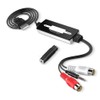
USB Analog To Digital Audio Converter Recorder Support MP3 WMA WAV OGG Format
$45.66
- Free US shipping
-
Arrives
This usb audio capture device is a perfect analog to digital audio converter and a digital audio recorder with output in selectable MP3, WAV, WMA and OGG format.
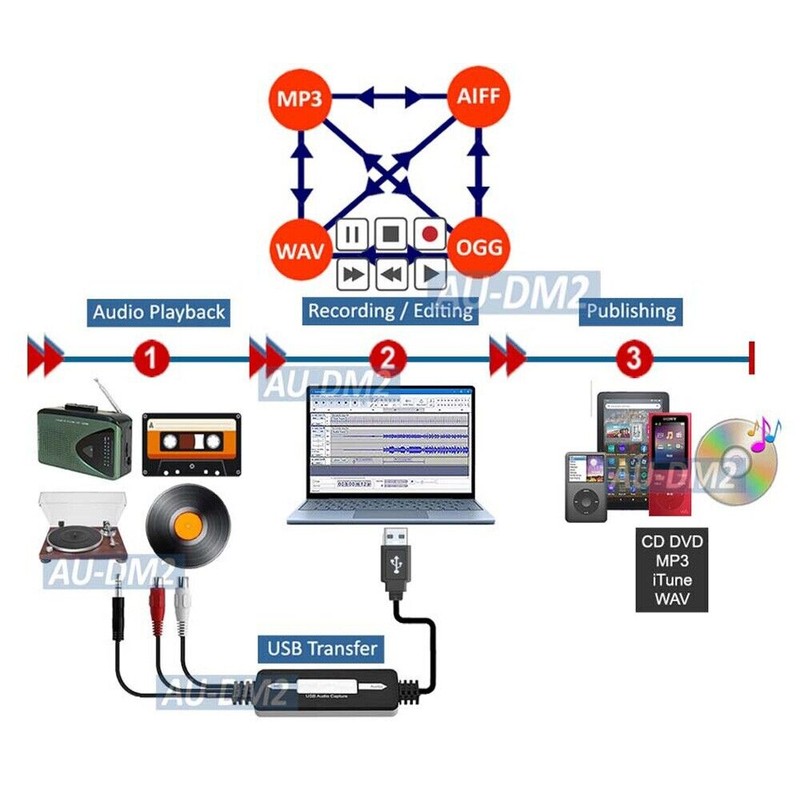
It helps you record/transfer audio from audio equipments into computer in selectable digital formats and save them in digital files.
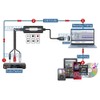
Once recording done in a digital format, users can use the recorded audio feeds for playback in MP3 player or smart phone, car stereo, audio editing or audio CD disc production.
Super Plug And Play Setup
Absolutely no driver installation needed for
operation in PC Windows, Mac OS or Linux systems.
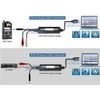
Users simply just plug it into the USB port of the computer and install the audio software from the cd disc in computer. It will get ready for use immediately.
Digital Audio Recording
Users can connect any analog audio equipment into computer through this USB audio adapter for recording and digitizing
process:
- CD/ DVD players or other multimedia players
- TV audio out, Hi-Fi or home theater system
- Portable MP3 players such as iPods or iPad
- Smart phones with 3.5mm audio output
- Computer sound cards or tablet PC's audio output
- A/V mixers and home audio receivers
- Musical instruments, keyboards
- Powered microphone
- Reel-to-reel tape decks, cassette players,
- Turntables (after going thru a pre-amplifier highly recommended for optimum recording quality)
- MiniDisc (MD) players or LP players
- Radio tuners
Dual Audio Inputs
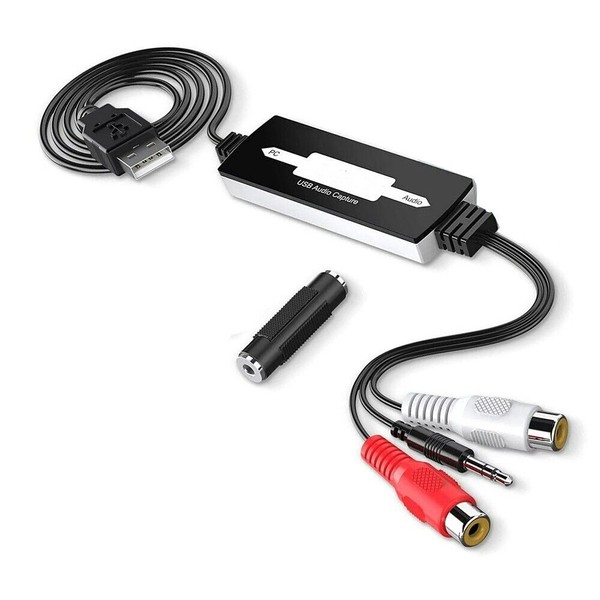
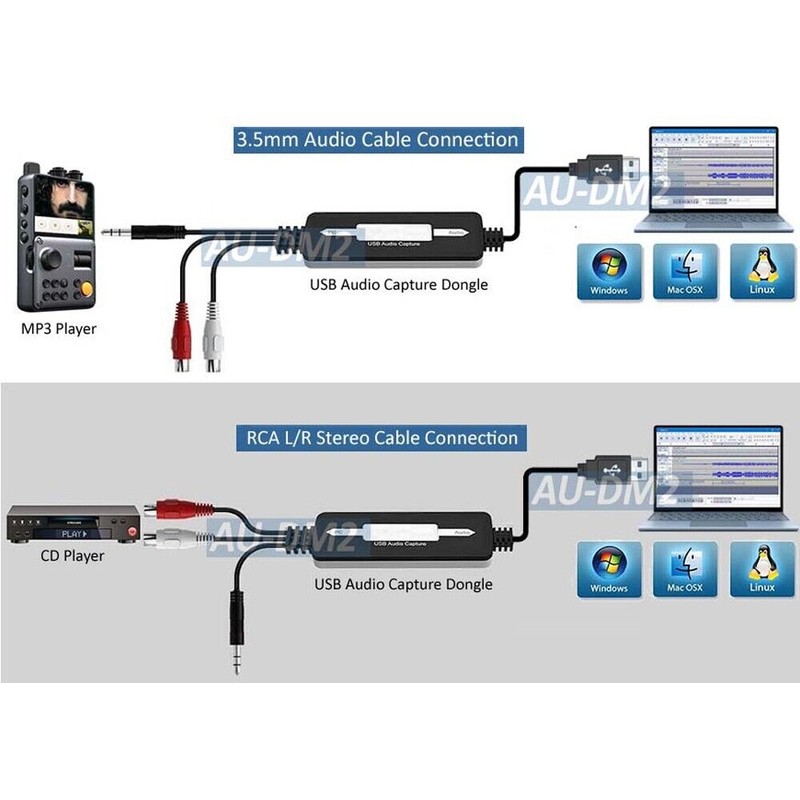
This USB audio frame grabber supports 1 set of RCA L/R female input and a 3.5mm audio male input for hookup with any analog audio equipment.
A 3.5mm female to female coupler is included as an bonus item.
Cross-Platform Audio Recorder Editor Software
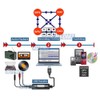
The supplied audio software is advanced in recording and editing sound
clips.
Major features that this audio software can provide are as follows:
- Manual setup for optimal recording level for recording with low or no distortion.
- Supports import/export function for WAV, AIFF, AU, FLAC and OGG files.
- Tracks with different sample rates or formats are converted automatically in real time using high-quality re-sampling and dithering algorithm.
- Edit and encode OGG, MP3, WAV or AIFF into different formats accordingly.
- Easy editing with major functions such as cut, copy, paste, delete, splice or mix functions for controlling the recording and playback.
- Supports editing and mixing large numbers of sound tracks.
- Supports 16-bit, 24-bit and 32-bit float sampling rate.
- Digital cleaning filter for reducing noise such as statics, clicks, pops, hiss, hum or other background noises.
- Alter frequencies with Equalization, Bass Boost, High/Low Pass and Notch Filter effects.
- Adjust volume with Compressor, Amplify, Normalize and Fade In/Out effects.
- Splitting/Joining Stereo Tracks.
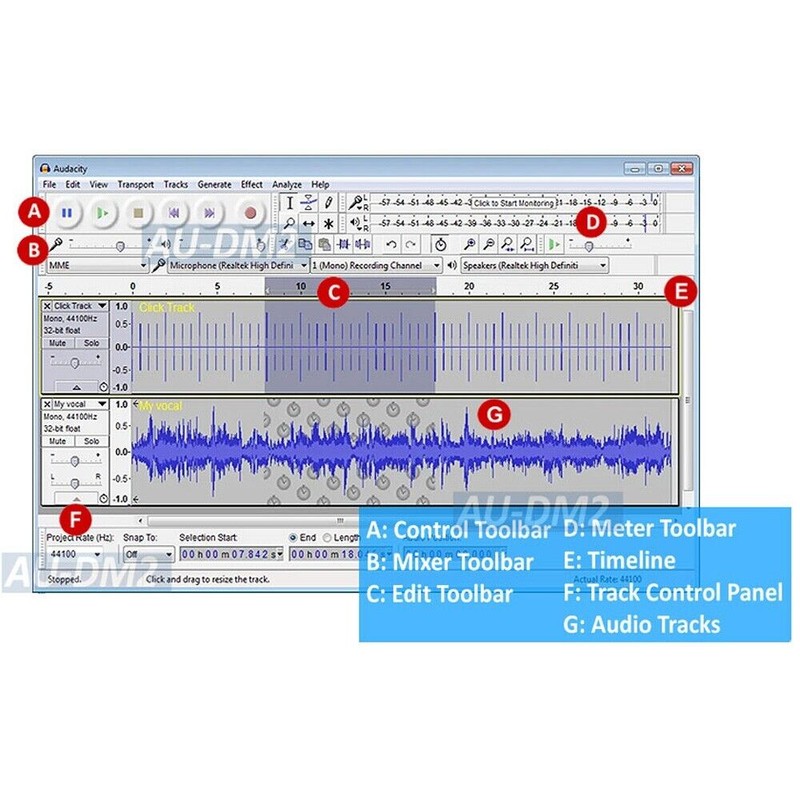
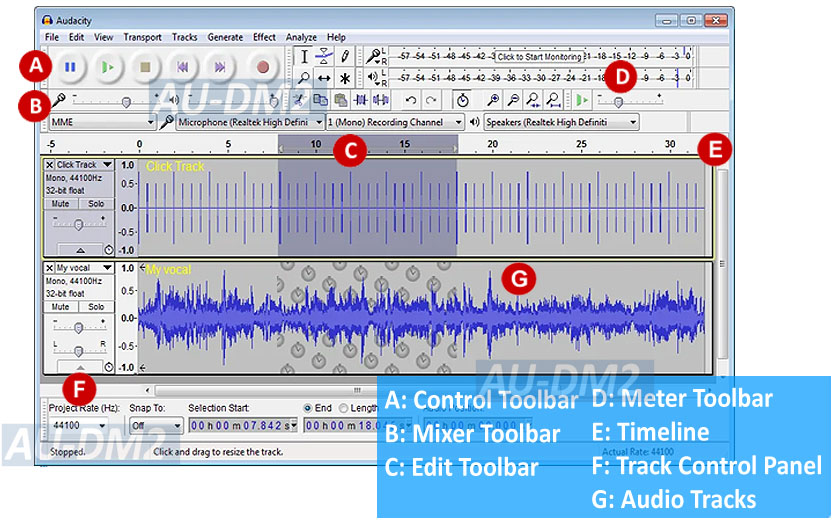
- Mixer Toolbar: controls the output and input levels of the audio devices currently selected from input source such as microphone, Line In, Audio CD, etc.
- Editing Toolbar: supports Cut, copy, paste, trim, silence, undo, redo, sync-lock, zoom.
MP3 WAV OGG AIFF Encoder
The bundled audio software supports import/export function
for file formats in WAV, AIFF, AU, FLAC and OGG. Some main features as follows:
- Encodes MP3, AIFF, OGG into WAV format in PC Windows/Linux for for CD burning
- Converts WAV, AIFF, OGG into MP3 format for loading into an MP3 player.
- Encodes MP3, OGG, WAV into Mac AIFF format for loading into iTune/iPod or CD burning.
- Tracks with different sample rates or formats are converted automatically in real time.
- Rip selected tracks from audio CD and convert the digital format needed. Users can select the format from options setting.
Digital Cleaning Process And Effects
There are various special sonic effects provided from the audio software can instantly remove clicks, pops and crackles
digitally and restores your source audio to original or better quality after the
process.
Users can choose the existing or new digital effects to be applied during the recording session. Many digital effects are available from the audio software for improving the recorded sessions.
- Premium USB-based analog audio digitizer with full-function audio recording/editing software provided for recording live audio, editing recorded clips and digital audio production.
- Perfect digital audio recorder with output in selectable MP3, WAV, WMA and OGG format.
- 100% plug and play. No driver installation needed for Windows, Mac OS X and Linux.
- Supports both RCA L/R phono input and a 3.5mm line audio input for capturing audio from devices such as tape deck, cassette player, turntable, LP, mic, computer, DVD player, audio receiver, mixer and so on.
- Converts your collection of LPs, cassettes or vinyl records into digital audio files for storage, CD production or MP3 playback on portable audio player.
- Edit and encode OGG, MP3, WAV or AIFF into different formats accordingly.
- Easy sound track editing/mixing with major functions such as cut, copy, paste, delete, splice or mix functions for controlling the recording and playback.
- Supports editing and mixing large numbers of sound tracks.
- Sample rates and formats are converted using high-quality re-sampling and dithering algorithm.
- Cleaning the recordings by removing pop, noise, hiss and hum off in digital recordings.
- Supports various sonic cleaning features for digitally cleaning and restoring the musical quality.
- Removes clicks, pops and hiss from records and tapes during recording.
- Multi-function MP3 WAV OGG AIFF converter for transcoding any WAV, MP3, AIFF, OGG format into MP3, OGG, WAV, AIFF format.
- Split up previously recorded MP3s, WAVs, AIFFs or OGGs into multiple tracks or burn to CD.
- Automatic track detection and silence removal algorithm splits your albums into tracks ready for your iPod, MP3 or CD player
- Alter frequencies with Equalization, Bass Boost, High/Low Pass and Notch Filter effects.
- Adjustable speed, temp and pitch for recording with Compressor, Amplify, Normalize and Fade In/Out effects.
- Audio Inputs:
- RCA Phono L/R x 1
- 3.5mm x 1
- Audio Output: USB Connector: Type B, USB 1.1/2.0 compatible
- Audio Recording Formats: MP3, WAV, OGG, AIFF (For Mac only)
- Audio Capture: Sampling Bit Rate: 16-bit, 24-bit, 32-bit
- Cable Length: 32" (USB end) + 6.3" (Audio Input end)
- USB audio capture unit
- Audio recording software CD
- User manual copy
- 3.5mm audio female to female coupler x 1
- Free 30-Day Returns
- Full Refund for Damaged or Incorrect Items
- Guaranteed Delivery or Money Back
- Secure Checkout & Fast Support

This usb audio capture device is a perfect analog to digital audio converter and a digital audio recorder with output in selectable MP3, WAV, WMA and OGG format.
It helps you record/transfer audio from audio equipments into computer in selectable digital formats and save them in digital files.
Once recording done in a digital format, users can use the recorded audio feeds for playback in MP3 player or smart phone, car stereo, audio editing or audio CD disc production.
Super Plug And Play Setup
Absolutely no driver installation needed for
operation in PC Windows, Mac OS or Linux systems.
Users simply just plug it into the USB port of the computer and install the audio software from the cd disc in computer. It will get ready for use immediately.
Digital Audio Recording
Users can connect any analog audio equipment into computer through this USB audio adapter for recording and digitizing
process:
- CD/ DVD players or other multimedia players
- TV audio out, Hi-Fi or home theater system
- Portable MP3 players such as iPods or iPad
- Smart phones with 3.5mm audio output
- Computer sound cards or tablet PC's audio output
- A/V mixers and home audio receivers
- Musical instruments, keyboards
- Powered microphone
- Reel-to-reel tape decks, cassette players,
- Turntables (after going thru a pre-amplifier highly recommended for optimum recording quality)
- MiniDisc (MD) players or LP players
- Radio tuners
Dual Audio Inputs
This USB audio frame grabber supports 1 set of RCA L/R female input and a 3.5mm audio male input for hookup with any analog audio equipment.
A 3.5mm female to female coupler is included as an bonus item.
Cross-Platform Audio Recorder Editor Software
The supplied audio software is advanced in recording and editing sound
clips.
Major features that this audio software can provide are as follows:
- Manual setup for optimal recording level for recording with low or no distortion.
- Supports import/export function for WAV, AIFF, AU, FLAC and OGG files.
- Tracks with different sample rates or formats are converted automatically in real time using high-quality re-sampling and dithering algorithm.
- Edit and encode OGG, MP3, WAV or AIFF into different formats accordingly.
- Easy editing with major functions such as cut, copy, paste, delete, splice or mix functions for controlling the recording and playback.
- Supports editing and mixing large numbers of sound tracks.
- Supports 16-bit, 24-bit and 32-bit float sampling rate.
- Digital cleaning filter for reducing noise such as statics, clicks, pops, hiss, hum or other background noises.
- Alter frequencies with Equalization, Bass Boost, High/Low Pass and Notch Filter effects.
- Adjust volume with Compressor, Amplify, Normalize and Fade In/Out effects.
- Splitting/Joining Stereo Tracks.
- Mixer Toolbar: controls the output and input levels of the audio devices currently selected from input source such as microphone, Line In, Audio CD, etc.
- Editing Toolbar: supports Cut, copy, paste, trim, silence, undo, redo, sync-lock, zoom.
MP3 WAV OGG AIFF Encoder
The bundled audio software supports import/export function
for file formats in WAV, AIFF, AU, FLAC and OGG. Some main features as follows:
- Encodes MP3, AIFF, OGG into WAV format in PC Windows/Linux for for CD burning
- Converts WAV, AIFF, OGG into MP3 format for loading into an MP3 player.
- Encodes MP3, OGG, WAV into Mac AIFF format for loading into iTune/iPod or CD burning.
- Tracks with different sample rates or formats are converted automatically in real time.
- Rip selected tracks from audio CD and convert the digital format needed. Users can select the format from options setting.
Digital Cleaning Process And Effects
There are various special sonic effects provided from the audio software can instantly remove clicks, pops and crackles
digitally and restores your source audio to original or better quality after the
process.
Users can choose the existing or new digital effects to be applied during the recording session. Many digital effects are available from the audio software for improving the recorded sessions.
- Premium USB-based analog audio digitizer with full-function audio recording/editing software provided for recording live audio, editing recorded clips and digital audio production.
- Perfect digital audio recorder with output in selectable MP3, WAV, WMA and OGG format.
- 100% plug and play. No driver installation needed for Windows, Mac OS X and Linux.
- Supports both RCA L/R phono input and a 3.5mm line audio input for capturing audio from devices such as tape deck, cassette player, turntable, LP, mic, computer, DVD player, audio receiver, mixer and so on.
- Converts your collection of LPs, cassettes or vinyl records into digital audio files for storage, CD production or MP3 playback on portable audio player.
- Edit and encode OGG, MP3, WAV or AIFF into different formats accordingly.
- Easy sound track editing/mixing with major functions such as cut, copy, paste, delete, splice or mix functions for controlling the recording and playback.
- Supports editing and mixing large numbers of sound tracks.
- Sample rates and formats are converted using high-quality re-sampling and dithering algorithm.
- Cleaning the recordings by removing pop, noise, hiss and hum off in digital recordings.
- Supports various sonic cleaning features for digitally cleaning and restoring the musical quality.
- Removes clicks, pops and hiss from records and tapes during recording.
- Multi-function MP3 WAV OGG AIFF converter for transcoding any WAV, MP3, AIFF, OGG format into MP3, OGG, WAV, AIFF format.
- Split up previously recorded MP3s, WAVs, AIFFs or OGGs into multiple tracks or burn to CD.
- Automatic track detection and silence removal algorithm splits your albums into tracks ready for your iPod, MP3 or CD player
- Alter frequencies with Equalization, Bass Boost, High/Low Pass and Notch Filter effects.
- Adjustable speed, temp and pitch for recording with Compressor, Amplify, Normalize and Fade In/Out effects.
- Audio Inputs:
- RCA Phono L/R x 1
- 3.5mm x 1
- Audio Output: USB Connector: Type B, USB 1.1/2.0 compatible
- Audio Recording Formats: MP3, WAV, OGG, AIFF (For Mac only)
- Audio Capture: Sampling Bit Rate: 16-bit, 24-bit, 32-bit
- Cable Length: 32" (USB end) + 6.3" (Audio Input end)
- USB audio capture unit
- Audio recording software CD
- User manual copy
- 3.5mm audio female to female coupler x 1
This usb audio capture device is a perfect analog to digital audio converter and a digital audio recorder with output in selectable MP3, WAV, WMA and OGG format.
It helps you record/transfer audio from audio equipments into computer in selectable digital formats and save them in digital files.
Once recording done in a digital format, users can use the recorded audio feeds for playback in MP3 player or smart phone, car stereo, audio editing or audio CD disc production.
 |
Super Plug And Play Setup
Absolutely no driver installation needed for
operation in PC Windows, Mac OS or Linux systems.
Users simply just plug it into the USB port of the computer and install the audio software from the cd disc in computer. It will get ready for use immediately.
 |
Digital Audio Recording
Users can connect any analog audio equipment into computer through this USB audio adapter for recording and digitizing
process:
- CD/ DVD players or other multimedia players
- TV audio out, Hi-Fi or home theater system
- Portable MP3 players such as iPods or iPad
- Smart phones with 3.5mm audio output
- Computer sound cards or tablet PC's audio output
- A/V mixers and home audio receivers
- Musical instruments, keyboards
- Powered microphone
- Reel-to-reel tape decks, cassette players,
- Turntables (after going thru a pre-amplifier highly recommended for optimum recording quality)
- MiniDisc (MD) players or LP players
- Radio tuners
Dual Audio Inputs
This USB audio frame grabber supports 1 set of RCA L/R female input and a 3.5mm audio male input for hookup with any analog audio equipment.
A 3.5mm female to female coupler is included as an bonus item.
 |
Cross-Platform Audio Recorder Editor Software
The supplied audio software is advanced in recording and editing sound
clips.
Major features that this audio software can provide are as follows:
- Manual setup for optimal recording level for recording with low or no distortion.
- Supports import/export function for WAV, AIFF, AU, FLAC and OGG files.
- Tracks with different sample rates or formats are converted automatically in real time using high-quality re-sampling and dithering algorithm.
- Edit and encode OGG, MP3, WAV or AIFF into different formats accordingly.
- Easy editing with major functions such as cut, copy, paste, delete, splice or mix functions for controlling the recording and playback.
- Supports editing and mixing large numbers of sound tracks.
- Supports 16-bit, 24-bit and 32-bit float sampling rate.
- Digital cleaning filter for reducing noise such as statics, clicks, pops, hiss, hum or other background noises.
- Alter frequencies with Equalization, Bass Boost, High/Low Pass and Notch Filter effects.
- Adjust volume with Compressor, Amplify, Normalize and Fade In/Out effects.
- Splitting/Joining Stereo Tracks.
- Mixer Toolbar: controls the output and input levels of the audio devices currently selected from input source such as microphone, Line In, Audio CD, etc.
- Editing Toolbar: supports Cut, copy, paste, trim, silence, undo, redo, sync-lock, zoom.
 |
MP3 WAV OGG AIFF Encoder
The bundled audio software supports import/export function
for file formats in WAV, AIFF, AU, FLAC and OGG. Some main features as follows:
- Encodes MP3, AIFF, OGG into WAV format in PC Windows/Linux for for CD burning
- Converts WAV, AIFF, OGG into MP3 format for loading into an MP3 player.
- Encodes MP3, OGG, WAV into Mac AIFF format for loading into iTune/iPod or CD burning.
- Tracks with different sample rates or formats are converted automatically in real time.
- Rip selected tracks from audio CD and convert the digital format needed. Users can select the format from options setting.
 |
Digital Cleaning Process And Effects
There are various special sonic effects provided from the audio software can instantly remove clicks, pops and crackles
digitally and restores your source audio to original or better quality after the
process.
Users can choose the existing or new digital effects to be applied during the recording session. Many digital effects are available from the audio software for improving the recorded sessions.

- Premium USB-based analog audio digitizer with full-function audio recording/editing software provided for recording live audio, editing recorded clips and digital audio production.
- Perfect digital audio recorder with output in selectable MP3, WAV, WMA and OGG format.
- 100% plug and play. No driver installation needed for Windows, Mac OS X and Linux.
- Supports both RCA L/R phono input and a 3.5mm line audio input for capturing audio from devices such as tape deck, cassette player, turntable, LP, mic, computer, DVD player, audio receiver, mixer and so on.
- Converts your collection of LPs, cassettes or vinyl records into digital audio files for storage, CD production or MP3 playback on portable audio player.
- Edit and encode OGG, MP3, WAV or AIFF into different formats accordingly.
- Easy sound track editing/mixing with major functions such as cut, copy, paste, delete, splice or mix functions for controlling the recording and playback.
- Supports editing and mixing large numbers of sound tracks.
- Sample rates and formats are converted using high-quality re-sampling and dithering algorithm.
- Cleaning the recordings by removing pop, noise, hiss and hum off in digital recordings.
- Supports various sonic cleaning features for digitally cleaning and restoring the musical quality.
- Removes clicks, pops and hiss from records and tapes during recording.
- Multi-function MP3 WAV OGG AIFF converter for transcoding any WAV, MP3, AIFF, OGG format into MP3, OGG, WAV, AIFF format.
- Split up previously recorded MP3s, WAVs, AIFFs or OGGs into multiple tracks or burn to CD.
- Automatic track detection and silence removal algorithm splits your albums into tracks ready for your iPod, MP3 or CD player
- Alter frequencies with Equalization, Bass Boost, High/Low Pass and Notch Filter effects.
- Adjustable speed, temp and pitch for recording with Compressor, Amplify, Normalize and Fade In/Out effects.

- Audio Inputs:
- RCA Phono L/R x 1
- 3.5mm x 1
- Audio Output: USB Connector: Type B, USB 1.1/2.0 compatible
- Audio Recording Formats: MP3, WAV, OGG, AIFF (For Mac only)
- Audio Capture: Sampling Bit Rate: 16-bit, 24-bit, 32-bit
- Cable Length: 32" (USB end) + 6.3" (Audio Input end)

- USB audio capture unit
- Audio recording software CD
- User manual copy
- 3.5mm audio female to female coupler x 1
Condition
Model
Input/Output Ports
Type
Features
MPN
Interface Type
Brand
UPC
Processing Time
- We process and ship orders Monday through Friday, excluding holidays.
- Most orders are processed within 1–3 business days, depending on product availability.
- Processing time does not include delivery time, which varies based on your location and the product’s shipping origin.
Shipping Coverage
We currently ship to addresses within the United States only.
Products may ship from:
- Our U.S. warehouses, or
- Our international fulfillment centers (including Korea, Japan, China, Australia, Mexico, Canada, the United Kingdom, and the EU).
Each product page clearly displays the “Ships From” location before checkout.
Shipping Methods & Estimated Delivery
| Shipping Method | Estimated Delivery | Cost |
|---|---|---|
| Free Shipping (US) | 5–10 business days | Free, available on eligible items |
| Standard Shipping (US to US by Item) | 5–10 business days | $5.95 for the first item, $3.00 each additional |
| Standard Shipping (From US Warehouse by Weight) | 3–7 business days | Starts at $5.95, increasing by $2 for every additional 4 oz (0.25 lb) up to 1 lb, then by $4 for each additional pound beyond 1 lb. |
| Extended Delivery (Ships from Overseas Warehouse) | 10–20 business days | $14.50 for the first item, $2.00 each additional |
Shipping costs vary by product weight, quantity and origin. Exact rates and delivery estimates are displayed on each product page and confirmed during checkout.
Free Shipping
We offer free standard shipping on select products or during promotional periods. Availability of free shipping will be displayed on the product page and at checkout.
Carriers
We primarily use USPS and UPS for U.S. deliveries. Items shipped from international warehouses may be handled by partner carriers depending on the country of origin.
Import Duties & Taxes
All import duties and taxes for goods imported into the United States are included in the product price. There are no hidden fees or additional charges at checkout.
Tracking & Notifications
Every order is fully trackable. You will receive a tracking number via email once your order ships. If your order ships in multiple packages, each package will have its own tracking number. If you don’t receive a shipping confirmation immediately, your order is still being processed and will arrive within the estimated timeframe shown at checkout.
You can track your shipment anytime using the Track Your Order page on our website.
Order Changes & Cancellations
If you need to modify or cancel an order, please contact our customer support team as soon as possible. Orders can only be canceled before they ship. Once shipped, cancellations are not possible, but you may request a return after the item is delivered.
Contact: support@ibspot.com
Item Not Received
If your tracking number shows “Delivered” but you haven’t received your package:
- Check with your local USPS or UPS office.
- Confirm that the shipping address provided was correct.
- If the issue remains unresolved, contact support@ibspot.com for assistance.
Damaged or Lost Parcels
If your package arrives damaged or fails to arrive, please contact us immediately. For deliveries to P.O. boxes, ibspot is not responsible for damage caused by weather, temperature, or theft.
Customer Support
For any questions about shipping, tracking, or delivery, our customer support team is here to help.
Email: support@ibspot.com
We’re always happy to help.
Please read our policy carefully before making a purchase.
We aim to ensure every customer has a smooth and transparent experience with ibspot.com.
Order Cancellation Policy
Customers may request to cancel an order before it has been shipped.
Once the package has been shipped, cancellations are no longer possible; however, you may still request a return after receiving your order.
How to Request a Cancellation
You can contact us through:
- Email: support@ibspot.com
- Contact Form: Submit a request through our Contact Us page
Please submit your cancellation request as soon as possible after placing the order to allow us to process it before shipment.
Return Policy
We accept returns for most items within 30 days of delivery for a full refund.
To be eligible for a return:
- The item must be unused, in the same condition as received, and in its original packaging.
- A tracking number must be provided to confirm the return shipment.
Non-Returnable Items
Certain products cannot be returned, including:
- Perishable goods (for example, food, flowers, newspapers, magazines)
- Intimate or sanitary goods
- Hazardous materials or flammable liquids/gases
- Gift cards
- Downloadable software
- Some health and personal care items
Partial Refunds (If Applicable)
Partial refunds may be granted in specific situations, such as:
- Books with obvious signs of use
- Opened CDs, DVDs, software, or vinyl records
- Items not in their original condition, damaged, or missing parts not due to our error
- Items returned more than 30 days after delivery
How to Return an Item
To initiate a return, please contact us at support@ibspot.com with your order number and details about the product you wish to return.
Our team will provide you with return instructions and a prepaid return label.
Shipping Cost for Returns
Please contact us before returning any item.
We will provide a free return shipping label.
If a return is sent back without prior contact or without our provided label, we cannot be held responsible for return shipping costs.
For items valued over $75, we recommend using a trackable shipping service or purchasing shipping insurance.
We cannot guarantee that we will receive your returned item if shipped independently.
Refund Processing
Once your return is received and inspected:
- In-store returns are refunded to the original form of payment or issued as a gift card.
- Mail-in returns using our prepaid label are refunded to the original payment method within 3–5 business days after we receive your return.
Please allow:
- 5–7 business days for the return to reach our Returns Center.
- An additional 3–10 business days for your bank to post the refund to your account.
Damages, Issues & Claims
Please inspect your order immediately upon receipt.
If you receive a defective, damaged, or incorrect item, contact us right away at support@ibspot.com.
We’ll evaluate the issue promptly and make it right.
Product Claims
Before purchasing, please review product details carefully.
If there is a problem with your order upon arrival, visit our Support Center or contact us directly to arrange return shipping or replacement.
Exchanges
We do not process direct exchanges.
The fastest way to get what you need is to return the original item and place a new order once your return is accepted.
Return Address
IBSPOT Return Center
15 Sawmill Ln
Dover Plains, NY 12522
United States
Customer Support
Our support team is available 24/7 to assist with cancellations, returns, or general inquiries.
Email: support@ibspot.com
Contact Form: Contact Us page
Oops!
Sorry, it looks like some products are not available in selected quantity.