

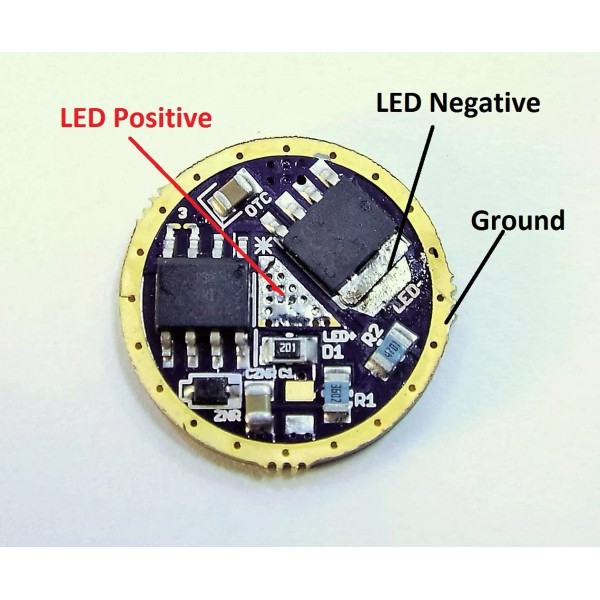


Lumencraft® 0-10+ Amp capable LED Flashlight driver board 17mm, Cree XHP70, XHP50, XML2, XPL - 3 Volt, Wire and spring
$48.39
- Free US shipping
-
Arrives
-Capable of over 10 amps of power
-User selectable mode groups-3-16V configurable
-For use with Cree XML2, XHP50, XHP70 and more
-Single or multi LED
PLEASE READ FULL DESCRIPTION FOR DIRECTIONS BEFORE
PURCHASING. You must know what you are doing to use this driver
correctly.
The most powerful LED driver on the market
today! This tiny versatile little board packs more punch pound for
pound than any driver its size, and offers ULTIMATE output flexibility.
Used
for some time in Lumencraft's own products it's now available for
the DIY user. This board is capable of both very low output and very
high. How high depends entirely on what batteries and LED emitters are
used.
This board is linear which basically means direct drive.
It can be configured for use with either a single 3.7 li-ion cell ( or 3
nimh) or for multiple li-ion cells.
How it works.
For use with 3V LEDs: For Cree XML2, XPG2 or similar choose the 3V option. Any number of emitters can then be wired in parallel and run from one 3.7V IMR li-ion battery such as 18650 or 26650.
For use with 6V LEDs:
For Cree XHP50, XHP70 or MTG2 choose the zener modded 6V driver
option. Then a single emitter or multiple emitters can be wired in parallel and powered from 2x IMR li-ion cells such as 18650 or 26650.
Optional use for the 6V driver: You can also choose this driver and create LED configurations in higher voltage. Such as 3 XML2 wired in series, or multiple XHP emitters as long as your battery voltage is equal.
Examples would be three XML2 driven by 3x 3.7V lion. Two x XHP70s in series driven by 4 li-ion.
REMEMBER This driver is NOT
a buck. You can NOT power an emitter with any more voltage using this
than you would in a direct drive situation with no circuit board. Putting Two 3.7V 18650s behind one XML2 WILL KILL YOUR LED.
Other factors: This
driver is well able to be used in high output setups. It has been
tested here at Adventure Sport in excess of 125 watts. However
to accomplish this you must have proper heat sinking for the LEDs, and
the driver. In addition your batteries must be able to carry the heavy
load. If you need help choosing a proper set up please feel free to
ask before you purchase.
Purchase options:
If you choose the 3V option it will come with LVP ( low voltage
protection) for one li-ion cell. Choosing the 6V option will also give
you LVP for 2 li-ion cells. You can use this option for higher
voltage setups as described above, you just wont have the LVP for a
greater number of cells.
Drivers are shipped fully assembled and
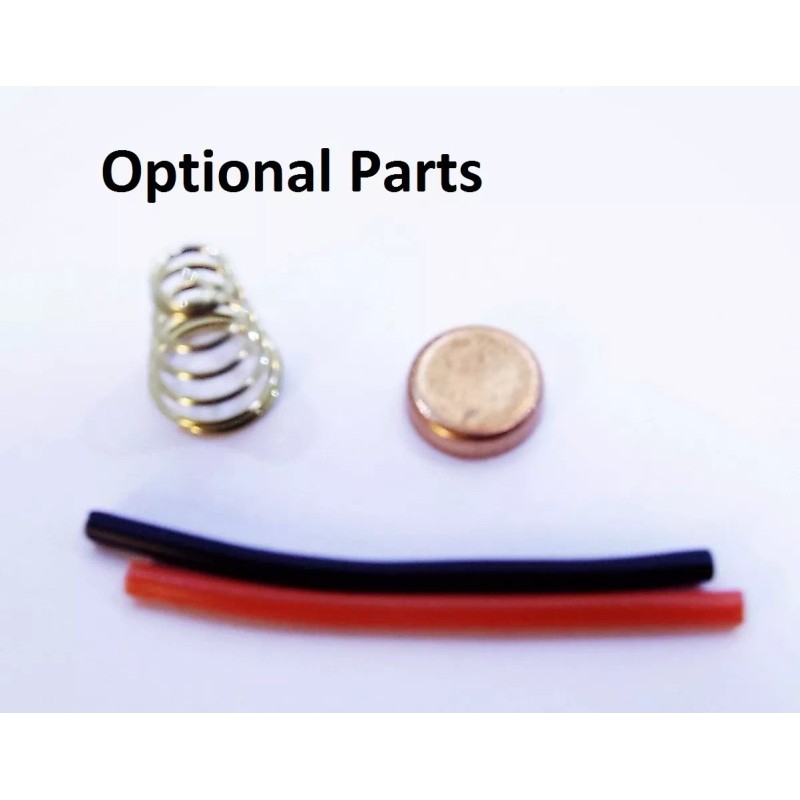
programmed. Additional purchase options include wire leads and
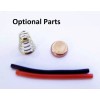
positive spring. These can be
purchased with the driver, but will not come attached.
USER INTERFACE:
None
other than Dr.Jones Guppy2drv. The ultimate in flexibility. This UI
offers a wide range of modes to choose from. Something for almost any
occasion.
Here is a short video on how it works.
User Selectable Groups:
- 1% - 25% - 100% | Memory
- 1% - 25% - 100% | No Memory
- 100% - 25% - 1% | No Memory
- 1% - 25% - 100% - Strobe | No Memory
- 1% - 25% - 100% - Strobe | Memory
- 10% - 100% | Memory
- 10% - 100% | No Memory
- 100% - 10% | No Memory
- 100%
- 100% - Strobe | No Memory
- Strobe - 100% | No Memory
- ML - 2% - 25% - 100% | Memory
- ML - 2% - 25% - 100% - Strobe - Beacon | No Memory
- ML - 100% | No Memory
- 100% - ML | No Memory
- ML - 100% | Memory
- ML - 1% - 5% - 15% - 40% - 100% | Memory
- ML - 1% - 5% - 15% - 40% - 100% | No Memory
- 100% - 40% - 15% - 5% - 1% - ML | No Memory
- 100% - 40% - 15% - 5% - 1% - ML | Memory
- 1% - 5% - 15% - 40% - 100% | Memory
- 1% - 5% - 15% - 40% - 100% | No Memory
- 100% - 40% - 15% - 5% - 1% | No Memory
- 100% - 40% - 15% - 5% - 1% | Memory
Guppydrv Instructions
To switch mode groups:
rapidly tap the switch 8 times, the light will then enter the
programming mode and begin to flash. With the light in programming mode,
tap the switch the same number of times as your desired mode group. The
light will blink and your mode group will be memorized.
Example:
To select mode group 3, tap the switch 8 times quickly to enter
programming mode. As soon as the light enters programming mode and
beings flashing, tap the switch three times. The light will blink to
recognize the mode group change.
To set the turbo timer:
rapidly tap the switch 8 times, the light will then enter the
programming mode and begin to flash. With the light in programming mode,
tap the switch 30 times to enter the turbo timer set mode. The light
will then switch to 100% power. When the light is at the desired
temperature for the turbo step down, turn the light off. The turbo timer
will then be set. The turbo timer steps the light down to 50%
regardless of the mode group set.
To disable the turbo timer simply go into program and cut it off in >3 seconds.
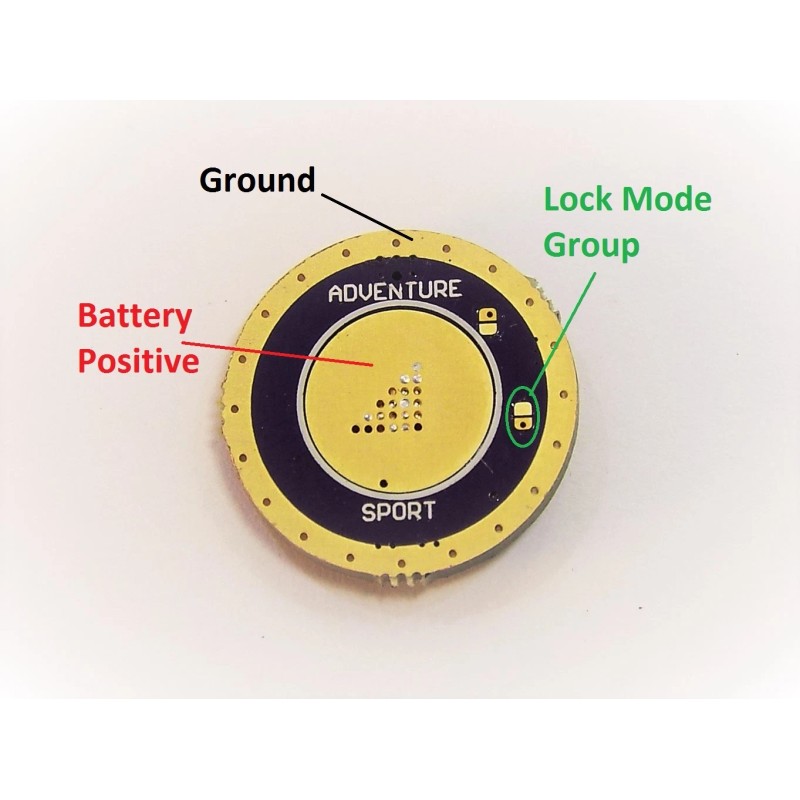
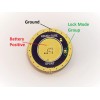
The mode group can also be locked by soldering the bridge show in picture 2.
SHIPPING IS COMBINED FOR MULTIPLE ITEMS
Please
Note: Using this diver with li-ion or any batteries carries risk.
Building high powered electrical setups has potential to cause fire, eye
injury, burning of skin and other. Lumencraft® is NOT
responsible for accidents or damage including but not limited to fire
or personal injury resulting from use or misuse of its products. By
purchasing you agree to these terms.
- Free 30-Day Returns
- Full Refund for Damaged or Incorrect Items
- Guaranteed Delivery or Money Back
- Secure Checkout & Fast Support

-Capable of over 10 amps of power
-User selectable mode groups-3-16V configurable
-For use with Cree XML2, XHP50, XHP70 and more
-Single or multi LED
PLEASE READ FULL DESCRIPTION FOR DIRECTIONS BEFORE
PURCHASING. You must know what you are doing to use this driver
correctly.
The most powerful LED driver on the market
today! This tiny versatile little board packs more punch pound for
pound than any driver its size, and offers ULTIMATE output flexibility.
Used
for some time in Lumencraft's own products it's now available for
the DIY user. This board is capable of both very low output and very
high. How high depends entirely on what batteries and LED emitters are
used.
This board is linear which basically means direct drive.
It can be configured for use with either a single 3.7 li-ion cell ( or 3
nimh) or for multiple li-ion cells.
How it works.
For use with 3V LEDs: For Cree XML2, XPG2 or similar choose the 3V option. Any number of emitters can then be wired in parallel and run from one 3.7V IMR li-ion battery such as 18650 or 26650.
For use with 6V LEDs:
For Cree XHP50, XHP70 or MTG2 choose the zener modded 6V driver
option. Then a single emitter or multiple emitters can be wired in parallel and powered from 2x IMR li-ion cells such as 18650 or 26650.
Optional use for the 6V driver: You can also choose this driver and create LED configurations in higher voltage. Such as 3 XML2 wired in series, or multiple XHP emitters as long as your battery voltage is equal.
Examples would be three XML2 driven by 3x 3.7V lion. Two x XHP70s in series driven by 4 li-ion.
REMEMBER This driver is NOT
a buck. You can NOT power an emitter with any more voltage using this
than you would in a direct drive situation with no circuit board. Putting Two 3.7V 18650s behind one XML2 WILL KILL YOUR LED.
Other factors: This
driver is well able to be used in high output setups. It has been
tested here at Adventure Sport in excess of 125 watts. However
to accomplish this you must have proper heat sinking for the LEDs, and
the driver. In addition your batteries must be able to carry the heavy
load. If you need help choosing a proper set up please feel free to
ask before you purchase.
Purchase options:
If you choose the 3V option it will come with LVP ( low voltage
protection) for one li-ion cell. Choosing the 6V option will also give
you LVP for 2 li-ion cells. You can use this option for higher
voltage setups as described above, you just wont have the LVP for a
greater number of cells.
Drivers are shipped fully assembled and
programmed. Additional purchase options include wire leads and
positive spring. These can be
purchased with the driver, but will not come attached.
USER INTERFACE:
None
other than Dr.Jones Guppy2drv. The ultimate in flexibility. This UI
offers a wide range of modes to choose from. Something for almost any
occasion.
Here is a short video on how it works.
User Selectable Groups:
- 1% - 25% - 100% | Memory
- 1% - 25% - 100% | No Memory
- 100% - 25% - 1% | No Memory
- 1% - 25% - 100% - Strobe | No Memory
- 1% - 25% - 100% - Strobe | Memory
- 10% - 100% | Memory
- 10% - 100% | No Memory
- 100% - 10% | No Memory
- 100%
- 100% - Strobe | No Memory
- Strobe - 100% | No Memory
- ML - 2% - 25% - 100% | Memory
- ML - 2% - 25% - 100% - Strobe - Beacon | No Memory
- ML - 100% | No Memory
- 100% - ML | No Memory
- ML - 100% | Memory
- ML - 1% - 5% - 15% - 40% - 100% | Memory
- ML - 1% - 5% - 15% - 40% - 100% | No Memory
- 100% - 40% - 15% - 5% - 1% - ML | No Memory
- 100% - 40% - 15% - 5% - 1% - ML | Memory
- 1% - 5% - 15% - 40% - 100% | Memory
- 1% - 5% - 15% - 40% - 100% | No Memory
- 100% - 40% - 15% - 5% - 1% | No Memory
- 100% - 40% - 15% - 5% - 1% | Memory
Guppydrv Instructions
To switch mode groups:
rapidly tap the switch 8 times, the light will then enter the
programming mode and begin to flash. With the light in programming mode,
tap the switch the same number of times as your desired mode group. The
light will blink and your mode group will be memorized.
Example:
To select mode group 3, tap the switch 8 times quickly to enter
programming mode. As soon as the light enters programming mode and
beings flashing, tap the switch three times. The light will blink to
recognize the mode group change.
To set the turbo timer:
rapidly tap the switch 8 times, the light will then enter the
programming mode and begin to flash. With the light in programming mode,
tap the switch 30 times to enter the turbo timer set mode. The light
will then switch to 100% power. When the light is at the desired
temperature for the turbo step down, turn the light off. The turbo timer
will then be set. The turbo timer steps the light down to 50%
regardless of the mode group set.
To disable the turbo timer simply go into program and cut it off in >3 seconds.
The mode group can also be locked by soldering the bridge show in picture 2.
SHIPPING IS COMBINED FOR MULTIPLE ITEMS
Please
Note: Using this diver with li-ion or any batteries carries risk.
Building high powered electrical setups has potential to cause fire, eye
injury, burning of skin and other. Lumencraft® is NOT
responsible for accidents or damage including but not limited to fire
or personal injury resulting from use or misuse of its products. By
purchasing you agree to these terms.
-Capable of over 10 amps of power
-User selectable mode groups-3-16V configurable
-For use with Cree XML2, XHP50, XHP70 and more
-Single or multi LED
PLEASE READ FULL DESCRIPTION FOR DIRECTIONS BEFORE
PURCHASING. You must know what you are doing to use this driver
correctly.
The most powerful LED driver on the market
today! This tiny versatile little board packs more punch pound for
pound than any driver its size, and offers ULTIMATE output flexibility.
Used
for some time in Lumencraft's own products it's now available for
the DIY user. This board is capable of both very low output and very
high. How high depends entirely on what batteries and LED emitters are
used.
This board is linear which basically means direct drive.
It can be configured for use with either a single 3.7 li-ion cell ( or 3
nimh) or for multiple li-ion cells.
How it works.
For use with 3V LEDs: For Cree XML2, XPG2 or similar choose the 3V option. Any number of emitters can then be wired in parallel and run from one 3.7V IMR li-ion battery such as 18650 or 26650.
For use with 6V LEDs:
For Cree XHP50, XHP70 or MTG2 choose the zener modded 6V driver
option. Then a single emitter or multiple emitters can be wired in parallel and powered from 2x IMR li-ion cells such as 18650 or 26650.
Optional use for the 6V driver: You can also choose this driver and create LED configurations in higher voltage. Such as 3 XML2 wired in series, or multiple XHP emitters as long as your battery voltage is equal.
Examples would be three XML2 driven by 3x 3.7V lion. Two x XHP70s in series driven by 4 li-ion.
REMEMBER This driver is NOT
a buck. You can NOT power an emitter with any more voltage using this
than you would in a direct drive situation with no circuit board. Putting Two 3.7V 18650s behind one XML2 WILL KILL YOUR LED.
Other factors: This
driver is well able to be used in high output setups. It has been
tested here at Adventure Sport in excess of 125 watts. However
to accomplish this you must have proper heat sinking for the LEDs, and
the driver. In addition your batteries must be able to carry the heavy
load. If you need help choosing a proper set up please feel free to
ask before you purchase.
Purchase options:
If you choose the 3V option it will come with LVP ( low voltage
protection) for one li-ion cell. Choosing the 6V option will also give
you LVP for 2 li-ion cells. You can use this option for higher
voltage setups as described above, you just wont have the LVP for a
greater number of cells.
Drivers are shipped fully assembled and
programmed. Additional purchase options include wire leads and
positive spring. These can be
purchased with the driver, but will not come attached.
USER INTERFACE:
None
other than Dr.Jones Guppy2drv. The ultimate in flexibility. This UI
offers a wide range of modes to choose from. Something for almost any
occasion.
Here is a short video on how it works.
User Selectable Groups:
- 1% - 25% - 100% | Memory
- 1% - 25% - 100% | No Memory
- 100% - 25% - 1% | No Memory
- 1% - 25% - 100% - Strobe | No Memory
- 1% - 25% - 100% - Strobe | Memory
- 10% - 100% | Memory
- 10% - 100% | No Memory
- 100% - 10% | No Memory
- 100%
- 100% - Strobe | No Memory
- Strobe - 100% | No Memory
- ML - 2% - 25% - 100% | Memory
- ML - 2% - 25% - 100% - Strobe - Beacon | No Memory
- ML - 100% | No Memory
- 100% - ML | No Memory
- ML - 100% | Memory
- ML - 1% - 5% - 15% - 40% - 100% | Memory
- ML - 1% - 5% - 15% - 40% - 100% | No Memory
- 100% - 40% - 15% - 5% - 1% - ML | No Memory
- 100% - 40% - 15% - 5% - 1% - ML | Memory
- 1% - 5% - 15% - 40% - 100% | Memory
- 1% - 5% - 15% - 40% - 100% | No Memory
- 100% - 40% - 15% - 5% - 1% | No Memory
- 100% - 40% - 15% - 5% - 1% | Memory
Guppydrv Instructions
To switch mode groups:
rapidly tap the switch 8 times, the light will then enter the
programming mode and begin to flash. With the light in programming mode,
tap the switch the same number of times as your desired mode group. The
light will blink and your mode group will be memorized.
Example:
To select mode group 3, tap the switch 8 times quickly to enter
programming mode. As soon as the light enters programming mode and
beings flashing, tap the switch three times. The light will blink to
recognize the mode group change.
To set the turbo timer:
rapidly tap the switch 8 times, the light will then enter the
programming mode and begin to flash. With the light in programming mode,
tap the switch 30 times to enter the turbo timer set mode. The light
will then switch to 100% power. When the light is at the desired
temperature for the turbo step down, turn the light off. The turbo timer
will then be set. The turbo timer steps the light down to 50%
regardless of the mode group set.
To disable the turbo timer simply go into program and cut it off in >3 seconds.
The mode group can also be locked by soldering the bridge show in picture 2.
SHIPPING IS COMBINED FOR MULTIPLE ITEMS
Please
Note: Using this diver with li-ion or any batteries carries risk.
Building high powered electrical setups has potential to cause fire, eye
injury, burning of skin and other. Lumencraft® is NOT
responsible for accidents or damage including but not limited to fire
or personal injury resulting from use or misuse of its products. By
purchasing you agree to these terms.
- Country/Region of Manufacture: United States
- MPN: Does Not Apply
- Brand: Lumencraft®
Processing Time
- We process and ship orders Monday through Friday, excluding holidays.
- Most orders are processed within 1–3 business days, depending on product availability.
- Processing time does not include delivery time, which varies based on your location and the product’s shipping origin.
Shipping Coverage
We currently ship to addresses within the United States only.
Products may ship from:
- Our U.S. warehouses, or
- Our international fulfillment centers (including Korea, Japan, China, Australia, Mexico, Canada, the United Kingdom, and the EU).
Each product page clearly displays the “Ships From” location before checkout.
Shipping Methods & Estimated Delivery
| Shipping Method | Estimated Delivery | Cost |
|---|---|---|
| Free Shipping (US) | 5–10 business days | Free, available on eligible items |
| Standard Shipping (US to US by Item) | 5–10 business days | $5.95 for the first item, $3.00 each additional |
| Standard Shipping (From US Warehouse by Weight) | 3–7 business days | Starts at $5.95, increasing by $2 for every additional 4 oz (0.25 lb) up to 1 lb, then by $4 for each additional pound beyond 1 lb. |
| Extended Delivery (Ships from Overseas Warehouse) | 10–20 business days | $14.50 for the first item, $2.00 each additional |
Shipping costs vary by product weight, quantity and origin. Exact rates and delivery estimates are displayed on each product page and confirmed during checkout.
Free Shipping
We offer free standard shipping on select products or during promotional periods. Availability of free shipping will be displayed on the product page and at checkout.
Carriers
We primarily use USPS and UPS for U.S. deliveries. Items shipped from international warehouses may be handled by partner carriers depending on the country of origin.
Import Duties & Taxes
All import duties and taxes for goods imported into the United States are included in the product price. There are no hidden fees or additional charges at checkout.
Tracking & Notifications
Every order is fully trackable. You will receive a tracking number via email once your order ships. If your order ships in multiple packages, each package will have its own tracking number. If you don’t receive a shipping confirmation immediately, your order is still being processed and will arrive within the estimated timeframe shown at checkout.
You can track your shipment anytime using the Track Your Order page on our website.
Order Changes & Cancellations
If you need to modify or cancel an order, please contact our customer support team as soon as possible. Orders can only be canceled before they ship. Once shipped, cancellations are not possible, but you may request a return after the item is delivered.
Contact: support@ibspot.com
Item Not Received
If your tracking number shows “Delivered” but you haven’t received your package:
- Check with your local USPS or UPS office.
- Confirm that the shipping address provided was correct.
- If the issue remains unresolved, contact support@ibspot.com for assistance.
Damaged or Lost Parcels
If your package arrives damaged or fails to arrive, please contact us immediately. For deliveries to P.O. boxes, ibspot is not responsible for damage caused by weather, temperature, or theft.
Customer Support
For any questions about shipping, tracking, or delivery, our customer support team is here to help.
Email: support@ibspot.com
We’re always happy to help.
Please read our policy carefully before making a purchase.
We aim to ensure every customer has a smooth and transparent experience with ibspot.com.
Order Cancellation Policy
Customers may request to cancel an order before it has been shipped.
Once the package has been shipped, cancellations are no longer possible; however, you may still request a return after receiving your order.
How to Request a Cancellation
You can contact us through:
- Email: support@ibspot.com
- Contact Form: Submit a request through our Contact Us page
Please submit your cancellation request as soon as possible after placing the order to allow us to process it before shipment.
Return Policy
We accept returns for most items within 30 days of delivery for a full refund.
To be eligible for a return:
- The item must be unused, in the same condition as received, and in its original packaging.
- A tracking number must be provided to confirm the return shipment.
Non-Returnable Items
Certain products cannot be returned, including:
- Perishable goods (for example, food, flowers, newspapers, magazines)
- Intimate or sanitary goods
- Hazardous materials or flammable liquids/gases
- Gift cards
- Downloadable software
- Some health and personal care items
Partial Refunds (If Applicable)
Partial refunds may be granted in specific situations, such as:
- Books with obvious signs of use
- Opened CDs, DVDs, software, or vinyl records
- Items not in their original condition, damaged, or missing parts not due to our error
- Items returned more than 30 days after delivery
How to Return an Item
To initiate a return, please contact us at support@ibspot.com with your order number and details about the product you wish to return.
Our team will provide you with return instructions and a prepaid return label.
Shipping Cost for Returns
Please contact us before returning any item.
We will provide a free return shipping label.
If a return is sent back without prior contact or without our provided label, we cannot be held responsible for return shipping costs.
For items valued over $75, we recommend using a trackable shipping service or purchasing shipping insurance.
We cannot guarantee that we will receive your returned item if shipped independently.
Refund Processing
Once your return is received and inspected:
- In-store returns are refunded to the original form of payment or issued as a gift card.
- Mail-in returns using our prepaid label are refunded to the original payment method within 3–5 business days after we receive your return.
Please allow:
- 5–7 business days for the return to reach our Returns Center.
- An additional 3–10 business days for your bank to post the refund to your account.
Damages, Issues & Claims
Please inspect your order immediately upon receipt.
If you receive a defective, damaged, or incorrect item, contact us right away at support@ibspot.com.
We’ll evaluate the issue promptly and make it right.
Product Claims
Before purchasing, please review product details carefully.
If there is a problem with your order upon arrival, visit our Support Center or contact us directly to arrange return shipping or replacement.
Exchanges
We do not process direct exchanges.
The fastest way to get what you need is to return the original item and place a new order once your return is accepted.
Return Address
IBSPOT Return Center
15 Sawmill Ln
Dover Plains, NY 12522
United States
Customer Support
Our support team is available 24/7 to assist with cancellations, returns, or general inquiries.
Email: support@ibspot.com
Contact Form: Contact Us page
Oops!
Sorry, it looks like some products are not available in selected quantity.