

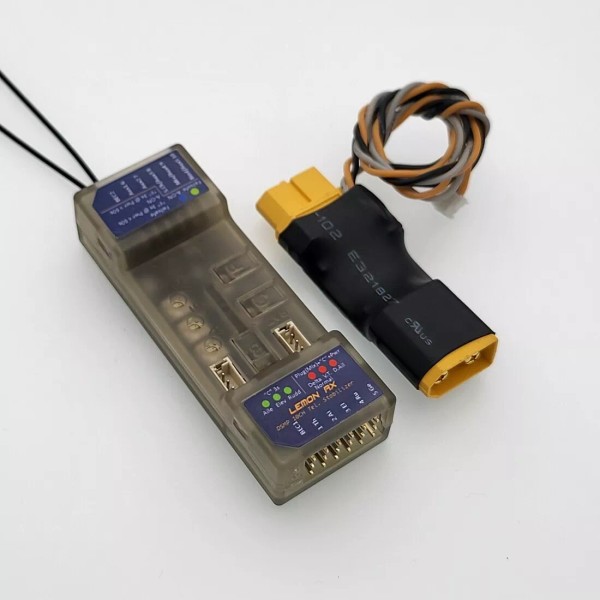
Lemon Rx DSMP 10-CH Telemetry Stabilizer XT60 Energy Meter DSMX DSM2 Compatible

Brand: Lemon Rx

Product Overview

Lemon Rx DSMP 10-Channel Telemetry Stabilizer XT60 Energy Meter DSMX DSM2 Compatible

Specification
Weight and Dimension:
16.3 grams, 66mm x 15mm x 24mm
Recommended voltage range:
3.9V to 8.5V (2S LiPo capable)
Telemetry Option:
Integrated with Barometer with Vario, Altimeter, Energy meter (Requires V/I sensor) and Internal Temperature Sensor
Technology:
DSMP with GEN2 SDR stack (DSMX / DSM2 compatibility)
Highlight
The generation 2 DSMP 10-channel telemetry stabilizer is a complete redesign that provides the ultimate reliability, features and performance.

- Choices of voltage and current sensors with exceptional capability
        - XT60 / T-Plug: 5S LiPo (21V max), 60A max.
        - Voltage Probe: 45V max.
- DSMX / DSM2 compatible, 10-channel full-range telemetry stabilizer with full telemetry features including a built-in barometer with vario, altimeter, energy meter (Current, Voltage, mAh),  and internal temperature sensor
- High sensitivity gyro with proprietary stabilization algorithm ensures responsive airplane control for both electric and gasoline engine application
- BEC1 and BEC2 dual inputs allow high-reliability operation while improving setup for high current drain performance servo
- Built-in Detla, V-tail and Normal Wing mixer
- Supports stabilization with separated channel dual aileron operation
- Stabilization always-on feature allows nine usable channels on a 10-channel receiver
- Real-time variable stabilization gain control on channel 8
- All-channel failsafe
- Firmware health monitoring software stack and ultra-low operational voltage (3.6V) ensures high operation reliability
- Generation 2 SDR stack ensures the fastest channel searching and advanced algorithm for signal recovery with ultra-low-latency experience

- Antenna diversity improves the reliability of the wireless link 
- Satellite port for additional signal diversity
- Gyro stabilization activation with either AUX2 or Gear channel
- 3 potentiometers for individual gain tuning

Quick Reference Guide
Reset stabilizer
- Connect power
- Hold F and B buttons (approximately 5 secs+) until all LED flashes randomly
- Press the C button. Multiple LEDs flash a few times to complete the operation
Bind with bind plug
- Insert bind plug on Channel 10
- Connect power
Bind without bind plug
- Connect power
- Hold the B button until the red LED flashes

Bind with a satellite without a bind plug
- Connect power
- Hold the B button until the red LED flashes
- Disconnect power
- Plug the satellite wire connector into the stabilizer
- Connect power
Failsafe
- Connect power to the receiver and ensure the servos are working with the transmitter
- Press the F button for 3 seconds until green changes from off to on and vice versa to change the failsafe setting. Channel value is saved as failsafe default at the time the green LED turns on. 
- Turn off the transmitter and wait 2 seconds to ensure the failsafe is activated accordingly by ensuring there is torque generated with finger-pushing the servo linkage if it was to be set. Vice versa.
Stabilization activation switch
- Disconnect power
- Insert bind plug to channel 8
- Hold the C button
- Connect power. Wait for about 1 second until the 6 LEDs flash.
- Release the C button
- Press C to make changes within 3 seconds. Green = CH7, Blue = CH5.
- Wait for 3 seconds and remove the bind plug
Wing Mode and Dual Aileron
- Disconnect power
- Insert bind plug to channel 9
- Hold the C button
- Connect power. Wait for about 1 second until the 6 LEDs flash
- Check the receiver label/user manual to understand the referred LEDs' operation 
- Release the C button
- Observe which red LED is flashing and brief press C to select the required mode
- Press C to toggle between settings. On means selected. Exit automatically in 5 seconds.
- Wait for 3 seconds and remove the bind plug
- Ensure transmitter mixing is set accordingly for dual aileron if stabilized dual aileron is to be configured.
Gyro direction
- Check the receiver  label/user manual to understand the referred LEDs' operation
- Connect power and wait 1 second 
- Hold the C button and wait for about 1 second until the 6 LEDs flash
- Release the C button
- Observe which red LED is flashing and brief press C to select the required mode
- Press C to toggle between settings. On means selected. Exit automatically in 5 seconds.
- Wait for 3 seconds and remove the bind plug.
V/I sensor calibration
- Turn on the receiver and transmitter. The telemetry report page may optionally be checked during and after calibration.
- Plug the V/I sensor. Make sure the required DC loading device such as a brushless motor with ESC as well as the current and voltage meter is connected. 
- Press the F and B buttons together at the same time for 2 seconds but no greater than 5 seconds
- Observe 3 green LED flashes. Ensure 8.4V is provided to the V/I sensor.
- Press F or C button briefly
- Observe 3 red LED flashes
- Turn on the DC loading device by throttling the transmitter. Ensure 4A is drawing across the V/I sensor. Be careful with the motor spinning if it is to be used.
- Press the B button to save and exit.
V/I probe calibration
- Turn on the receiver and transmitter. The telemetry report page may optionally be checked during and after calibration.
- Plug the V/I sensor. Make sure the required DC loading device such as a brushless motor with ESC as well as the current and voltage meter is connected. 
- Press the F and B buttons together at the same time for 2 seconds but no greater than 5 seconds
- Observe 3 green LED flashes. Ensure 8.4V is provided to the V/I sensor.
- Press F or C button briefly
- Observe 3 red LED flashes
- Press the B button to save and exit.
Gain setting
- Adjust via the 3 dials or real-time master gain on channel 8 depending on the transmitter channel's availability.
 
View setting LEDs with all on
- Press the C button briefly (no more than 2 seconds).
Brand: Lemon Rx
Isin: IBRVOLCGHXI9

$194.52

  • Free shipping in US
  • Arrives:

  • Free 30-Day returns

In Stock

Sold by , Fulfilled by IBSPOT
Ships from USA

IBspot Buyer Protection

Shop confidently on IBspot, receive your item as described or your money back for eligible orders. Learn Program Terms

More seller options

Starting from

Compare all sellers
scroll to top arrow
Lemon Rx DSMP 10-CH Telemetry Stabilizer XT60 Energy Meter DSMX DSM2 Compatible

Lemon Rx DSMP 10-CH Telemetry Stabilizer XT60 Energy Meter DSMX DSM2 Compatible

$194.52

Product Overview

Lemon Rx DSMP 10-Channel Telemetry Stabilizer XT60 Energy Meter DSMX DSM2 Compatible

Specification
Weight and Dimension:
16.3 grams, 66mm x 15mm x 24mm
Recommended voltage range:
3.9V to 8.5V (2S LiPo capable)
Telemetry Option:
Integrated with Barometer with Vario, Altimeter, Energy meter (Requires V/I sensor) and Internal Temperature Sensor
Technology:
DSMP with GEN2 SDR stack (DSMX / DSM2 compatibility)
Highlight
The generation 2 DSMP 10-channel telemetry stabilizer is a complete redesign that provides the ultimate reliability, features and performance.

- Choices of voltage and current sensors with exceptional capability
        - XT60 / T-Plug: 5S LiPo (21V max), 60A max.
        - Voltage Probe: 45V max.
- DSMX / DSM2 compatible, 10-channel full-range telemetry stabilizer with full telemetry features including a built-in barometer with vario, altimeter, energy meter (Current, Voltage, mAh),  and internal temperature sensor
- High sensitivity gyro with proprietary stabilization algorithm ensures responsive airplane control for both electric and gasoline engine application
- BEC1 and BEC2 dual inputs allow high-reliability operation while improving setup for high current drain performance servo
- Built-in Detla, V-tail and Normal Wing mixer
- Supports stabilization with separated channel dual aileron operation
- Stabilization always-on feature allows nine usable channels on a 10-channel receiver
- Real-time variable stabilization gain control on channel 8
- All-channel failsafe
- Firmware health monitoring software stack and ultra-low operational voltage (3.6V) ensures high operation reliability
- Generation 2 SDR stack ensures the fastest channel searching and advanced algorithm for signal recovery with ultra-low-latency experience

- Antenna diversity improves the reliability of the wireless link 
- Satellite port for additional signal diversity
- Gyro stabilization activation with either AUX2 or Gear channel
- 3 potentiometers for individual gain tuning

Quick Reference Guide
Reset stabilizer
- Connect power
- Hold F and B buttons (approximately 5 secs+) until all LED flashes randomly
- Press the C button. Multiple LEDs flash a few times to complete the operation
Bind with bind plug
- Insert bind plug on Channel 10
- Connect power
Bind without bind plug
- Connect power
- Hold the B button until the red LED flashes

Bind with a satellite without a bind plug
- Connect power
- Hold the B button until the red LED flashes
- Disconnect power
- Plug the satellite wire connector into the stabilizer
- Connect power
Failsafe
- Connect power to the receiver and ensure the servos are working with the transmitter
- Press the F button for 3 seconds until green changes from off to on and vice versa to change the failsafe setting. Channel value is saved as failsafe default at the time the green LED turns on. 
- Turn off the transmitter and wait 2 seconds to ensure the failsafe is activated accordingly by ensuring there is torque generated with finger-pushing the servo linkage if it was to be set. Vice versa.
Stabilization activation switch
- Disconnect power
- Insert bind plug to channel 8
- Hold the C button
- Connect power. Wait for about 1 second until the 6 LEDs flash.
- Release the C button
- Press C to make changes within 3 seconds. Green = CH7, Blue = CH5.
- Wait for 3 seconds and remove the bind plug
Wing Mode and Dual Aileron
- Disconnect power
- Insert bind plug to channel 9
- Hold the C button
- Connect power. Wait for about 1 second until the 6 LEDs flash
- Check the receiver label/user manual to understand the referred LEDs' operation 
- Release the C button
- Observe which red LED is flashing and brief press C to select the required mode
- Press C to toggle between settings. On means selected. Exit automatically in 5 seconds.
- Wait for 3 seconds and remove the bind plug
- Ensure transmitter mixing is set accordingly for dual aileron if stabilized dual aileron is to be configured.
Gyro direction
- Check the receiver  label/user manual to understand the referred LEDs' operation
- Connect power and wait 1 second 
- Hold the C button and wait for about 1 second until the 6 LEDs flash
- Release the C button
- Observe which red LED is flashing and brief press C to select the required mode
- Press C to toggle between settings. On means selected. Exit automatically in 5 seconds.
- Wait for 3 seconds and remove the bind plug.
V/I sensor calibration
- Turn on the receiver and transmitter. The telemetry report page may optionally be checked during and after calibration.
- Plug the V/I sensor. Make sure the required DC loading device such as a brushless motor with ESC as well as the current and voltage meter is connected. 
- Press the F and B buttons together at the same time for 2 seconds but no greater than 5 seconds
- Observe 3 green LED flashes. Ensure 8.4V is provided to the V/I sensor.
- Press F or C button briefly
- Observe 3 red LED flashes
- Turn on the DC loading device by throttling the transmitter. Ensure 4A is drawing across the V/I sensor. Be careful with the motor spinning if it is to be used.
- Press the B button to save and exit.
V/I probe calibration
- Turn on the receiver and transmitter. The telemetry report page may optionally be checked during and after calibration.
- Plug the V/I sensor. Make sure the required DC loading device such as a brushless motor with ESC as well as the current and voltage meter is connected. 
- Press the F and B buttons together at the same time for 2 seconds but no greater than 5 seconds
- Observe 3 green LED flashes. Ensure 8.4V is provided to the V/I sensor.
- Press F or C button briefly
- Observe 3 red LED flashes
- Press the B button to save and exit.
Gain setting
- Adjust via the 3 dials or real-time master gain on channel 8 depending on the transmitter channel's availability.
 
View setting LEDs with all on
- Press the C button briefly (no more than 2 seconds).
Brand: Lemon Rx
Isin: IBRVOLCGHXI9

Lemon Rx DSMP 10-Channel Telemetry Stabilizer XT60 Energy Meter DSMX DSM2 Compatible

Specification

Weight and Dimension:
16.3 grams, 66mm x 15mm x 24mm
Recommended voltage range:
3.9V to 8.5V (2S LiPo capable)
Telemetry Option:
Integrated with Barometer with Vario, Altimeter, Energy meter (Requires V/I sensor) and Internal Temperature Sensor
Technology:
DSMP with GEN2 SDR stack (DSMX / DSM2 compatibility)

Highlight

The generation 2 DSMP 10-channel telemetry stabilizer is a complete redesign that provides the ultimate reliability, features and performance.

- Choices of voltage and current sensors with exceptional capability
        - XT60 / T-Plug: 5S LiPo (21V max), 60A max.
        - Voltage Probe: 45V max.
- DSMX / DSM2 compatible, 10-channel full-range telemetry stabilizer with full telemetry features including a built-in barometer with vario, altimeter, energy meter (Current, Voltage, mAh),  and internal temperature sensor
- High sensitivity gyro with proprietary stabilization algorithm ensures responsive airplane control for both electric and gasoline engine application
- BEC1 and BEC2 dual inputs allow high-reliability operation while improving setup for high current drain performance servo
- Built-in Detla, V-tail and Normal Wing mixer
- Supports stabilization with separated channel dual aileron operation
- Stabilization always-on feature allows nine usable channels on a 10-channel receiver
- Real-time variable stabilization gain control on channel 8
- All-channel failsafe
- Firmware health monitoring software stack and ultra-low operational voltage (3.6V) ensures high operation reliability
- Generation 2 SDR stack ensures the fastest channel searching and advanced algorithm for signal recovery with ultra-low-latency experience

- Antenna diversity improves the reliability of the wireless link 
- Satellite port for additional signal diversity
- Gyro stabilization activation with either AUX2 or Gear channel
- 3 potentiometers for individual gain tuning

Quick Reference Guide
Reset stabilizer
- Connect power
- Hold F and B buttons (approximately 5 secs+) until all LED flashes randomly
- Press the C button. Multiple LEDs flash a few times to complete the operation

Bind with bind plug
- Insert bind plug on Channel 10
- Connect power

Bind without bind plug
- Connect power
- Hold the B button until the red LED flashes

Bind with a satellite without a bind plug
- Connect power
- Hold the B button until the red LED flashes
- Disconnect power
- Plug the satellite wire connector into the stabilizer
- Connect power

Failsafe
- Connect power to the receiver and ensure the servos are working with the transmitter
- Press the F button for 3 seconds until green changes from off to on and vice versa to change the failsafe setting. Channel value is saved as failsafe default at the time the green LED turns on. 
- Turn off the transmitter and wait 2 seconds to ensure the failsafe is activated accordingly by ensuring there is torque generated with finger-pushing the servo linkage if it was to be set. Vice versa.

Stabilization activation switch
- Disconnect power
- Insert bind plug to channel 8
- Hold the C button
- Connect power. Wait for about 1 second until the 6 LEDs flash.
- Release the C button
- Press C to make changes within 3 seconds. Green = CH7, Blue = CH5.
- Wait for 3 seconds and remove the bind plug

Wing Mode and Dual Aileron
- Disconnect power
- Insert bind plug to channel 9
- Hold the C button
- Connect power. Wait for about 1 second until the 6 LEDs flash
- Check the receiver label/user manual to understand the referred LEDs' operation 
- Release the C button
- Observe which red LED is flashing and brief press C to select the required mode
- Press C to toggle between settings. On means selected. Exit automatically in 5 seconds.
- Wait for 3 seconds and remove the bind plug
- Ensure transmitter mixing is set accordingly for dual aileron if stabilized dual aileron is to be configured.

Gyro direction
- Check the receiver  label/user manual to understand the referred LEDs' operation
- Connect power and wait 1 second 
- Hold the C button and wait for about 1 second until the 6 LEDs flash
- Release the C button
- Observe which red LED is flashing and brief press C to select the required mode
- Press C to toggle between settings. On means selected. Exit automatically in 5 seconds.
- Wait for 3 seconds and remove the bind plug.

V/I sensor calibration
- Turn on the receiver and transmitter. The telemetry report page may optionally be checked during and after calibration.
- Plug the V/I sensor. Make sure the required DC loading device such as a brushless motor with ESC as well as the current and voltage meter is connected. 
- Press the F and B buttons together at the same time for 2 seconds but no greater than 5 seconds
- Observe 3 green LED flashes. Ensure 8.4V is provided to the V/I sensor.
- Press F or C button briefly
- Observe 3 red LED flashes
- Turn on the DC loading device by throttling the transmitter. Ensure 4A is drawing across the V/I sensor. Be careful with the motor spinning if it is to be used.
- Press the B button to save and exit.

V/I probe calibration
- Turn on the receiver and transmitter. The telemetry report page may optionally be checked during and after calibration.
- Plug the V/I sensor. Make sure the required DC loading device such as a brushless motor with ESC as well as the current and voltage meter is connected. 
- Press the F and B buttons together at the same time for 2 seconds but no greater than 5 seconds
- Observe 3 green LED flashes. Ensure 8.4V is provided to the V/I sensor.
- Press F or C button briefly
- Observe 3 red LED flashes
- Press the B button to save and exit.

Gain setting
- Adjust via the 3 dials or real-time master gain on channel 8 depending on the transmitter channel's availability.
 
View setting LEDs with all on
- Press the C button briefly (no more than 2 seconds).


Processing Time

  • We process and ship orders Monday through Friday, excluding holidays.
  • Most orders are processed within 1–3 business days, depending on product availability.
  • Processing time does not include delivery time, which varies based on your location and the product’s shipping origin.

Shipping Coverage

We currently ship to addresses within the United States only.

Products may ship from:

  • Our U.S. warehouses, or
  • Our international fulfillment centers (including Korea, Japan, China, Australia, Mexico, Canada, the United Kingdom, and the EU).

Each product page clearly displays the “Ships From” location before checkout.


Shipping Methods & Estimated Delivery


Shipping Method Estimated Delivery Cost
Free Shipping (US) 5–10 business days Free, available on eligible items
Standard Shipping (US to US by Item) 5–10 business days $5.95 for the first item, $3.00 each additional
Standard Shipping (From US Warehouse by Weight) 3–7 business days Starts at $5.95, increasing by $2 for every additional 4 oz (0.25 lb) up to 1 lb, then by $4 for each additional pound beyond 1 lb.
Extended Delivery (Ships from Overseas Warehouse) 10–20 business days $14.50 for the first item, $2.00 each additional

Shipping costs vary by product weight, quantity and origin. Exact rates and delivery estimates are displayed on each product page and confirmed during checkout.

Free Shipping

We offer free standard shipping on select products or during promotional periods. Availability of free shipping will be displayed on the product page and at checkout. 


Carriers

We primarily use USPS and UPS for U.S. deliveries. Items shipped from international warehouses may be handled by partner carriers depending on the country of origin.


Import Duties & Taxes

All import duties and taxes for goods imported into the United States are included in the product price. There are no hidden fees or additional charges at checkout.


Tracking & Notifications

Every order is fully trackable. You will receive a tracking number via email once your order ships. If your order ships in multiple packages, each package will have its own tracking number. If you don’t receive a shipping confirmation immediately, your order is still being processed and will arrive within the estimated timeframe shown at checkout.

You can track your shipment anytime using the Track Your Order page on our website.


Order Changes & Cancellations

If you need to modify or cancel an order, please contact our customer support team as soon as possible. Orders can only be canceled before they ship. Once shipped, cancellations are not possible, but you may request a return after the item is delivered.

Contact: support@ibspot.com


Item Not Received

If your tracking number shows “Delivered” but you haven’t received your package:

  1. Check with your local USPS or UPS office.
  2. Confirm that the shipping address provided was correct.
  3. If the issue remains unresolved, contact support@ibspot.com for assistance.

Damaged or Lost Parcels

If your package arrives damaged or fails to arrive, please contact us immediately. For deliveries to P.O. boxes, ibspot is not responsible for damage caused by weather, temperature, or theft.


Customer Support

For any questions about shipping, tracking, or delivery, our customer support team is here to help.

Email: support@ibspot.com

We’re always happy to help.

Please read our policy carefully before making a purchase.
We aim to ensure every customer has a smooth and transparent experience with ibspot.com.


Order Cancellation Policy

Customers may request to cancel an order before it has been shipped.
Once the package has been shipped, cancellations are no longer possible; however, you may still request a return after receiving your order.

How to Request a Cancellation

You can contact us through:

Please submit your cancellation request as soon as possible after placing the order to allow us to process it before shipment.


Return Policy

We accept returns for most items within 30 days of delivery for a full refund.

To be eligible for a return:

  • The item must be unused, in the same condition as received, and in its original packaging.
  • A tracking number must be provided to confirm the return shipment.

Non-Returnable Items

Certain products cannot be returned, including:

  • Perishable goods (for example, food, flowers, newspapers, magazines)
  • Intimate or sanitary goods
  • Hazardous materials or flammable liquids/gases
  • Gift cards
  • Downloadable software
  • Some health and personal care items

Partial Refunds (If Applicable)

Partial refunds may be granted in specific situations, such as:

  • Books with obvious signs of use
  • Opened CDs, DVDs, software, or vinyl records
  • Items not in their original condition, damaged, or missing parts not due to our error
  • Items returned more than 30 days after delivery

How to Return an Item

To initiate a return, please contact us at support@ibspot.com with your order number and details about the product you wish to return.
Our team will provide you with return instructions and a prepaid return label.


Shipping Cost for Returns

Please contact us before returning any item.
We will provide a free return shipping label.

If a return is sent back without prior contact or without our provided label, we cannot be held responsible for return shipping costs.

For items valued over $75, we recommend using a trackable shipping service or purchasing shipping insurance.
We cannot guarantee that we will receive your returned item if shipped independently.


Refund Processing

Once your return is received and inspected:

  • In-store returns are refunded to the original form of payment or issued as a gift card.
  • Mail-in returns using our prepaid label are refunded to the original payment method within 3–5 business days after we receive your return.

Please allow:

  • 5–7 business days for the return to reach our Returns Center.
  • An additional 3–10 business days for your bank to post the refund to your account.

Damages, Issues & Claims

Please inspect your order immediately upon receipt.
If you receive a defective, damaged, or incorrect item, contact us right away at support@ibspot.com.
We’ll evaluate the issue promptly and make it right.

Product Claims

Before purchasing, please review product details carefully.
If there is a problem with your order upon arrival, visit our Support Center or contact us directly to arrange return shipping or replacement.


Exchanges

We do not process direct exchanges.
The fastest way to get what you need is to return the original item and place a new order once your return is accepted.


Return Address

IBSPOT Return Center
15 Sawmill Ln
Dover Plains, NY 12522
United States


Customer Support

Our support team is available 24/7 to assist with cancellations, returns, or general inquiries.

Email: support@ibspot.com
Contact Form: Contact Us page

Oops!

Sorry, it looks like some products are not available in selected quantity.

OK

Subscribe To Our Newsletter

Disclaimer: Statements made, or products sold through this website, have not been evaluated by the United States Food and Drug Administration. Products are not intended to diagnose, treat, cure or prevent any disease.