

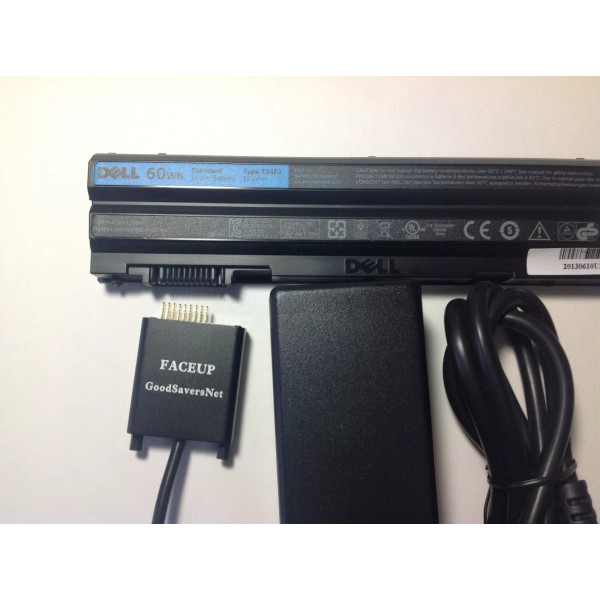


GOODSAVERSNET NE17 External Battery Charger for DELL LATITUDE E6420 WU946 AND MORE
$202.91
- Free US shipping
-
Arrives
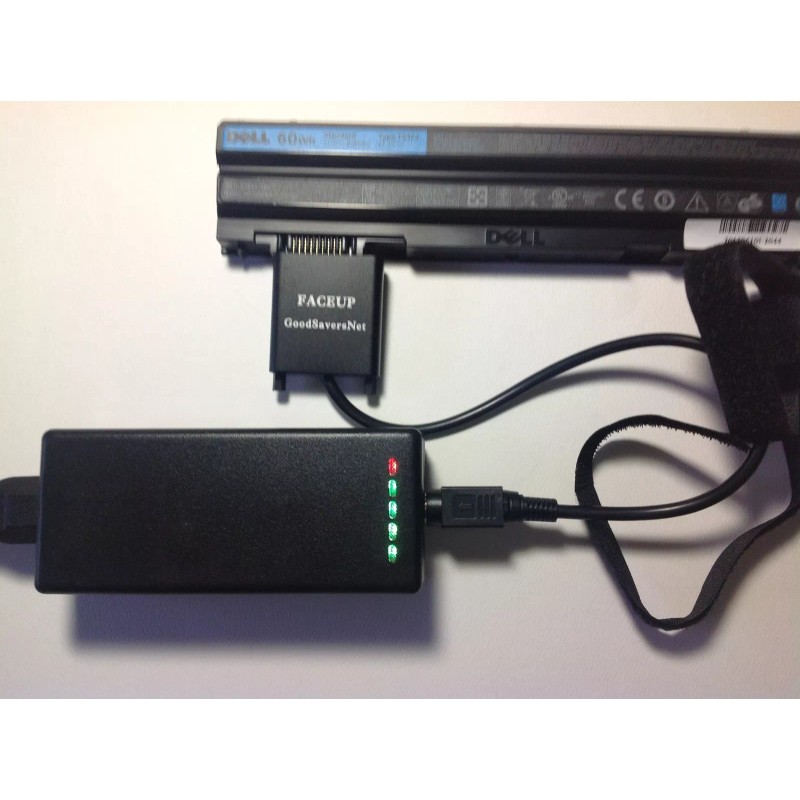
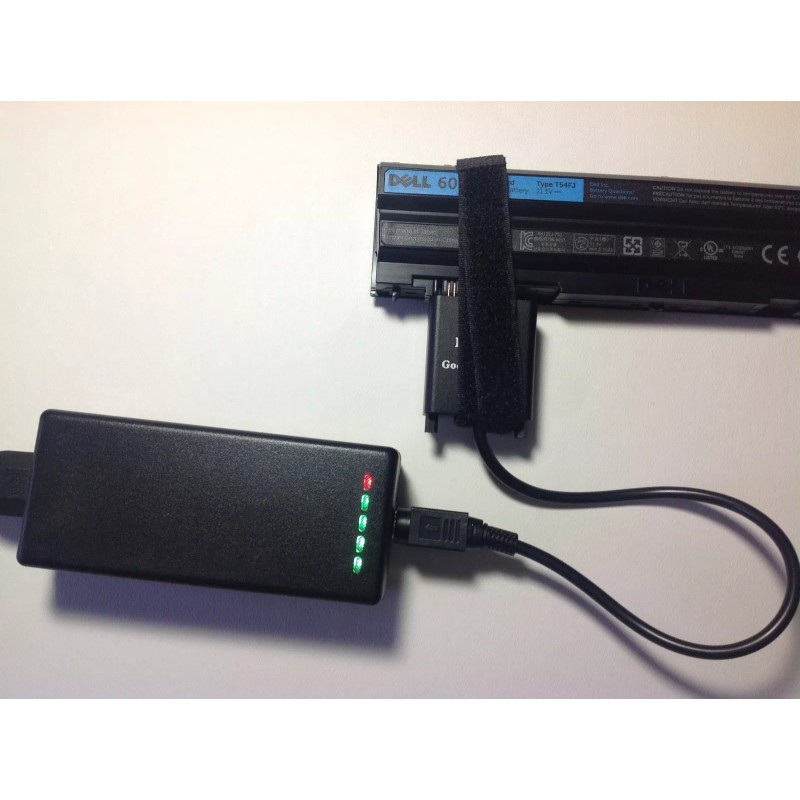
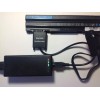
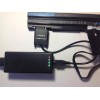
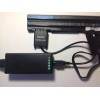
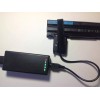
This external charger is charging DELL LATITUDE E6420 T54FJ STUDIO 1535 batteries and those compatible with following part No.:
This Latitude E6420 battery is compatible with following part No.:
| |||||
This Latitude E6420 battery is compatible with following models:
|
This Studio 1535 battery is compatible with following part No.:
| |||||
This Studio 1535 battery is compatible with following models:
|
Technical Details
- Input: 100-240V, 50/60Hz
- Charger for 10.8V and 11.1V Laptop Battery Interface: 9 pin Color: Black
- Output Voltage: 20V / 2.5A
- Condition: Brand New
- 6 months limited warranty
- GOODSAVERSNET External Laptop Battery Charger allows you to charge your laptop battery outside of your computer. You can simply plug directly into your battery connector to charge your battery anytime, anywhere. Most laptop batteries require about 4 hours to charge completely, but the time can vary depend battery capacity. Charging an extra laptop battery to take with you will let you have peace of mind to work twice as long as you want to.
- The following information will help to ensure that you get the right unit and this GOODSAVERSNET External Laptop Battery Charger will only fit your 10.8V or 11.1V Laptop Battery. Buy This to ensure quality products! 6 months warranty
- Input: 100-240V, 50/60Hz
- Charger for 10.8V and 11.1V Laptop Battery Interface: 9 pin Color: Black
- Output Voltage: 20V / 2.5A
- Condition: Brand New
- 6 months limited warranty
- GOODSAVERSNET External Laptop Battery Charger allows you to charge your laptop battery outside of your computer. You can simply plug directly into your battery connector to charge your battery anytime, anywhere. Most laptop batteries require about 4 hours to charge completely, but the time can vary depend battery capacity. Charging an extra laptop battery to take with you will let you have peace of mind to work twice as long as you want to.
- The following information will help to ensure that you get the right unit and this GOODSAVERSNET External Laptop Battery Charger will only fit your 10.8V or 11.1V Laptop Battery. Buy This to ensure quality products! 6 months warranty
A set of the product includes: a charger, a connecting wire, and AC POWER CORD.
Basic Parameters
Model No.: GOODSAVERSNET
Dimensions: 128*51.5*33 mm
Color: black
Weight: 200g
Input Voltage: AC 100~240V
Maximum output power: 40W
Standby power consumption: <1W
Output voltage: DC 7.2~14.8V
Maximum output current: 2.5A
Warranty: 6 MONTH
Length of charging time: 6 hours MAX(Different charging time for batteries of different capacity)
Safety Standard: CE standard (UL, CB, GS, T-Mark etc. )
Charging Instruction
1. Normal Working Condition:
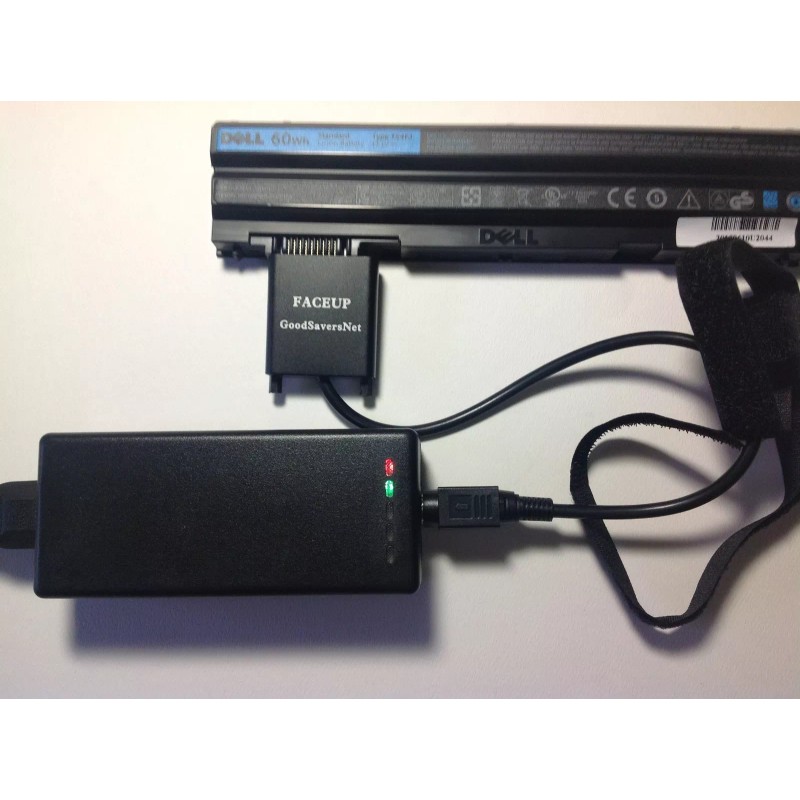
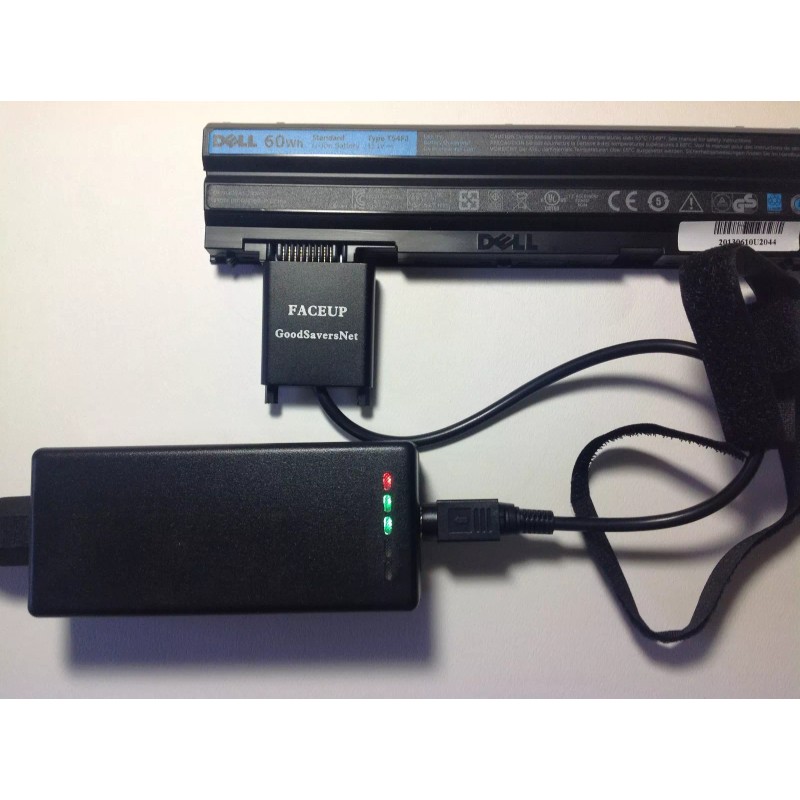
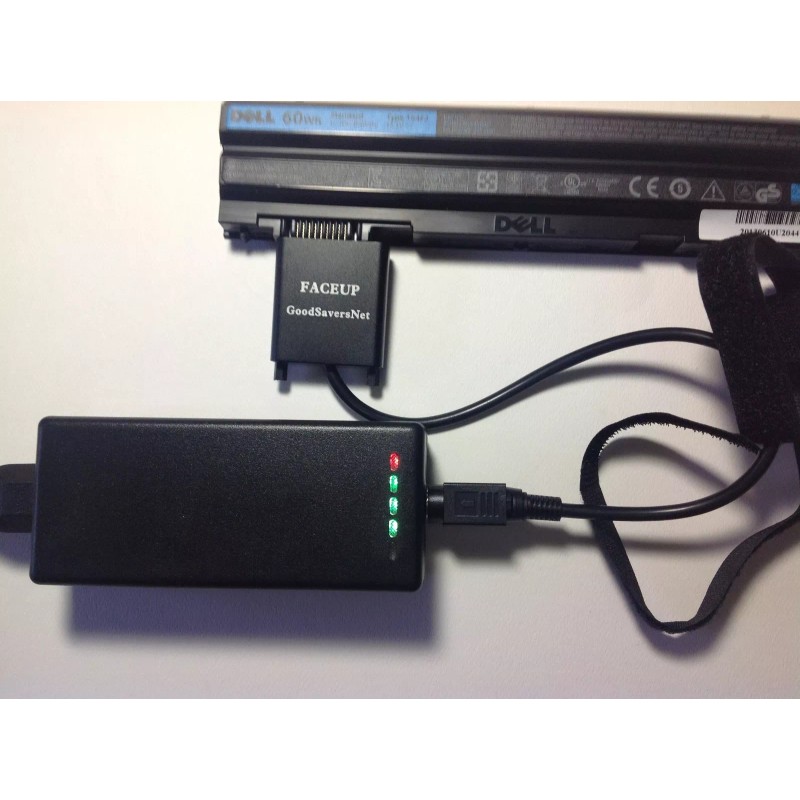
Four charging lights(GREEN LED LIGHT) and the power light (RED LED LIGHT) go on after switching on.
The charger acquires the battery information from the battery protective plate, and then starts charging.
Charging LED STATUS Capacity Percentage
All the four LEDs blink circularly < 100%
All the four LEDs are on =100%
2. Activate Charging Condition:
The four charging lights blink synchronously after switching on. It might be the charger is not connected well with the battery. Users should check and confirm the device is connected correctly.
One minute later, if the charger enters normal working condition, it means the battery has been activated.
One minute later, if the four charging lights still blink synchronously, it means the battery has been damaged and can not be repaired.
Cautions:
1. To avoid explosion and danger, damaged batteries and leaking batteries are not allowed.
2. This product is good for indoors. Do not expose and use it in outdoors.
3. Do not drop or put something heavy on it. Children are not allowed to use the product without adults.
4. The operation temperature must be 0~40 C
5. Do not keep the product under the direct rays, beside the hot devices or in other hot environment.
6. Do not disassemble or assemble the product.
7. When charger is charging battery. use fan to ventilate the cool air and reduce the heat generated by charger.PLEASE NOTICE:To make sure this charger can fit and charge your battery.Please send us the laptop models and part numbers AFTER ordering
THE PHOTOS FOR THE REFERENCE TO SHOW HOW TO CONNECT AND CHARGE BATTERY.
THIS KIT DOES NOT INCLUDE GENUINE DELL T54FJ BATTERY.
A set of the product includes: a charger, a connecting wire, and AC POWER CORD.
Basic Parameters
Model No.: GOODSAVERSNET
Dimensions: 128*51.5*33 mm
Color: black
Weight: 200g
Input Voltage: AC 100~240V
Maximum output power: 40W
Standby power consumption: <1W
Output voltage: DC 7.2~14.8V
Maximum output current: 2.5A
Warranty: 6 MONTH
Length of charging time: 6 hours MAX(Different charging time for batteries of different capacity)
Safety Standard: CE standard (UL, CB, GS, T-Mark etc. )
Charging Instruction
1. Normal Working Condition:
Four charging lights(GREEN LED LIGHT) and the power light (RED LED LIGHT) go on after switching on.
The charger acquires the battery information from the battery protective plate, and then starts charging.
Charging LED STATUS Capacity Percentage
All the four LEDs blink circularly < 100%
All the four LEDs are on =100%
2. Activate Charging Condition:
The four charging lights blink synchronously after switching on. It might be the charger is not connected well with the battery. Users should check and confirm the device is connected correctly.
One minute later, if the charger enters normal working condition, it means the battery has been activated.
One minute later, if the four charging lights still blink synchronously, it means the battery has been damaged and can not be repaired.
Cautions:
1. To avoid explosion and danger, damaged batteries and leaking batteries are not allowed.
2. This product is good for indoors. Do not expose and use it in outdoors.
3. Do not drop or put something heavy on it. Children are not allowed to use the product without adults.
4. The operation temperature must be 0~40 C
5. Do not keep the product under the direct rays, beside the hot devices or in other hot environment.
6. Do not disassemble or assemble the product.
Please send us the laptop models and part numbers AFTER ordering
THE PHOTOS FOR THE REFERENCE TO SHOW HOW TO CONNECT AND CHARGE BATTERY.
THIS KIT DOES NOT INCLUDE GENUINE DELL T54FJ BATTERY.
- Free 30-Day Returns
- Full Refund for Damaged or Incorrect Items
- Guaranteed Delivery or Money Back
- Secure Checkout & Fast Support

This external charger is charging DELL LATITUDE E6420 T54FJ STUDIO 1535 batteries and those compatible with following part No.:
This Latitude E6420 battery is compatible with following part No.:
| |||||
This Latitude E6420 battery is compatible with following models:
|
This Studio 1535 battery is compatible with following part No.:
| |||||
This Studio 1535 battery is compatible with following models:
|
Technical Details
- Input: 100-240V, 50/60Hz
- Charger for 10.8V and 11.1V Laptop Battery Interface: 9 pin Color: Black
- Output Voltage: 20V / 2.5A
- Condition: Brand New
- 6 months limited warranty
- GOODSAVERSNET External Laptop Battery Charger allows you to charge your laptop battery outside of your computer. You can simply plug directly into your battery connector to charge your battery anytime, anywhere. Most laptop batteries require about 4 hours to charge completely, but the time can vary depend battery capacity. Charging an extra laptop battery to take with you will let you have peace of mind to work twice as long as you want to.
- The following information will help to ensure that you get the right unit and this GOODSAVERSNET External Laptop Battery Charger will only fit your 10.8V or 11.1V Laptop Battery. Buy This to ensure quality products! 6 months warranty
- Input: 100-240V, 50/60Hz
- Charger for 10.8V and 11.1V Laptop Battery Interface: 9 pin Color: Black
- Output Voltage: 20V / 2.5A
- Condition: Brand New
- 6 months limited warranty
- GOODSAVERSNET External Laptop Battery Charger allows you to charge your laptop battery outside of your computer. You can simply plug directly into your battery connector to charge your battery anytime, anywhere. Most laptop batteries require about 4 hours to charge completely, but the time can vary depend battery capacity. Charging an extra laptop battery to take with you will let you have peace of mind to work twice as long as you want to.
- The following information will help to ensure that you get the right unit and this GOODSAVERSNET External Laptop Battery Charger will only fit your 10.8V or 11.1V Laptop Battery. Buy This to ensure quality products! 6 months warranty
A set of the product includes: a charger, a connecting wire, and AC POWER CORD.
Basic Parameters
Model No.: GOODSAVERSNET
Dimensions: 128*51.5*33 mm
Color: black
Weight: 200g
Input Voltage: AC 100~240V
Maximum output power: 40W
Standby power consumption: <1W
Output voltage: DC 7.2~14.8V
Maximum output current: 2.5A
Warranty: 6 MONTH
Length of charging time: 6 hours MAX(Different charging time for batteries of different capacity)
Safety Standard: CE standard (UL, CB, GS, T-Mark etc. )
Charging Instruction
1. Normal Working Condition:
Four charging lights(GREEN LED LIGHT) and the power light (RED LED LIGHT) go on after switching on.
The charger acquires the battery information from the battery protective plate, and then starts charging.
Charging LED STATUS Capacity Percentage
All the four LEDs blink circularly < 100%
All the four LEDs are on =100%
2. Activate Charging Condition:
The four charging lights blink synchronously after switching on. It might be the charger is not connected well with the battery. Users should check and confirm the device is connected correctly.
One minute later, if the charger enters normal working condition, it means the battery has been activated.
One minute later, if the four charging lights still blink synchronously, it means the battery has been damaged and can not be repaired.
Cautions:
1. To avoid explosion and danger, damaged batteries and leaking batteries are not allowed.
2. This product is good for indoors. Do not expose and use it in outdoors.
3. Do not drop or put something heavy on it. Children are not allowed to use the product without adults.
4. The operation temperature must be 0~40 C
5. Do not keep the product under the direct rays, beside the hot devices or in other hot environment.
6. Do not disassemble or assemble the product.
7. When charger is charging battery. use fan to ventilate the cool air and reduce the heat generated by charger.PLEASE NOTICE:To make sure this charger can fit and charge your battery.Please send us the laptop models and part numbers AFTER ordering
THE PHOTOS FOR THE REFERENCE TO SHOW HOW TO CONNECT AND CHARGE BATTERY.
THIS KIT DOES NOT INCLUDE GENUINE DELL T54FJ BATTERY.
A set of the product includes: a charger, a connecting wire, and AC POWER CORD.
Basic Parameters
Model No.: GOODSAVERSNET
Dimensions: 128*51.5*33 mm
Color: black
Weight: 200g
Input Voltage: AC 100~240V
Maximum output power: 40W
Standby power consumption: <1W
Output voltage: DC 7.2~14.8V
Maximum output current: 2.5A
Warranty: 6 MONTH
Length of charging time: 6 hours MAX(Different charging time for batteries of different capacity)
Safety Standard: CE standard (UL, CB, GS, T-Mark etc. )
Charging Instruction
1. Normal Working Condition:
Four charging lights(GREEN LED LIGHT) and the power light (RED LED LIGHT) go on after switching on.
The charger acquires the battery information from the battery protective plate, and then starts charging.
Charging LED STATUS Capacity Percentage
All the four LEDs blink circularly < 100%
All the four LEDs are on =100%
2. Activate Charging Condition:
The four charging lights blink synchronously after switching on. It might be the charger is not connected well with the battery. Users should check and confirm the device is connected correctly.
One minute later, if the charger enters normal working condition, it means the battery has been activated.
One minute later, if the four charging lights still blink synchronously, it means the battery has been damaged and can not be repaired.
Cautions:
1. To avoid explosion and danger, damaged batteries and leaking batteries are not allowed.
2. This product is good for indoors. Do not expose and use it in outdoors.
3. Do not drop or put something heavy on it. Children are not allowed to use the product without adults.
4. The operation temperature must be 0~40 C
5. Do not keep the product under the direct rays, beside the hot devices or in other hot environment.
6. Do not disassemble or assemble the product.
Please send us the laptop models and part numbers AFTER ordering
THE PHOTOS FOR THE REFERENCE TO SHOW HOW TO CONNECT AND CHARGE BATTERY.
THIS KIT DOES NOT INCLUDE GENUINE DELL T54FJ BATTERY.
This external charger is charging DELL LATITUDE E6420 T54FJ STUDIO 1535 batteries and those compatible with following part No.:
This Latitude E6420 battery is compatible with following part No.:
| |||||
This Latitude E6420 battery is compatible with following models:
|
This Studio 1535 battery is compatible with following part No.:
| |||||
This Studio 1535 battery is compatible with following models:
|
Technical Details
- Input: 100-240V, 50/60Hz
- Charger for 10.8V and 11.1V Laptop Battery Interface: 9 pin Color: Black
- Output Voltage: 20V / 2.5A
- Condition: Brand New
- 6 months limited warranty
- GOODSAVERSNET External Laptop Battery Charger allows you to charge your laptop battery outside of your computer. You can simply plug directly into your battery connector to charge your battery anytime, anywhere. Most laptop batteries require about 4 hours to charge completely, but the time can vary depend battery capacity. Charging an extra laptop battery to take with you will let you have peace of mind to work twice as long as you want to.
- The following information will help to ensure that you get the right unit and this GOODSAVERSNET External Laptop Battery Charger will only fit your 10.8V or 11.1V Laptop Battery. Buy This to ensure quality products! 6 months warranty
- Input: 100-240V, 50/60Hz
- Charger for 10.8V and 11.1V Laptop Battery Interface: 9 pin Color: Black
- Output Voltage: 20V / 2.5A
- Condition: Brand New
- 6 months limited warranty
- GOODSAVERSNET External Laptop Battery Charger allows you to charge your laptop battery outside of your computer. You can simply plug directly into your battery connector to charge your battery anytime, anywhere. Most laptop batteries require about 4 hours to charge completely, but the time can vary depend battery capacity. Charging an extra laptop battery to take with you will let you have peace of mind to work twice as long as you want to.
- The following information will help to ensure that you get the right unit and this GOODSAVERSNET External Laptop Battery Charger will only fit your 10.8V or 11.1V Laptop Battery. Buy This to ensure quality products! 6 months warranty
A set of the product includes: a charger, a connecting wire, and AC POWER CORD.
Basic Parameters
Model No.: GOODSAVERSNET
Dimensions: 128*51.5*33 mm
Color: black
Weight: 200g
Input Voltage: AC 100~240V
Maximum output power: 40W
Standby power consumption: <1W
Output voltage: DC 7.2~14.8V
Maximum output current: 2.5A
Warranty: 6 MONTH
Length of charging time: 6 hours MAX(Different charging time for batteries of different capacity)
Safety Standard: CE standard (UL, CB, GS, T-Mark etc. )
Charging Instruction
1. Normal Working Condition:
Four charging lights(GREEN LED LIGHT) and the power light (RED LED LIGHT) go on after switching on.
The charger acquires the battery information from the battery protective plate, and then starts charging.
Charging LED STATUS Capacity Percentage
All the four LEDs blink circularly < 100%
All the four LEDs are on =100%
2. Activate Charging Condition:
The four charging lights blink synchronously after switching on. It might be the charger is not connected well with the battery. Users should check and confirm the device is connected correctly.
One minute later, if the charger enters normal working condition, it means the battery has been activated.
One minute later, if the four charging lights still blink synchronously, it means the battery has been damaged and can not be repaired.
Cautions:
1. To avoid explosion and danger, damaged batteries and leaking batteries are not allowed.
2. This product is good for indoors. Do not expose and use it in outdoors.
3. Do not drop or put something heavy on it. Children are not allowed to use the product without adults.
4. The operation temperature must be 0~40 C
5. Do not keep the product under the direct rays, beside the hot devices or in other hot environment.
6. Do not disassemble or assemble the product.
7. When charger is charging battery. use fan to ventilate the cool air and reduce the heat generated by charger.PLEASE NOTICE:To make sure this charger can fit and charge your battery.Please send us the laptop models and part numbers AFTER ordering
THE PHOTOS FOR THE REFERENCE TO SHOW HOW TO CONNECT AND CHARGE BATTERY.
THIS KIT DOES NOT INCLUDE GENUINE DELL T54FJ BATTERY.
A set of the product includes: a charger, a connecting wire, and AC POWER CORD.
Basic Parameters
Model No.: GOODSAVERSNET
Dimensions: 128*51.5*33 mm
Color: black
Weight: 200g
Input Voltage: AC 100~240V
Maximum output power: 40W
Standby power consumption: <1W
Output voltage: DC 7.2~14.8V
Maximum output current: 2.5A
Warranty: 6 MONTH
Length of charging time: 6 hours MAX(Different charging time for batteries of different capacity)
Safety Standard: CE standard (UL, CB, GS, T-Mark etc. )
Charging Instruction
1. Normal Working Condition:
Four charging lights(GREEN LED LIGHT) and the power light (RED LED LIGHT) go on after switching on.
The charger acquires the battery information from the battery protective plate, and then starts charging.
Charging LED STATUS Capacity Percentage
All the four LEDs blink circularly < 100%
All the four LEDs are on =100%
2. Activate Charging Condition:
The four charging lights blink synchronously after switching on. It might be the charger is not connected well with the battery. Users should check and confirm the device is connected correctly.
One minute later, if the charger enters normal working condition, it means the battery has been activated.
One minute later, if the four charging lights still blink synchronously, it means the battery has been damaged and can not be repaired.
Cautions:
1. To avoid explosion and danger, damaged batteries and leaking batteries are not allowed.
2. This product is good for indoors. Do not expose and use it in outdoors.
3. Do not drop or put something heavy on it. Children are not allowed to use the product without adults.
4. The operation temperature must be 0~40 C
5. Do not keep the product under the direct rays, beside the hot devices or in other hot environment.
6. Do not disassemble or assemble the product.
Please send us the laptop models and part numbers AFTER ordering
THE PHOTOS FOR THE REFERENCE TO SHOW HOW TO CONNECT AND CHARGE BATTERY.
THIS KIT DOES NOT INCLUDE GENUINE DELL T54FJ BATTERY.
- Model: GSP2M9P
- Type: Mains Charger
- Compatible Battery Type(s): DELL E6420 T54FJ E5420 STUDIO 1535
- MPN: DELL E6420 T54FJ E5420 STUDIO 1535
- Brand: GOODSAVERSNET
- UPC: Does not apply
Processing Time
- We process and ship orders Monday through Friday, excluding holidays.
- Most orders are processed within 1–3 business days, depending on product availability.
- Processing time does not include delivery time, which varies based on your location and the product’s shipping origin.
Shipping Coverage
We currently ship to addresses within the United States only.
Products may ship from:
- Our U.S. warehouses, or
- Our international fulfillment centers (including Korea, Japan, China, Australia, Mexico, Canada, the United Kingdom, and the EU).
Each product page clearly displays the “Ships From” location before checkout.
Shipping Methods & Estimated Delivery
| Shipping Method | Estimated Delivery | Cost |
|---|---|---|
| Free Shipping (US) | 5–10 business days | Free, available on eligible items |
| Standard Shipping (US to US by Item) | 5–10 business days | $5.95 for the first item, $3.00 each additional |
| Standard Shipping (From US Warehouse by Weight) | 3–7 business days | Starts at $5.95, increasing by $2 for every additional 4 oz (0.25 lb) up to 1 lb, then by $4 for each additional pound beyond 1 lb. |
| Extended Delivery (Ships from Overseas Warehouse) | 10–20 business days | $14.50 for the first item, $2.00 each additional |
Shipping costs vary by product weight, quantity and origin. Exact rates and delivery estimates are displayed on each product page and confirmed during checkout.
Free Shipping
We offer free standard shipping on select products or during promotional periods. Availability of free shipping will be displayed on the product page and at checkout.
Carriers
We primarily use USPS and UPS for U.S. deliveries. Items shipped from international warehouses may be handled by partner carriers depending on the country of origin.
Import Duties & Taxes
All import duties and taxes for goods imported into the United States are included in the product price. There are no hidden fees or additional charges at checkout.
Tracking & Notifications
Every order is fully trackable. You will receive a tracking number via email once your order ships. If your order ships in multiple packages, each package will have its own tracking number. If you don’t receive a shipping confirmation immediately, your order is still being processed and will arrive within the estimated timeframe shown at checkout.
You can track your shipment anytime using the Track Your Order page on our website.
Order Changes & Cancellations
If you need to modify or cancel an order, please contact our customer support team as soon as possible. Orders can only be canceled before they ship. Once shipped, cancellations are not possible, but you may request a return after the item is delivered.
Contact: support@ibspot.com
Item Not Received
If your tracking number shows “Delivered” but you haven’t received your package:
- Check with your local USPS or UPS office.
- Confirm that the shipping address provided was correct.
- If the issue remains unresolved, contact support@ibspot.com for assistance.
Damaged or Lost Parcels
If your package arrives damaged or fails to arrive, please contact us immediately. For deliveries to P.O. boxes, ibspot is not responsible for damage caused by weather, temperature, or theft.
Customer Support
For any questions about shipping, tracking, or delivery, our customer support team is here to help.
Email: support@ibspot.com
We’re always happy to help.
Please read our policy carefully before making a purchase.
We aim to ensure every customer has a smooth and transparent experience with ibspot.com.
Order Cancellation Policy
Customers may request to cancel an order before it has been shipped.
Once the package has been shipped, cancellations are no longer possible; however, you may still request a return after receiving your order.
How to Request a Cancellation
You can contact us through:
- Email: support@ibspot.com
- Contact Form: Submit a request through our Contact Us page
Please submit your cancellation request as soon as possible after placing the order to allow us to process it before shipment.
Return Policy
We accept returns for most items within 30 days of delivery for a full refund.
To be eligible for a return:
- The item must be unused, in the same condition as received, and in its original packaging.
- A tracking number must be provided to confirm the return shipment.
Non-Returnable Items
Certain products cannot be returned, including:
- Perishable goods (for example, food, flowers, newspapers, magazines)
- Intimate or sanitary goods
- Hazardous materials or flammable liquids/gases
- Gift cards
- Downloadable software
- Some health and personal care items
Partial Refunds (If Applicable)
Partial refunds may be granted in specific situations, such as:
- Books with obvious signs of use
- Opened CDs, DVDs, software, or vinyl records
- Items not in their original condition, damaged, or missing parts not due to our error
- Items returned more than 30 days after delivery
How to Return an Item
To initiate a return, please contact us at support@ibspot.com with your order number and details about the product you wish to return.
Our team will provide you with return instructions and a prepaid return label.
Shipping Cost for Returns
Please contact us before returning any item.
We will provide a free return shipping label.
If a return is sent back without prior contact or without our provided label, we cannot be held responsible for return shipping costs.
For items valued over $75, we recommend using a trackable shipping service or purchasing shipping insurance.
We cannot guarantee that we will receive your returned item if shipped independently.
Refund Processing
Once your return is received and inspected:
- In-store returns are refunded to the original form of payment or issued as a gift card.
- Mail-in returns using our prepaid label are refunded to the original payment method within 3–5 business days after we receive your return.
Please allow:
- 5–7 business days for the return to reach our Returns Center.
- An additional 3–10 business days for your bank to post the refund to your account.
Damages, Issues & Claims
Please inspect your order immediately upon receipt.
If you receive a defective, damaged, or incorrect item, contact us right away at support@ibspot.com.
We’ll evaluate the issue promptly and make it right.
Product Claims
Before purchasing, please review product details carefully.
If there is a problem with your order upon arrival, visit our Support Center or contact us directly to arrange return shipping or replacement.
Exchanges
We do not process direct exchanges.
The fastest way to get what you need is to return the original item and place a new order once your return is accepted.
Return Address
IBSPOT Return Center
15 Sawmill Ln
Dover Plains, NY 12522
United States
Customer Support
Our support team is available 24/7 to assist with cancellations, returns, or general inquiries.
Email: support@ibspot.com
Contact Form: Contact Us page
Oops!
Sorry, it looks like some products are not available in selected quantity.