

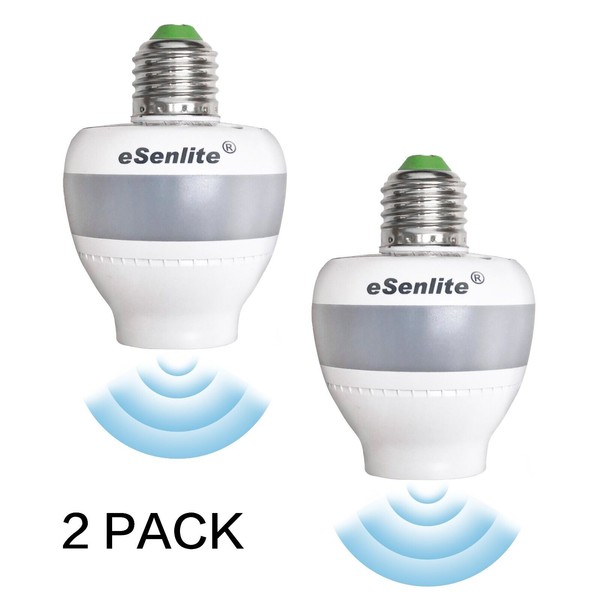


eSenLite LED CFL Bulb Lamp Sockets of Motion Activated Radar Sensor Dusk to Dawn (2-Pack)
$117.59
- Free US shipping
-
Arrives
- Built-in doppler/microwave smart sensor: penetrate physical barriers, overcome temperature changes, no motion sensing delay
- Detect and light up automatically before you enter the room.
- Innovative lighting no motion sensing delay modes with extremely low-low power consumption: smart- moonlight mode (fixed 1-Watt/80-lumen) or traditional auto-on mode (make your own choice)
- Featured with photocell sensors for true dusk to dawn illumination all night long
- Easy-DIY: keep your existing stylish light fixture with added-on user-friendly lighting profiles and smart saving feature
- Light fixture and light bulk are not included.
- Video link: https://www.youtube.com/watch?v=we6OU8H20oo
lQ&A eSenlite ( EE101WLS): Invisible Motion Activated Retrofit Lamp Socket
Q1: Is it a light bulb with radar sensor?
A: No, EE101WLS It is not a light bulb; it is a radar sensing retrofit socket and compatible with most existing E26 or E27 light bulbs or light fixtures and adds them with “SMART” mode without the need for APP control and Wi-Fi connection.
Q2: Is this for outdoor and/or indoor use?
A: The EE101WLS is add-on-able for most new or existing indoor & outdoor lighting fixtures built with E26/E27 including wall, ceiling, table, floor, and decorative lighting fixtures, etc. It makes the regular light become smart sensing lighting with energy-saving functions without any replacement.
Q3: What is the “SMART-MOONLIGHT” mode? Why do I need this mode?
Set dip-switch S5 ON to activate “SMART/ SMART-MOONLIGHT” mode. It is highly recommended and designated for security and safety purposes while utilizing low power consumption assuring the light illuminating area is not completely dark as a safety concern! (1W/80 lumens under fixed as dimed profile when no motion is detected). The soft glow moonlight brightness creates a neighbor-friendly and light pollution-free atmosphere during nighttime. Not worrying about light being too bright that disturbs your own home or neighbor’s peace, while having safety and eco-friendly environment.
Q4: Can I skip the “SMART” mode? I don’t need a dim profile.
A: EE101WLS comes with “SMART” and “AUTO” modes. The default setting is “SMART” mode. You have the option to select your preferred mode. “AUTO” is traditional motion sensing functionality with adjustable illumination time (delay time) and detection range.
Q5: Do I need to manually turn on / off the light? Does it work in daylight?
A: eSenlite EE101WLS is built with a photocell sensor, you can keep it powered on all the time and the light will be automatically operated in function during nighttime or in darkness conditions, therefore, you don’t need to manually turn on/ off the light.
Q6: What is a radar sensor and what are the benefits?
A: The radar sensor is built of an invisible and very high-frequency radio generator sensor, that is capable of penetrating most non-metallic materials such as walls, glass, wood, plastics, and some metallic screen structures, excluding solid metal. It detects the movement behind these materials and activates the light socket, Making your original lamps/fixtures “SMART” Illuminating dark areas before you enter, and worry free from “forgetting to turn off “afterward. It helps save energy and consumption by up to 98% without the need to replace the existing light fixture for other types of sensing light. It can also increase the lifespan of light bulbs by 2-3 times.
Q7: Can I adjust the illumination time and detection range?
A: Yes, you can. The EE101WLS allows adjusting of illumination time (delay-off time) 5sec, 30sec, 60sec, and 120sec. Detection range covering up to 26Ft radius with 360-degree coverage. Suggestion: 30sec for indoor and 60sec for outdoor, 13ft for indoor and 19ft for outdoor.
Q8: Does this radar Frequency used by this product affect my Wi-Fi?
A: No. EE101WLS uses the frequency of 5.8GHz in the ISM band, which is approved to use in the USA by FCC or Europe CE. It does not interfere with or affect your Wi-Fi 5.0GHz.
Q9: What is the Warranty of this EE101WLS?
A: We offer 2 years limited warranty for this radar sensor light socket. Our product is created, designed, and quality-controlled by our US team. Our goal is to ensure 100% customer satisfaction. If you have any questions regarding the environment setting or warranty, please don’t hesitate to contact us. You can reach us via phone or email us ( please find contact information in our store) Our Customer Service Hours are Mon - Fri 10 AM - 5 PM PST. We are here to assist you.
Q10: How can I set it up before using it?
A: We recommend customers start by using the default settings for the initial test. When the default settings are functioning properly, you can gradually adjust the delay-off time and sensing distance based on your actual usage environment. Suggest: 30sec for indoor and 60sec for outdoor, 13ft for indoor and 19ft for outdoor. If you encounter any issues or if there are any unclear settings, please don’t hesitate to contact us via phone or email us ( please find contact information in our store) Our Customer Service Hours are Mon - Fri 10 AM - 5 PM PST. We are here to assist you.
Q11: What is the required voltage for this radar sensor light socket?
A: The radar sensor light socket works on voltage of 120VAC or 220VAC.
Q12: Why use a radar sensor instead of a PIR sensor? What is the difference?
A: Radar Sensor can penetrate through most objects and walls to detect motion, so you can add motion-sensing capabilities to your current light fixture without replacement or exchange. Traditional PIR sensors cannot achieve this, it cannot be covered by anything like glass or lamp cover. Radar Sensor detects the movement when moving TOWARDS it, providing higher accuracy, reliability, and penetration compared to PIR (Passive Infrared) sensor across objects or walls. PIR needs to replace the existing socket or fixture, while EE101WLS “add-on” to existing one, reducing cost and labor. Additionally, the radar sensor socket operates on wider temperature range of 5°F to 158°F (-15 °C to +70°C), while PIR only operates at 32°F to 95°F (0°C to 35°C).
Q13: Is EE101WLS radar sensor socket large in size?
A: The EE101WLS has a bottom width of 2-3/8 inches (60mm), and a height of 2-1/2 inches (62mm), it is considered a “wide-body” design for the wide radar antenna. It may not fit certain lamp covers. However, our upcoming the 2nd Generation EE102WLS features a “narrow body” design.
Troubleshoot
1. When two radar sensor sockets are placed too close to each other (either side of the door within a few feet apart). One of the units activates first and lights up, and prevents the second unit from illuminating because the second sensor's photocell detects the light and stops its function.
To solve this issue, simply place a piece of paper between (set it side of inside the light fixture) the two radar sensors to reduce/block the light. Once the photocell of the second sensor no longer detects light from the first sensor, it can start working properly.
2. I feel that the detection of my movement path is not very sensitive.
The 360-degree detection range is not a perfect circle; it's more like an oval. Some directions have a shorter detection range compared to the next 90 degrees. To test the best detection side, you can twist the radar socket 45-90 degrees without tightening it all the way with the light bulb. Additionally, you can adjust the range and timing on the socket setting “S2”.
3. I installed a radar sensor socket outside of my house, I want it to detect outside movement only, but the 360-degree detection range also detects and illuminates when the movement is detected from inside of the house.
To prevent the radar sensor from detecting movement behind a wall, door, or lamp cover, you can simply use a small piece of oven foil to cover the back side of the light fixture to the wall to block the back detection direction.
Remember that the radar sensor can penetrate through walls, glass, and doors, as well as designed metal screen lamp covers/table fixtures, but not solid metal.
- Free 30-Day Returns
- Full Refund for Damaged or Incorrect Items
- Guaranteed Delivery or Money Back
- Secure Checkout & Fast Support

- Built-in doppler/microwave smart sensor: penetrate physical barriers, overcome temperature changes, no motion sensing delay
- Detect and light up automatically before you enter the room.
- Innovative lighting no motion sensing delay modes with extremely low-low power consumption: smart- moonlight mode (fixed 1-Watt/80-lumen) or traditional auto-on mode (make your own choice)
- Featured with photocell sensors for true dusk to dawn illumination all night long
- Easy-DIY: keep your existing stylish light fixture with added-on user-friendly lighting profiles and smart saving feature
- Light fixture and light bulk are not included.
- Video link: https://www.youtube.com/watch?v=we6OU8H20oo
lQ&A eSenlite ( EE101WLS): Invisible Motion Activated Retrofit Lamp Socket
Q1: Is it a light bulb with radar sensor?
A: No, EE101WLS It is not a light bulb; it is a radar sensing retrofit socket and compatible with most existing E26 or E27 light bulbs or light fixtures and adds them with “SMART” mode without the need for APP control and Wi-Fi connection.
Q2: Is this for outdoor and/or indoor use?
A: The EE101WLS is add-on-able for most new or existing indoor & outdoor lighting fixtures built with E26/E27 including wall, ceiling, table, floor, and decorative lighting fixtures, etc. It makes the regular light become smart sensing lighting with energy-saving functions without any replacement.
Q3: What is the “SMART-MOONLIGHT” mode? Why do I need this mode?
Set dip-switch S5 ON to activate “SMART/ SMART-MOONLIGHT” mode. It is highly recommended and designated for security and safety purposes while utilizing low power consumption assuring the light illuminating area is not completely dark as a safety concern! (1W/80 lumens under fixed as dimed profile when no motion is detected). The soft glow moonlight brightness creates a neighbor-friendly and light pollution-free atmosphere during nighttime. Not worrying about light being too bright that disturbs your own home or neighbor’s peace, while having safety and eco-friendly environment.
Q4: Can I skip the “SMART” mode? I don’t need a dim profile.
A: EE101WLS comes with “SMART” and “AUTO” modes. The default setting is “SMART” mode. You have the option to select your preferred mode. “AUTO” is traditional motion sensing functionality with adjustable illumination time (delay time) and detection range.
Q5: Do I need to manually turn on / off the light? Does it work in daylight?
A: eSenlite EE101WLS is built with a photocell sensor, you can keep it powered on all the time and the light will be automatically operated in function during nighttime or in darkness conditions, therefore, you don’t need to manually turn on/ off the light.
Q6: What is a radar sensor and what are the benefits?
A: The radar sensor is built of an invisible and very high-frequency radio generator sensor, that is capable of penetrating most non-metallic materials such as walls, glass, wood, plastics, and some metallic screen structures, excluding solid metal. It detects the movement behind these materials and activates the light socket, Making your original lamps/fixtures “SMART” Illuminating dark areas before you enter, and worry free from “forgetting to turn off “afterward. It helps save energy and consumption by up to 98% without the need to replace the existing light fixture for other types of sensing light. It can also increase the lifespan of light bulbs by 2-3 times.
Q7: Can I adjust the illumination time and detection range?
A: Yes, you can. The EE101WLS allows adjusting of illumination time (delay-off time) 5sec, 30sec, 60sec, and 120sec. Detection range covering up to 26Ft radius with 360-degree coverage. Suggestion: 30sec for indoor and 60sec for outdoor, 13ft for indoor and 19ft for outdoor.
Q8: Does this radar Frequency used by this product affect my Wi-Fi?
A: No. EE101WLS uses the frequency of 5.8GHz in the ISM band, which is approved to use in the USA by FCC or Europe CE. It does not interfere with or affect your Wi-Fi 5.0GHz.
Q9: What is the Warranty of this EE101WLS?
A: We offer 2 years limited warranty for this radar sensor light socket. Our product is created, designed, and quality-controlled by our US team. Our goal is to ensure 100% customer satisfaction. If you have any questions regarding the environment setting or warranty, please don’t hesitate to contact us. You can reach us via phone or email us ( please find contact information in our store) Our Customer Service Hours are Mon - Fri 10 AM - 5 PM PST. We are here to assist you.
Q10: How can I set it up before using it?
A: We recommend customers start by using the default settings for the initial test. When the default settings are functioning properly, you can gradually adjust the delay-off time and sensing distance based on your actual usage environment. Suggest: 30sec for indoor and 60sec for outdoor, 13ft for indoor and 19ft for outdoor. If you encounter any issues or if there are any unclear settings, please don’t hesitate to contact us via phone or email us ( please find contact information in our store) Our Customer Service Hours are Mon - Fri 10 AM - 5 PM PST. We are here to assist you.
Q11: What is the required voltage for this radar sensor light socket?
A: The radar sensor light socket works on voltage of 120VAC or 220VAC.
Q12: Why use a radar sensor instead of a PIR sensor? What is the difference?
A: Radar Sensor can penetrate through most objects and walls to detect motion, so you can add motion-sensing capabilities to your current light fixture without replacement or exchange. Traditional PIR sensors cannot achieve this, it cannot be covered by anything like glass or lamp cover. Radar Sensor detects the movement when moving TOWARDS it, providing higher accuracy, reliability, and penetration compared to PIR (Passive Infrared) sensor across objects or walls. PIR needs to replace the existing socket or fixture, while EE101WLS “add-on” to existing one, reducing cost and labor. Additionally, the radar sensor socket operates on wider temperature range of 5°F to 158°F (-15 °C to +70°C), while PIR only operates at 32°F to 95°F (0°C to 35°C).
Q13: Is EE101WLS radar sensor socket large in size?
A: The EE101WLS has a bottom width of 2-3/8 inches (60mm), and a height of 2-1/2 inches (62mm), it is considered a “wide-body” design for the wide radar antenna. It may not fit certain lamp covers. However, our upcoming the 2nd Generation EE102WLS features a “narrow body” design.
Troubleshoot
1. When two radar sensor sockets are placed too close to each other (either side of the door within a few feet apart). One of the units activates first and lights up, and prevents the second unit from illuminating because the second sensor's photocell detects the light and stops its function.
To solve this issue, simply place a piece of paper between (set it side of inside the light fixture) the two radar sensors to reduce/block the light. Once the photocell of the second sensor no longer detects light from the first sensor, it can start working properly.
2. I feel that the detection of my movement path is not very sensitive.
The 360-degree detection range is not a perfect circle; it's more like an oval. Some directions have a shorter detection range compared to the next 90 degrees. To test the best detection side, you can twist the radar socket 45-90 degrees without tightening it all the way with the light bulb. Additionally, you can adjust the range and timing on the socket setting “S2”.
3. I installed a radar sensor socket outside of my house, I want it to detect outside movement only, but the 360-degree detection range also detects and illuminates when the movement is detected from inside of the house.
To prevent the radar sensor from detecting movement behind a wall, door, or lamp cover, you can simply use a small piece of oven foil to cover the back side of the light fixture to the wall to block the back detection direction.
Remember that the radar sensor can penetrate through walls, glass, and doors, as well as designed metal screen lamp covers/table fixtures, but not solid metal.
- Built-in doppler/microwave smart sensor: penetrate physical barriers, overcome temperature changes, no motion sensing delay
- Detect and light up automatically before you enter the room.
- Innovative lighting no motion sensing delay modes with extremely low-low power consumption: smart- moonlight mode (fixed 1-Watt/80-lumen) or traditional auto-on mode (make your own choice)
- Featured with photocell sensors for true dusk to dawn illumination all night long
- Easy-DIY: keep your existing stylish light fixture with added-on user-friendly lighting profiles and smart saving feature
- Light fixture and light bulk are not included.
- Video link: https://www.youtube.com/watch?v=we6OU8H20oo
lQ&A eSenlite ( EE101WLS): Invisible Motion Activated Retrofit Lamp Socket
Q1: Is it a light bulb with radar sensor?
A: No, EE101WLS It is not a light bulb; it is a radar sensing retrofit socket and compatible with most existing E26 or E27 light bulbs or light fixtures and adds them with “SMART” mode without the need for APP control and Wi-Fi connection.
Q2: Is this for outdoor and/or indoor use?
A: The EE101WLS is add-on-able for most new or existing indoor & outdoor lighting fixtures built with E26/E27 including wall, ceiling, table, floor, and decorative lighting fixtures, etc. It makes the regular light become smart sensing lighting with energy-saving functions without any replacement.
Q3: What is the “SMART-MOONLIGHT” mode? Why do I need this mode?
Set dip-switch S5 ON to activate “SMART/ SMART-MOONLIGHT” mode. It is highly recommended and designated for security and safety purposes while utilizing low power consumption assuring the light illuminating area is not completely dark as a safety concern! (1W/80 lumens under fixed as dimed profile when no motion is detected). The soft glow moonlight brightness creates a neighbor-friendly and light pollution-free atmosphere during nighttime. Not worrying about light being too bright that disturbs your own home or neighbor’s peace, while having safety and eco-friendly environment.
Q4: Can I skip the “SMART” mode? I don’t need a dim profile.
A: EE101WLS comes with “SMART” and “AUTO” modes. The default setting is “SMART” mode. You have the option to select your preferred mode. “AUTO” is traditional motion sensing functionality with adjustable illumination time (delay time) and detection range.
Q5: Do I need to manually turn on / off the light? Does it work in daylight?
A: eSenlite EE101WLS is built with a photocell sensor, you can keep it powered on all the time and the light will be automatically operated in function during nighttime or in darkness conditions, therefore, you don’t need to manually turn on/ off the light.
Q6: What is a radar sensor and what are the benefits?
A: The radar sensor is built of an invisible and very high-frequency radio generator sensor, that is capable of penetrating most non-metallic materials such as walls, glass, wood, plastics, and some metallic screen structures, excluding solid metal. It detects the movement behind these materials and activates the light socket, Making your original lamps/fixtures “SMART” Illuminating dark areas before you enter, and worry free from “forgetting to turn off “afterward. It helps save energy and consumption by up to 98% without the need to replace the existing light fixture for other types of sensing light. It can also increase the lifespan of light bulbs by 2-3 times.
Q7: Can I adjust the illumination time and detection range?
A: Yes, you can. The EE101WLS allows adjusting of illumination time (delay-off time) 5sec, 30sec, 60sec, and 120sec. Detection range covering up to 26Ft radius with 360-degree coverage. Suggestion: 30sec for indoor and 60sec for outdoor, 13ft for indoor and 19ft for outdoor.
Q8: Does this radar Frequency used by this product affect my Wi-Fi?
A: No. EE101WLS uses the frequency of 5.8GHz in the ISM band, which is approved to use in the USA by FCC or Europe CE. It does not interfere with or affect your Wi-Fi 5.0GHz.
Q9: What is the Warranty of this EE101WLS?
A: We offer 2 years limited warranty for this radar sensor light socket. Our product is created, designed, and quality-controlled by our US team. Our goal is to ensure 100% customer satisfaction. If you have any questions regarding the environment setting or warranty, please don’t hesitate to contact us. You can reach us via phone or email us ( please find contact information in our store) Our Customer Service Hours are Mon - Fri 10 AM - 5 PM PST. We are here to assist you.
Q10: How can I set it up before using it?
A: We recommend customers start by using the default settings for the initial test. When the default settings are functioning properly, you can gradually adjust the delay-off time and sensing distance based on your actual usage environment. Suggest: 30sec for indoor and 60sec for outdoor, 13ft for indoor and 19ft for outdoor. If you encounter any issues or if there are any unclear settings, please don’t hesitate to contact us via phone or email us ( please find contact information in our store) Our Customer Service Hours are Mon - Fri 10 AM - 5 PM PST. We are here to assist you.
Q11: What is the required voltage for this radar sensor light socket?
A: The radar sensor light socket works on voltage of 120VAC or 220VAC.
Q12: Why use a radar sensor instead of a PIR sensor? What is the difference?
A: Radar Sensor can penetrate through most objects and walls to detect motion, so you can add motion-sensing capabilities to your current light fixture without replacement or exchange. Traditional PIR sensors cannot achieve this, it cannot be covered by anything like glass or lamp cover. Radar Sensor detects the movement when moving TOWARDS it, providing higher accuracy, reliability, and penetration compared to PIR (Passive Infrared) sensor across objects or walls. PIR needs to replace the existing socket or fixture, while EE101WLS “add-on” to existing one, reducing cost and labor. Additionally, the radar sensor socket operates on wider temperature range of 5°F to 158°F (-15 °C to +70°C), while PIR only operates at 32°F to 95°F (0°C to 35°C).
Q13: Is EE101WLS radar sensor socket large in size?
A: The EE101WLS has a bottom width of 2-3/8 inches (60mm), and a height of 2-1/2 inches (62mm), it is considered a “wide-body” design for the wide radar antenna. It may not fit certain lamp covers. However, our upcoming the 2nd Generation EE102WLS features a “narrow body” design.
Troubleshoot
1. When two radar sensor sockets are placed too close to each other (either side of the door within a few feet apart). One of the units activates first and lights up, and prevents the second unit from illuminating because the second sensor's photocell detects the light and stops its function.
To solve this issue, simply place a piece of paper between (set it side of inside the light fixture) the two radar sensors to reduce/block the light. Once the photocell of the second sensor no longer detects light from the first sensor, it can start working properly.
2. I feel that the detection of my movement path is not very sensitive.
The 360-degree detection range is not a perfect circle; it's more like an oval. Some directions have a shorter detection range compared to the next 90 degrees. To test the best detection side, you can twist the radar socket 45-90 degrees without tightening it all the way with the light bulb. Additionally, you can adjust the range and timing on the socket setting “S2”.
3. I installed a radar sensor socket outside of my house, I want it to detect outside movement only, but the 360-degree detection range also detects and illuminates when the movement is detected from inside of the house.
To prevent the radar sensor from detecting movement behind a wall, door, or lamp cover, you can simply use a small piece of oven foil to cover the back side of the light fixture to the wall to block the back detection direction.
Remember that the radar sensor can penetrate through walls, glass, and doors, as well as designed metal screen lamp covers/table fixtures, but not solid metal.
- Sensor Type: Motion
- Installation Area: Indoor & Outdoor
- Type: Wall Light
- Color: White
- Year Manufactured: 2022
- Brand: eSenLite
- Manufacturer Warranty: 2 Years
- Power Source: AC SMART Lighting
- Features: Dusk to Dawn, Adjustable, Dimmable, Sensor
- Manufacturer: eSenlite
- Light Color: Warm White
- Lighting Technology: LED
Processing Time
- We process and ship orders Monday through Friday, excluding holidays.
- Most orders are processed within 1–3 business days, depending on product availability.
- Processing time does not include delivery time, which varies based on your location and the product’s shipping origin.
Shipping Coverage
We currently ship to addresses within the United States only.
Products may ship from:
- Our U.S. warehouses, or
- Our international fulfillment centers (including Korea, Japan, China, Australia, Mexico, Canada, the United Kingdom, and the EU).
Each product page clearly displays the “Ships From” location before checkout.
Shipping Methods & Estimated Delivery
| Shipping Method | Estimated Delivery | Cost |
|---|---|---|
| Free Shipping (US) | 5–10 business days | Free, available on eligible items |
| Standard Shipping (US to US by Item) | 5–10 business days | $5.95 for the first item, $3.00 each additional |
| Standard Shipping (From US Warehouse by Weight) | 3–7 business days | Starts at $5.95, increasing by $2 for every additional 4 oz (0.25 lb) up to 1 lb, then by $4 for each additional pound beyond 1 lb. |
| Extended Delivery (Ships from Overseas Warehouse) | 10–20 business days | $14.99 for the first item, $2.00 each additional |
Shipping costs vary by product weight, quantity and origin. Exact rates and delivery estimates are displayed on each product page and confirmed during checkout.
Free Shipping
We offer free standard shipping on select products or during promotional periods. Availability of free shipping will be displayed on the product page and at checkout.
Carriers
We primarily use USPS and UPS for U.S. deliveries. Items shipped from international warehouses may be handled by partner carriers depending on the country of origin.
Import Duties & Taxes
All import duties and taxes for goods imported into the United States are included in the product price. There are no hidden fees or additional charges at checkout.
Tracking & Notifications
Every order is fully trackable. You will receive a tracking number via email once your order ships. If your order ships in multiple packages, each package will have its own tracking number. If you don’t receive a shipping confirmation immediately, your order is still being processed and will arrive within the estimated timeframe shown at checkout.
You can track your shipment anytime using the Track Your Order page on our website.
Order Changes & Cancellations
If you need to modify or cancel an order, please contact our customer support team as soon as possible. Orders can only be canceled before they ship. Once shipped, cancellations are not possible, but you may request a return after the item is delivered.
Contact: support@ibspot.com
Item Not Received
If your tracking number shows “Delivered” but you haven’t received your package:
- Check with your local USPS or UPS office.
- Confirm that the shipping address provided was correct.
- If the issue remains unresolved, contact support@ibspot.com for assistance.
Damaged or Lost Parcels
If your package arrives damaged or fails to arrive, please contact us immediately. For deliveries to P.O. boxes, ibspot is not responsible for damage caused by weather, temperature, or theft.
Customer Support
For any questions about shipping, tracking, or delivery, our customer support team is here to help.
Email: support@ibspot.com
We’re always happy to help.
Please read our policy carefully before making a purchase.
We aim to ensure every customer has a smooth and transparent experience with ibspot.com.
Order Cancellation Policy
Customers may request to cancel an order before it has been shipped.
Once the package has been shipped, cancellations are no longer possible; however, you may still request a return after receiving your order.
How to Request a Cancellation
You can contact us through:
- Email: support@ibspot.com
- Contact Form: Submit a request through our Contact Us page
Please submit your cancellation request as soon as possible after placing the order to allow us to process it before shipment.
Return Policy
We accept returns for most items within 30 days of delivery for a full refund.
To be eligible for a return:
- The item must be unused, in the same condition as received, and in its original packaging.
- A tracking number must be provided to confirm the return shipment.
Non-Returnable Items
Certain products cannot be returned, including:
- Perishable goods (for example, food, flowers, newspapers, magazines)
- Intimate or sanitary goods
- Hazardous materials or flammable liquids/gases
- Gift cards
- Downloadable software
- Some health and personal care items
Partial Refunds (If Applicable)
Partial refunds may be granted in specific situations, such as:
- Books with obvious signs of use
- Opened CDs, DVDs, software, or vinyl records
- Items not in their original condition, damaged, or missing parts not due to our error
- Items returned more than 30 days after delivery
How to Return an Item
To initiate a return, please contact us at support@ibspot.com with your order number and details about the product you wish to return.
Our team will provide you with return instructions and a prepaid return label.
Shipping Cost for Returns
Please contact us before returning any item.
We may provide a return shipping label for your return. If the return is due to our error, such as receiving the wrong item, a damaged item, or a defective product, we will cover the return shipping cost.
If the return is due to the customer’s reason, such as ordering the wrong item, changing your mind, or no longer needing the item, the original shipping fee and the return label fee will be deducted from your refund amount.
If a return is sent back without prior contact or without using our provided label, we cannot be held responsible for any return shipping costs or delivery issues.
For items valued over $75, we recommend using a trackable shipping service or purchasing shipping insurance.
We cannot guarantee that we will receive your returned item if shipped independently.
Refund Processing
Once your return is received and inspected:
- In-store returns are refunded to the original form of payment or issued as a gift card.
- Mail-in returns using our prepaid label are refunded to the original payment method within 3–5 business days after we receive your return.
Please allow:
- 5–7 business days for the return to reach our Returns Center.
- An additional 3–10 business days for your bank to post the refund to your account.
Damages, Issues & Claims
Please inspect your order immediately upon receipt.
If you receive a defective, damaged, or incorrect item, contact us right away at support@ibspot.com.
We’ll evaluate the issue promptly and make it right.
Product Claims
Before purchasing, please review product details carefully.
If there is a problem with your order upon arrival, visit our Support Center or contact us directly to arrange return shipping or replacement.
Exchanges
We do not process direct exchanges.
The fastest way to get what you need is to return the original item and place a new order once your return is accepted.
Return Address
IBSPOT Return Center
15 Sawmill Ln
Dover Plains, NY 12522
United States
Customer Support
Our support team is available 24/7 to assist with cancellations, returns, or general inquiries.
Email: support@ibspot.com
Contact Form: Contact Us page
Oops!
Sorry, it looks like some products are not available in selected quantity.