

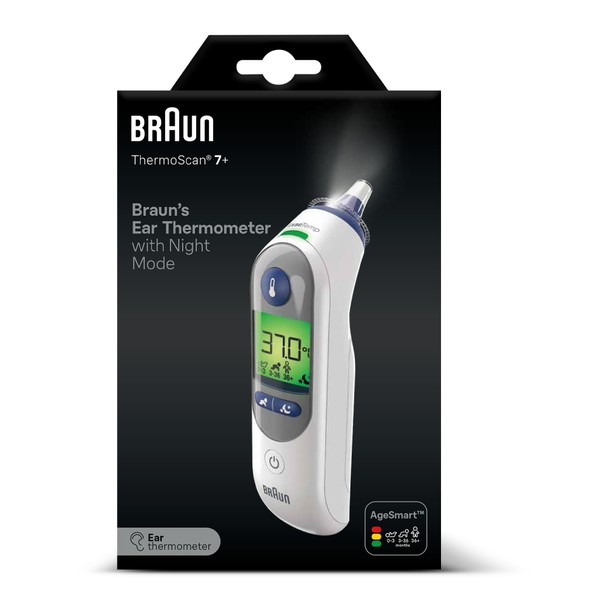


Braun Thermoscan 7+ Ear Thermometer
$308.79
- $14.99 shipping from Australia View details
-
Arrives
Braun's AgeSmart™ colour-coded display takes the guess work out of interpreting temperature for the entire family. Simply use the AgeSmart™ button to select the appropriate age setting and take a temperature. A green screen suggests no fever, a yellow screen suggests moderate fever, and red signals high fever.
Braun Ear Thermometer AgeSmart™ with Night Mode ThermoScan® 7+ uses a light and sound to confirm proper positioning.
Suitable For: Measurement of Temperature
Suitable For: Measurement of Temperature
Boxed Contents: Braun Thermoscan 7+ Ear Thermometer, Protective storage case, Hygienic lens filters x 21, 2 x 1.5V AA (LR 06) batteries
KEY FEATURES
• AgeSmart™ technology - fever definition is adjusted for child's age• Colour-coded display for easy interpretation - Green for no fever, yellow for moderate fever, red for high fever.
• Night mode - soft light and silent mode
• ExacTemp® Stability Indicator - confirms stable position to ensure accurate readings.
• Exclusive pre-warmed tip - designed to minimise the cooling effect of the tip inside the ear canal, providing more accurate measurements.
• Fast, gentle and easy to use for infants, children and adults.
• Memory function recalls the last temperature reading.
• 2 year warranty - FGB Natural Products provide a 2 year warranty on the product commencing on the date of purchase. This warranty covers defects or faults in the appliance but not damage due to improper use or normal wear. Refer to the Information Manual for full warranty details.
Warnings
Always read the label and follow the directions for use. If fever or complaints persist, consult your doctor.
Directions
2. Press the Power button
3. Attach a new Braun lens filter
4. Select age with the AgeSmart™ button.
5. Fit the probe snuggly into the ear canal.
6. Push and release the Start button. A confirmation beep will sound when the temperature has been taken.
7. Read the temperature.
8. Press Eject button to remove the used lens filter.
9. Discard the used lens filter.
NOTE: The Braun ThermoScan® ear thermometer turns off automatically after 60 seconds of inactivity and can also be turned off manually by pressing the Power button
USAGE ADVICE
Always use the thermometer with an undamaged lens filter for each measurement to maintain accuracy, hygiene and reduce the risk of cross-contamination. Right ear and left ear measurements can vary. Always take temperature in the same ear.• The ear must be free of excess ear wax build up to take an accurate temperature.
• Use the untreated ear if ear drops or other medications have been placed in the ear canal.
STORAGE INSTRUCTIONS
Use a soft, dry cloth to clean the exterior, and if necessary to clean the probe tip, do so very gently with a cotton swab moistened with alcohol. Never use abrasive cleaners or submerge thermometer in water or any other liquid.- Free 30-Day Returns
- Full Refund for Damaged or Incorrect Items
- Guaranteed Delivery or Money Back
- Secure Checkout & Fast Support

Braun's AgeSmart™ colour-coded display takes the guess work out of interpreting temperature for the entire family. Simply use the AgeSmart™ button to select the appropriate age setting and take a temperature. A green screen suggests no fever, a yellow screen suggests moderate fever, and red signals high fever.
Braun Ear Thermometer AgeSmart™ with Night Mode ThermoScan® 7+ uses a light and sound to confirm proper positioning.
Suitable For: Measurement of Temperature
Suitable For: Measurement of Temperature
Boxed Contents: Braun Thermoscan 7+ Ear Thermometer, Protective storage case, Hygienic lens filters x 21, 2 x 1.5V AA (LR 06) batteries
KEY FEATURES
• AgeSmart™ technology - fever definition is adjusted for child's age• Colour-coded display for easy interpretation - Green for no fever, yellow for moderate fever, red for high fever.
• Night mode - soft light and silent mode
• ExacTemp® Stability Indicator - confirms stable position to ensure accurate readings.
• Exclusive pre-warmed tip - designed to minimise the cooling effect of the tip inside the ear canal, providing more accurate measurements.
• Fast, gentle and easy to use for infants, children and adults.
• Memory function recalls the last temperature reading.
• 2 year warranty - FGB Natural Products provide a 2 year warranty on the product commencing on the date of purchase. This warranty covers defects or faults in the appliance but not damage due to improper use or normal wear. Refer to the Information Manual for full warranty details.
Warnings
Always read the label and follow the directions for use. If fever or complaints persist, consult your doctor.
Directions
2. Press the Power button
3. Attach a new Braun lens filter
4. Select age with the AgeSmart™ button.
5. Fit the probe snuggly into the ear canal.
6. Push and release the Start button. A confirmation beep will sound when the temperature has been taken.
7. Read the temperature.
8. Press Eject button to remove the used lens filter.
9. Discard the used lens filter.
NOTE: The Braun ThermoScan® ear thermometer turns off automatically after 60 seconds of inactivity and can also be turned off manually by pressing the Power button
USAGE ADVICE
Always use the thermometer with an undamaged lens filter for each measurement to maintain accuracy, hygiene and reduce the risk of cross-contamination. Right ear and left ear measurements can vary. Always take temperature in the same ear.• The ear must be free of excess ear wax build up to take an accurate temperature.
• Use the untreated ear if ear drops or other medications have been placed in the ear canal.
STORAGE INSTRUCTIONS
Use a soft, dry cloth to clean the exterior, and if necessary to clean the probe tip, do so very gently with a cotton swab moistened with alcohol. Never use abrasive cleaners or submerge thermometer in water or any other liquid.Braun's AgeSmart™ colour-coded display takes the guess work out of interpreting temperature for the entire family. Simply use the AgeSmart™ button to select the appropriate age setting and take a temperature. A green screen suggests no fever, a yellow screen suggests moderate fever, and red signals high fever.
Braun Ear Thermometer AgeSmart™ with Night Mode ThermoScan® 7+ uses a light and sound to confirm proper positioning.
Suitable For: Measurement of Temperature
Suitable For: Measurement of Temperature
Boxed Contents: Braun Thermoscan 7+ Ear Thermometer, Protective storage case, Hygienic lens filters x 21, 2 x 1.5V AA (LR 06) batteries
KEY FEATURES
• AgeSmart™ technology - fever definition is adjusted for child's age• Colour-coded display for easy interpretation - Green for no fever, yellow for moderate fever, red for high fever.
• Night mode - soft light and silent mode
• ExacTemp® Stability Indicator - confirms stable position to ensure accurate readings.
• Exclusive pre-warmed tip - designed to minimise the cooling effect of the tip inside the ear canal, providing more accurate measurements.
• Fast, gentle and easy to use for infants, children and adults.
• Memory function recalls the last temperature reading.
• 2 year warranty - FGB Natural Products provide a 2 year warranty on the product commencing on the date of purchase. This warranty covers defects or faults in the appliance but not damage due to improper use or normal wear. Refer to the Information Manual for full warranty details.
Warnings
Always read the label and follow the directions for use. If fever or complaints persist, consult your doctor.
Directions
2. Press the Power button
3. Attach a new Braun lens filter
4. Select age with the AgeSmart™ button.
5. Fit the probe snuggly into the ear canal.
6. Push and release the Start button. A confirmation beep will sound when the temperature has been taken.
7. Read the temperature.
8. Press Eject button to remove the used lens filter.
9. Discard the used lens filter.
NOTE: The Braun ThermoScan® ear thermometer turns off automatically after 60 seconds of inactivity and can also be turned off manually by pressing the Power button
USAGE ADVICE
Always use the thermometer with an undamaged lens filter for each measurement to maintain accuracy, hygiene and reduce the risk of cross-contamination. Right ear and left ear measurements can vary. Always take temperature in the same ear.• The ear must be free of excess ear wax build up to take an accurate temperature.
• Use the untreated ear if ear drops or other medications have been placed in the ear canal.
STORAGE INSTRUCTIONS
Use a soft, dry cloth to clean the exterior, and if necessary to clean the probe tip, do so very gently with a cotton swab moistened with alcohol. Never use abrasive cleaners or submerge thermometer in water or any other liquid.Processing Time
- We process and ship orders Monday through Friday, excluding holidays.
- Most orders are processed within 1–3 business days, depending on product availability.
- Processing time does not include delivery time, which varies based on your location and the product’s shipping origin.
Shipping Coverage
We currently ship to addresses within the United States only.
Products may ship from:
- Our U.S. warehouses, or
- Our international fulfillment centers (including Korea, Japan, China, Australia, Mexico, Canada, the United Kingdom, and the EU).
Each product page clearly displays the “Ships From” location before checkout.
Shipping Methods & Estimated Delivery
| Shipping Method | Estimated Delivery | Cost |
|---|---|---|
| Free Shipping (US) | 5–10 business days | Free, available on eligible items |
| Standard Shipping (US to US by Item) | 5–10 business days | $5.95 for the first item, $3.00 each additional |
| Standard Shipping (From US Warehouse by Weight) | 3–7 business days | Starts at $5.95, increasing by $2 for every additional 4 oz (0.25 lb) up to 1 lb, then by $4 for each additional pound beyond 1 lb. |
| Extended Delivery (Ships from Overseas Warehouse) | 10–20 business days | $14.99 for the first item, $2.00 each additional |
Shipping costs vary by product weight, quantity and origin. Exact rates and delivery estimates are displayed on each product page and confirmed during checkout.
Free Shipping
We offer free standard shipping on select products or during promotional periods. Availability of free shipping will be displayed on the product page and at checkout.
Carriers
We primarily use USPS and UPS for U.S. deliveries. Items shipped from international warehouses may be handled by partner carriers depending on the country of origin.
Import Duties & Taxes
All import duties and taxes for goods imported into the United States are included in the product price. There are no hidden fees or additional charges at checkout.
Tracking & Notifications
Every order is fully trackable. You will receive a tracking number via email once your order ships. If your order ships in multiple packages, each package will have its own tracking number. If you don’t receive a shipping confirmation immediately, your order is still being processed and will arrive within the estimated timeframe shown at checkout.
You can track your shipment anytime using the Track Your Order page on our website.
Order Changes & Cancellations
If you need to modify or cancel an order, please contact our customer support team as soon as possible. Orders can only be canceled before they ship. Once shipped, cancellations are not possible, but you may request a return after the item is delivered.
Contact: support@ibspot.com
Item Not Received
If your tracking number shows “Delivered” but you haven’t received your package:
- Check with your local USPS or UPS office.
- Confirm that the shipping address provided was correct.
- If the issue remains unresolved, contact support@ibspot.com for assistance.
Damaged or Lost Parcels
If your package arrives damaged or fails to arrive, please contact us immediately. For deliveries to P.O. boxes, ibspot is not responsible for damage caused by weather, temperature, or theft.
Customer Support
For any questions about shipping, tracking, or delivery, our customer support team is here to help.
Email: support@ibspot.com
We’re always happy to help.
Please read our policy carefully before making a purchase.
We aim to ensure every customer has a smooth and transparent experience with ibspot.com.
Order Cancellation Policy
Customers may request to cancel an order before it has been shipped.
Once the package has been shipped, cancellations are no longer possible; however, you may still request a return after receiving your order.
How to Request a Cancellation
You can contact us through:
- Email: support@ibspot.com
- Contact Form: Submit a request through our Contact Us page
Please submit your cancellation request as soon as possible after placing the order to allow us to process it before shipment.
Return Policy
We accept returns for most items within 30 days of delivery for a full refund.
To be eligible for a return:
- The item must be unused, in the same condition as received, and in its original packaging.
- A tracking number must be provided to confirm the return shipment.
Non-Returnable Items
Certain products cannot be returned, including:
- Perishable goods (for example, food, flowers, newspapers, magazines)
- Intimate or sanitary goods
- Hazardous materials or flammable liquids/gases
- Gift cards
- Downloadable software
- Some health and personal care items
Partial Refunds (If Applicable)
Partial refunds may be granted in specific situations, such as:
- Books with obvious signs of use
- Opened CDs, DVDs, software, or vinyl records
- Items not in their original condition, damaged, or missing parts not due to our error
- Items returned more than 30 days after delivery
How to Return an Item
To initiate a return, please contact us at support@ibspot.com with your order number and details about the product you wish to return.
Our team will provide you with return instructions and a prepaid return label.
Shipping Cost for Returns
Please contact us before returning any item.
We may provide a return shipping label for your return. If the return is due to our error, such as receiving the wrong item, a damaged item, or a defective product, we will cover the return shipping cost.
If the return is due to the customer’s reason, such as ordering the wrong item, changing your mind, or no longer needing the item, the original shipping fee and the return label fee will be deducted from your refund amount.
If a return is sent back without prior contact or without using our provided label, we cannot be held responsible for any return shipping costs or delivery issues.
For items valued over $75, we recommend using a trackable shipping service or purchasing shipping insurance.
We cannot guarantee that we will receive your returned item if shipped independently.
Refund Processing
Once your return is received and inspected:
- In-store returns are refunded to the original form of payment or issued as a gift card.
- Mail-in returns using our prepaid label are refunded to the original payment method within 3–5 business days after we receive your return.
Please allow:
- 5–7 business days for the return to reach our Returns Center.
- An additional 3–10 business days for your bank to post the refund to your account.
Damages, Issues & Claims
Please inspect your order immediately upon receipt.
If you receive a defective, damaged, or incorrect item, contact us right away at support@ibspot.com.
We’ll evaluate the issue promptly and make it right.
Product Claims
Before purchasing, please review product details carefully.
If there is a problem with your order upon arrival, visit our Support Center or contact us directly to arrange return shipping or replacement.
Exchanges
We do not process direct exchanges.
The fastest way to get what you need is to return the original item and place a new order once your return is accepted.
Return Address
IBSPOT Return Center
15 Sawmill Ln
Dover Plains, NY 12522
United States
Customer Support
Our support team is available 24/7 to assist with cancellations, returns, or general inquiries.
Email: support@ibspot.com
Contact Form: Contact Us page
Oops!
Sorry, it looks like some products are not available in selected quantity.